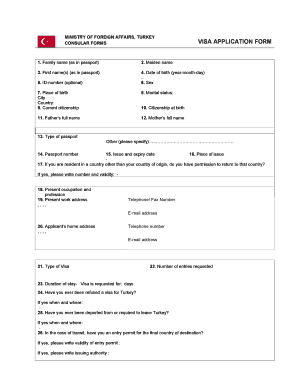
T name(s) (as in passport) 4. Date of birth (year-month-day) .. 6. Sex 5. ID-number (optional) 7. Place of birth City : Country: 9. Current citizenship 8. Marital status: 11. Father s full name 12. Mother s full name 10. Citizenship at birth 13. Type of passport Other (please specify) . 14. Passport number 15. Issue and expiry date 16. Place of issue 17. If you are resident in a country other than your country of origin, do you.
Open form follow the instructions
Easily sign the form with your finger
Send filled & signed form or save
How to fill out the VISA APPLICATION FORM online
Filling out the visa application form accurately is crucial for obtaining a visa efficiently. This guide will walk you through the process of completing the visa application form online, ensuring you provide the necessary information correctly.
Follow the steps to complete the online VISA APPLICATION FORM
- Click ‘Get Form’ button to access the visa application form and open it in your chosen editor.
- Begin by entering your family name as it appears in your passport, followed by your maiden name (if applicable) and first name(s). Ensure each name matches your passport exactly.
- Provide your date of birth in the format of year-month-day. This is important for identification purposes.
- Indicate your sex as required. This field may be presented in various formats.
- If you have an ID number, you may optionally provide it in the designated field.
- Enter your place of birth, specifying the city and country.
- Indicate your current citizenship. If you possess multiple citizenships, specify them accordingly.
- State your marital status from the provided options.
- Fill in your father's and mother's full names as they are known.
- Mention your citizenship at birth, which may differ from your current citizenship.
- Specify the type of passport you hold and any relevant details in the provided section.
- Enter your passport number, ensuring accuracy for verification purposes.
- Provide the issue date and expiry date of your passport.
- Indicate the place where your passport was issued.
- If you are residing in a country other than your country of origin, confirm if you have permission to return there, specifying any required details.
- State your current occupation and profession.
- Provide your present work address, including your telephone/fax number and email address.
- Fill in your home address along with your own telephone number and email address.
- Select the type of visa you are applying for from the provided options.
- Indicate the number of entries you’re requesting for your visa.
- Specify the duration of stay for which the visa is requested.
- Answer if you have ever been refused a visa for Turkey, including details if applicable.
- Confirm if you have ever been deported from Turkey and provide details if necessary.
- If you are transiting, verify if you have an entry permit for your final destination and include the validity and issuing authority.
- Explain the purpose of your trip, and provide your intended date of arrival and departure.
- Specify the port of first entry or transit route and the means of transport you will use during your trip.
- Indicate who will be paying for your trip and living costs during your stay, and submit corresponding documentation.
- Provide the name of your host, company in Turkey, or hotel, along with contact details.
- Discuss your means of support during your stay, including travel and health insurance if applicable.
- If applicable, list details about your spouse and children, indicating that applications must be submitted separately for each passport.
- Certify and date your application, providing your signature. For minors, a custodian's signature is required.
- Once all fields are completed, ensure you save changes, and proceed to download, print, or share the completed form as required.
Complete your documents online to ensure a smooth visa application process.
Experience a faster way to fill out and sign forms on the web. Access the most extensive library of templates available.
Related content
The DS-160, Online Nonimmigrant Visa Application form, is for temporary travel to the...
DS-160 Visa Application · DS-160 Frequently Asked Questions · Applying for a Visa ·...
The beneficiary is in the United States and will apply for adjustment of status to that of...
Get answers to your most pressing questions about US Legal Forms API.
How do I view my U.S. visa application form?
You can view your U.S. visa application form by logging into the official U.S. Department of State website or the specific embassy site where you submitted your application. Ensure you have the necessary credentials, such as your application number or other identifying information. If needed, consider using resources from US Legal Forms to help guide you through the process.
How to check visa application form?
To check the status of your visa application form, visit the official website of the embassy or consulate where you applied. They typically provide a status check feature where you can enter your application details. Alternatively, you can contact them directly for personalized assistance.
What is my visa application form?
Your visa application form is the official document you submit to request a visa for travel. It contains personal information, travel details, and specific reasons for your visit. If you need assistance in filling out or understanding the visa application form, resources like US Legal Forms can be extremely helpful.
How to print a Brazil visa application form?
Once you have completed the Brazil visa application form, look for the print option on the form's webpage. If you filled it out online, use the print function in your internet browser. You can also save the form as a PDF first, which allows you to print it later as needed.
How to fill a Brazil visa application form online?
To fill a Brazil visa application form online, start by visiting the official Brazil visa website or use an online service like US Legal Forms. After accessing the correct form, carefully follow the instructions and provide accurate information in each section. Don’t forget to review your completed application to ensure all details are correct before submitting.
How do I get a receipt of visa application form in Brazil?
In Brazil, once you submit your visa application form, you should receive a confirmation receipt via email or directly from the embassy or consulate. This receipt serves as proof of your application and usually contains important information regarding further steps. Make sure to check your spam folder for this receipt if you do not see it in your inbox.
How do I get a visa form?
You can obtain a visa application form by visiting the official embassy or consulate website of the country you plan to visit. Typically, these websites provide direct downloads of the visa application form. Additionally, services like US Legal Forms offer a convenient way to access and complete your visa application form online, simplifying the process.
How to write an application for a visa application?
When writing an application for a VISA APPLICATION FORM, clearly explain your purpose for traveling and provide any supporting information required by the consulate. Structure your application logically, starting with your personal details followed by your travel intentions. Be precise and concise to enhance your chances of approval.
How to fill out forms correctly?
Filling out forms correctly, like the VISA APPLICATION FORM, requires attention to detail and accuracy. Start by reading all instructions, then follow each guideline step by step. Make sure your handwriting is clear if you are filling it out by hand, and double-check all entries before submission.
How to fill out a PDF form application?
To fill out a PDF application for your VISA APPLICATION FORM, use a PDF editor or viewer that allows editing. Open the file, type in your responses, and ensure you save your changes. Also, check that your information is clear and legible before finalizing the document.
Use professional pre-built templates to fill in and sign documents online faster. Get access to thousands of forms.
If you believe that this page should be taken down, please follow our DMCA take down process here.