Loading
Form preview
  • US Legal Forms
  • Form Library
  • More Forms
  • More Multi-State Forms
  • Lost Drivers License Ct 2020

Get Lost Drivers License Ct 2020-2026

How it works

  1. Open form

    Open form follow the instructions

  2. Easily sign form

    Easily sign the form with your finger

  3. Share form

    Send filled & signed form or save

How to fill out the Lost Drivers License Ct online

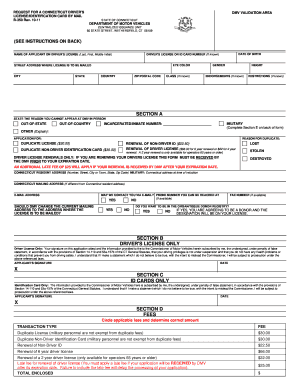
Filing for a lost driver's license in Connecticut can be a straightforward process when completed online. This guide will provide step-by-step instructions to help users navigate the Lost Drivers License Ct form efficiently and with ease.

Follow the steps to fill out the Lost Drivers License Ct form correctly

  1. Click ‘Get Form’ button to obtain the form and open it for completion.
  2. Begin by entering your legal name as it appears on your driver's license, including your last name, first name, and middle initial.
  3. Provide your state of residence and the gender you identify with.
  4. Fill in your eye color, the street address where your license should be mailed, and your city and zip/postal code.
  5. Enter your date of birth and, if you know it, your driver's license or ID card number.
  6. Indicate your country of residence and select your height.
  7. If applicable, list any endorsements or restrictions associated with your current driver's license.
  8. In Section A, state the reason you cannot appear in person at the DMV, selecting from options such as out-of-state, out-of-country, military, or other reasons.
  9. Specify the reason for needing a duplicate license and indicate the type of application you are submitting.
  10. If applying for a driver's license renewal, ensure that you submit this form before the expiration date.
  11. Provide your Connecticut resident address and mailing address, if different. Include your email address and opt-in for email contact if comfortable.
  12. Indicate whether DMV should change your current mailing address to where the license will be sent, and state your preferences for organ/tissue donation.
  13. Sign in Section B if applying for a driver’s license or Section C if applying for an ID card, affirming the accuracy of the information provided.
  14. Complete the fee section, circling applicable fees and calculating the total amount due.
  15. Mail the completed application to the DMV Centralized Issuance Unit, including payment in the form outlined in the instructions.

Start your application online to ensure a smoother process for obtaining your lost driver's license.

Get form

Experience a faster way to fill out and sign forms on the web. Access the most extensive library of templates available.
Get form

Related content

Replace a lost, stolen, or damaged driver's...
Request a duplicate driver's license if yours is lost, stolen, or damaged. Learn about the...
Learn more
College Photo IDs
If your student photo ID is lost, stolen, or destroyed, please go to the Bursar's office...
Learn more
1 Participating Agencies:
For drivers who have a license but fail to have their license with them at the time of the...
Learn more

Related links form

PROGRAMA DE RETIRO DE VEH CULO - Smogcheck Ca UCCJEA Uniform Child Custody Jurisdiction Enforcement Affidavit ... Solution - CS70 Study Guide For Microbiology An Introduction Pdf

Questions & Answers

Get answers to your most pressing questions about US Legal Forms API.

Contact support

If you find yourself without your Connecticut driver's license, the first step is to report the loss to the DMV. This ensures your identity remains protected and allows you to apply for a replacement. You can obtain a temporary driving permit if needed. Explore the US Legal Forms platform for resources that will help you efficiently navigate the process of handling a lost driver's license in CT.

If you've lost your driver's license in Connecticut, start by visiting the DMV website. You can apply for a replacement online, by mail, or in person. Gather the required documents, such as identification and proof of residency. Using the US Legal Forms platform can simplify the process, providing forms and guidance tailored to replacing your lost driver's license in CT.

To obtain a new ID in CT, start by gathering the necessary documents, including proof of identity. You can apply online through the Connecticut DMV website, or you may choose to visit a DMV office directly. The process is user-friendly, ensuring that you have a new ID as needed. This way, you can quickly resolve any concerns related to Lost Drivers License Ct.

If you lose your driver's license in CT, the first step is to report the loss to the DMV. This helps prevent identity theft and ensures your information remains secure. You can either apply for a replacement online or visit a DMV office. Taking these steps promptly will help you address your Lost Drivers License Ct issue efficiently.

To get a replacement ID in CT, you can visit the Connecticut DMV website to start the process online. Alternatively, you can go to a DMV office to complete your request in person. Remember to have identification documents and other required forms ready. The procedure is straightforward, aiming to resolve your Lost Drivers License Ct situation quickly.

If you lose your ID in CT, you can swiftly replace it by visiting the Connecticut Department of Motor Vehicles (DMV) website. There, you will find detailed instructions and forms you need to complete. You may also choose to visit a DMV office in person. Using the US Legal Forms platform, you can easily access the necessary paperwork to facilitate your ID replacement.

If your driver's license is lost, stolen, or damaged/destroyed, you can get a duplicate license online. You can't request a duplicate driver's license online if: Your name has changed since you got your last license.

How to add your driver's license or state ID to your iPhone and Apple Watch On your iPhone, open the Wallet app. Tap the Add button . Tap Driver's License or State ID and choose your state. Choose whether you want to add your license or ID to your iPhone only or to both your iPhone and paired Apple Watch.

Add, use, and share boarding passes, tickets, and other passes in Apple Wallet Open the app, email, notification, or other communication that contains your boarding pass, ticket, or other pass. Tap Add to Apple Wallet. Follow the instructions on the screen. If necessary, tap Add in the upper right corner.

The fee for a non-driver ID (valid for 7 years) is $28.

Get This Form Now!

Use professional pre-built templates to fill in and sign documents online faster. Get access to thousands of forms.
Get form
If you believe that this page should be taken down, please follow our DMCA take down processhere.

Industry-leading security and compliance

US Legal Forms protects your data by complying with industry-specific security standards.
  • In businnes since 1997
    25+ years providing professional legal documents.
  • Accredited business
    Guarantees that a business meets BBB accreditation standards in the US and Canada.
  • Secured by Braintree
    Validated Level 1 PCI DSS compliant payment gateway that accepts most major credit and debit card brands from across the globe.
Get Lost Drivers License Ct
Get form
  • Adoption
  • Bankruptcy
  • Contractors
  • Divorce
  • Home Sales
  • Employment
  • Identity Theft
  • Incorporation
  • Landlord Tenant
  • Living Trust
  • Name Change
  • Personal Planning
  • Small Business
  • Wills & Estates
  • Packages A-Z
  • Affidavits
  • Bankruptcy
  • Bill of Sale
  • Corporate - LLC
  • Divorce
  • Employment
  • Identity Theft
  • Internet Technology
  • Landlord Tenant
  • Living Wills
  • Name Change
  • Power of Attorney
  • Real Estate
  • Small Estates
  • Wills
  • All Forms
  • Forms A-Z
  • Form Library
  • Legal Hub
  • About Us
  • Help Portal
  • Legal Resources
  • Blog
  • Affiliates
  • Contact Us
  • Delete My Account
  • Site Map
  • Industries
  • Forms in Spanish
  • Localized Forms
  • State-specific Forms
  • Forms Kit
  • Real Estate Handbook
  • All Guides
  • Notarize
  • Incorporation services
  • For Consumers
  • For Small Business
  • For Attorneys
  • USLegal
  • FormsPass
  • pdfFiller
  • signNow
  • altaFlow
  • DocHub
  • Instapage
Form Packages
  • Adoption
  • Bankruptcy
  • Contractors
  • Divorce
  • Home Sales
  • Employment
  • Identity Theft
  • Incorporation
  • Landlord Tenant
  • Living Trust
  • Name Change
  • Personal Planning
  • Small Business
  • Wills & Estates
  • Packages A-Z
Form Categories
  • Affidavits
  • Bankruptcy
  • Bill of Sale
  • Corporate - LLC
  • Divorce
  • Employment
  • Identity Theft
  • Internet Technology
  • Landlord Tenant
  • Living Wills
  • Name Change
  • Power of Attorney
  • Real Estate
  • Small Estates
  • Wills
  • All Forms
  • Forms A-Z
  • Form Library
Customer Service
  • Legal Hub
  • About Us
  • Help Portal
  • Legal Resources
  • Blog
  • Affiliates
  • Contact Us
  • Delete My Account
  • Site Map
  • Industries
  • Forms in Spanish
  • Localized Forms
  • State-specific Forms
  • Forms Kit
Legal Guides
  • Real Estate Handbook
  • All Guides
Prepared for you
  • Notarize
  • Incorporation services
Our Customers
  • For Consumers
  • For Small Business
  • For Attorneys
Our Sites
  • USLegal
  • FormsPass
  • pdfFiller
  • signNow
  • altaFlow
  • DocHub
  • Instapage
Social Media
Call us now toll free:
+1 833 426 79 33
As seen in:
© Copyright 1999-2026 airSlate Legal Forms, Inc. 3720 Flowood Dr, Flowood, Mississippi 39232
  • Your Privacy Choices
  • Terms of Service
  • Privacy Notice
  • Content Takedown Policy
  • Bug Bounty Program