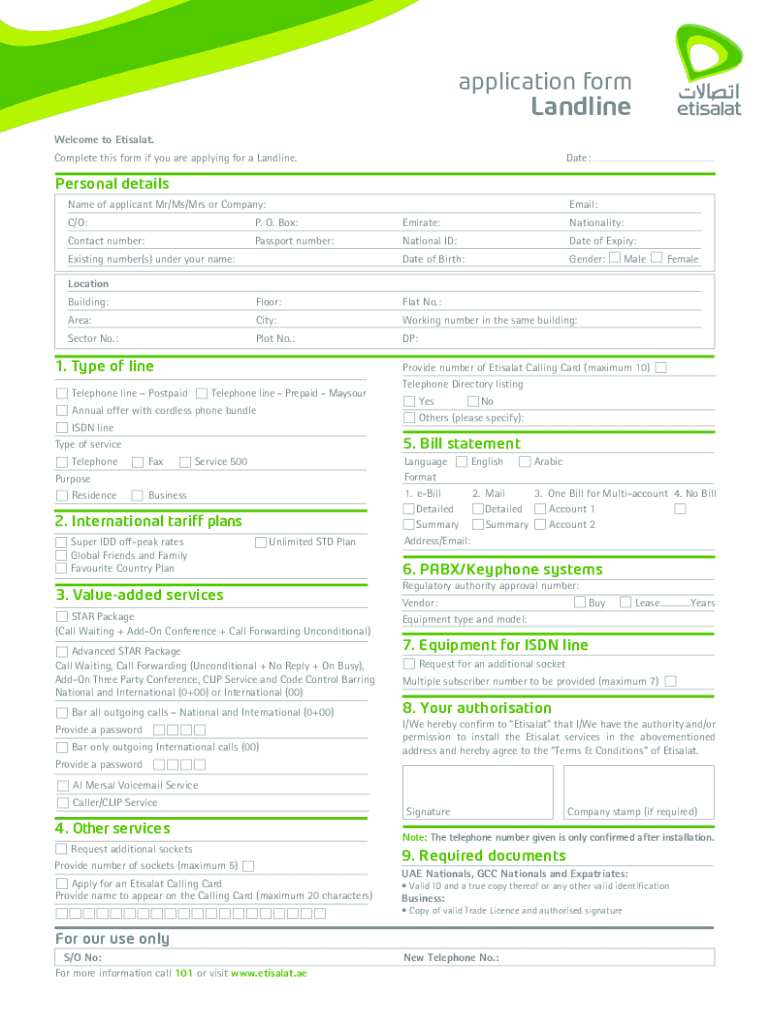
Mirate: Nationality: Contact number: Passport number: National ID: Date of Expiry: Date of Birth: Gender: Existing number(s) under your name: Male Female Location Building: Floor: Flat No.: Area: City: Working number in the same building: Sector No.: Plot No.: DP: 1. Type of line Provide number of Etisalat Calling Card (maximum 10) Telephone line Postpaid Telephone line - Prepaid - Maysour Annual offer with cordless phone bundle ISDN line Fax Service 500 Purpose Res.
Loading

Open form follow the instructions

Easily sign the form with your finger

Send filled & signed form or save
How to fill out the Etisalat Bill Pdf online
Filling out the Etisalat Bill Pdf is essential for users applying for landline services. This guide provides a clear, step-by-step approach to complete the form accurately and efficiently.
Follow the steps to successfully complete the Etisalat Bill Pdf.
- Click ‘Get Form’ button to obtain the form and open it in the editor.
- Fill in the date at the top of the form to indicate when you are submitting the application.
- In the 'Personal details' section, enter your email address, full name (Mr, Ms, Mrs or Company), and address details, including C/O and P.O. Box.
- Provide the required nationality, contact number, passport number, national ID, date of expiry, date of birth, and gender.
- List any existing number(s) under your name, if applicable.
- In the 'Location' section, complete the building name, floor, flat number, area, and city where the service should be installed.
- Provide the working number in the same building, along with sector and plot numbers, if required.
- Select the type of line you wish to apply for by choosing one of the options provided, such as telephone line postpaid or prepaid.
- Specify the purpose of the service, indicating whether it is for residence, business, or other purposes.
- Select the type of bill statement you prefer, indicating your preferred service details.
- If applicable, select any additional services or tariff plans you wish to include in your application.
- Provide any additional information required, such as requests for equipment or authorizations.
- Review the required documents section to ensure you have all necessary identification and documentation before submission.
- Sign the form in the designated area and add the company stamp if required.
- Finally, save changes, download, print, or share the form as needed.
Complete your Etisalat Bill Pdf online today for a seamless application process.
Experience a faster way to fill out and sign forms on the web. Access the most extensive library of templates available.
Related content
Aug 13, 2013 — In early 2009, the Federal National Council (FNC), the UAE's legislative...
by J Phipps · 2002 · Cited by 1 — Etisalat is the government-owned sole operator of...
This report sets out our key viewpoints gleaned from the digital transformations of...
Get answers to your most pressing questions about US Legal Forms API.
Can I leave the UAE without paying the Etisalat bill?
Leaving the UAE without settling your Etisalat bill is not advisable, as unpaid bills can lead to fines or restrictions on future services. It's best to clear any outstanding payments before you depart. Always refer to your Etisalat Bill Pdf for a clear overview of your financial obligations.
How to check Etisalat postpaid plan details?
You can check your Etisalat postpaid plan details easily through the Etisalat app or website. Simply log in to your account to view your current plan, including data limits and billing information. Regularly reviewing your Etisalat Bill Pdf ensures you are always informed about your plan and usage.
What is 121 170 Etisalat?
121 170 Etisalat is a customer service number for inquiries related to data packages and services. Calling this number connects you with customer support representatives who can assist you with your needs. Keeping your information handy, like your Etisalat Bill Pdf, may help expedite the process.
How to check Etisalat statement?
Checking your Etisalat statement is simple and can be done through the Etisalat app or website. By logging in, you can access your account balance, transaction history, and bills. For comprehensive records, including past transactions, refer to your Etisalat Bill Pdf.
How to get data on Etisalat UAE?
To get data on Etisalat in the UAE, you have several options. You can buy data packages online, through the Etisalat app, or by visiting a store. Make sure to review your purchases and monitor your usage through your Etisalat Bill Pdf.
What is 777 1 Etisalat data?
777 1 Etisalat data is a specific data package offered by Etisalat that allows users to access mobile internet services. This package typically comes with a fixed amount of data, which you can use for browsing, streaming, or other online activities. If you're looking to understand your usage, you can easily obtain an Etisalat Bill Pdf for detailed insights.
How can I check my Etisalat postpaid plan?
To check your Etisalat postpaid plan, simply log into your customer account via the Etisalat website or app. This will allow you to access your plan details, payment history, and usage statistics. Don't forget to download the Etisalat Bill PDF to keep a record of your billing and plan information for future reference.
How to change Etisalat bill limit?
To change your Etisalat bill limit, you should contact customer service or access your online account. In your account settings, you can manage your billing preferences and request a limit change. After making your request, you should download the updated Etisalat Bill PDF to confirm the changes reflected in your billing.
Can Etisalat file a case?
Yes, Etisalat can file a case for various issues, such as non-payment of bills or other contractual disputes. If you encounter severe problems, it’s best to contact their customer service for guidance on how to proceed. They may ask for your Etisalat Bill PDF to clarify any transactions related to the case.
How to check remaining package on Etisalat?
You can easily check your remaining package on Etisalat by logging into your online account or using the Etisalat mobile app. Once logged in, look for the usage details that show your package status. This is also where you can download the Etisalat Bill PDF to review your usage history.
Use professional pre-built templates to fill in and sign documents online faster. Get access to thousands of forms.
If you believe that this page should be taken down, please follow our DMCA take down process here.