Loading
Get Refund Form - Gas Malaysia Berhad 2020-2026
How it works
-

Open form follow the instructions
-

Easily sign the form with your finger
-

Send filled & signed form or save
How to fill out the Refund Form - Gas Malaysia Berhad online
This guide provides step-by-step instructions for completing the Refund Form for Gas Malaysia Berhad online. Understanding each component of the form will ensure a smooth and efficient submission process.
Follow the steps to accurately complete your refund form.
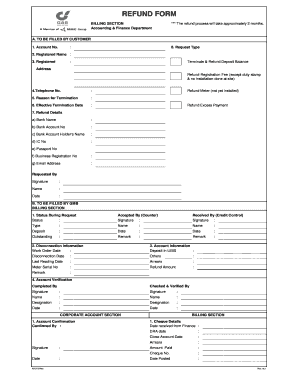
- Press the ‘Get Form’ button to access the refund form and open it in your preferred online editor.
- Begin by filling out 'A. To be filled by customer'. Start with your account number in the designated field, ensuring it matches your records.
- Fill in the registered name associated with the account as it appears on your documentation for accuracy.
- Provide the current registered address where the account is held, ensuring it reflects your latest information.
- Enter your telephone number in the specified section for contact purposes.
- State the reason for termination of service in the provided field. Be clear and concise in your explanation.
- Indicate the effective termination date for your account, ensuring it aligns with your planned disconnection.
- Specify your refund details: enter the bank name, bank account number, the name on the account, your identification card number, passport number (if applicable), business registration number (if applicable), and your email address.
- Sign the form, providing your printed name, and fill in the date of signing.
- Review all entries to confirm accuracy, then save any changes. You can download, print, or share the completed form as needed.
Complete your refund form online today to ensure a timely processing of your application.
We encourage customers to make payment online through Jompay (Biller Code: 47902), Maybank2u, CIMBClicks, Pos Online or myBSN. Cash payment can be made at GMRS's counter in Kuala Lumpur or at Pos Malaysia's counters.