Loading
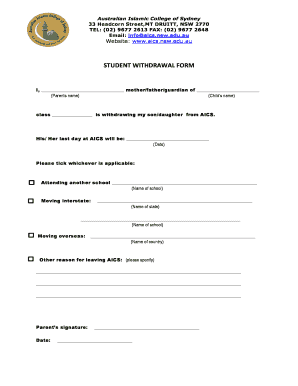
Get Student Withdrawal Form - Aics.nsw.edu.au - Aics Nsw Edu 2020-2025
How it works
-

Open form follow the instructions
-

Easily sign the form with your finger
-

Send filled & signed form or save
How to fill out the STUDENT WITHDRAWAL FORM - Aics.nsw.edu.au - Aics Nsw Edu online
Filling out the Student Withdrawal Form is an important process for notifying the Australian Islamic College of Sydney about a student's departure. This guide provides clear, step-by-step instructions to help parents and guardians complete the form easily and accurately.
Follow the steps to successfully complete the withdrawal form.
- Press the ‘Get Form’ button to obtain the Student Withdrawal Form and open it in an appropriate editor.
- Begin by entering the name of the parent or guardian in the designated field where it states 'I, _________________________________ mother/father/guardian of _________________________.' Make sure to include the full name.
- Next, input the child's name where it indicates 'Child’s name.' This ensures the form is associated with the correct student.
- In the section labeled 'class ________________,' write the current class of the student for identification purposes.
- Specify the date of withdrawal in the field provided, which states 'His/Her last day at AICS will be: _________________________________.' Choose a date that reflects the intended last day of attendance.
- Select the reason for withdrawal by ticking the appropriate box with the options provided: attending another school, moving interstate, moving overseas, or other reasons. If applicable, fill in the additional details for the chosen option.
- If the child is moving to another school, fill in the name of the school in the space designated under 'Attending another school.' For interstate moves, provide the state's name and, if available, the new school's name.
- For overseas moves, indicate the country's name where the student will be relocating.
- If there is another reason for leaving AICS, specify it in the section provided to ensure clear communication.
- Lastly, the parent or guardian should sign and date the form in the designated areas to validate the information provided.
- Once all fields are completed, you have the option to save changes, download, print, or share the completed form as needed.
Take action now and complete your documents online for a seamless withdrawal process.
Industry-leading security and compliance
US Legal Forms protects your data by complying with industry-specific security standards.
-
In businnes since 199725+ years providing professional legal documents.
-
Accredited businessGuarantees that a business meets BBB accreditation standards in the US and Canada.
-
Secured by BraintreeValidated Level 1 PCI DSS compliant payment gateway that accepts most major credit and debit card brands from across the globe.