Loading
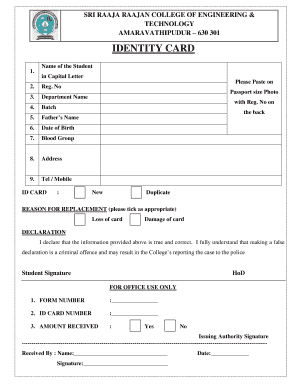
Get Id Card Form For Student - Sri Raaja Raajan College Of Engineering ... 2020-2025
How it works
-

Open form follow the instructions
-

Easily sign the form with your finger
-

Send filled & signed form or save
How to fill out the ID Card Form For Student - Sri Raaja Raajan College Of Engineering online
This guide provides clear instructions on how to accurately complete the ID card form for students at Sri Raaja Raajan College of Engineering online. Follow the steps outlined below to ensure that your application is both effective and efficient.
Follow the steps to fill out the ID card form.
- Click the 'Get Form' button to access the ID card form, which will open the document for editing.
- In the first field, enter the student's name in capital letters as required. Ensure the spelling is correct for proper identification.
- Next, input the registration number in the designated section. This number is unique to each student and is necessary for identification purposes.
- Fill in the department name accurately. This information helps to categorize students by their fields of study.
- Indicate the batch year in the relevant section. This allows the institution to organize students based on their admission year.
- Enter the father’s name as required by the form. This is a standard requirement for identification.
- Provide the date of birth in the specified format. This date is crucial for age verification.
- Fill in the blood group information, which may be necessary for emergencies.
- Input the current address. This should be a permanent address where you can be reached.
- Enter a contact telephone or mobile number. This will be used for communication regarding the ID card.
- Paste a recent passport-sized photo to the designated area on the form while ensuring that the registration number is written on the back of the photo.
- If applicable, select the reason for replacement (if you are applying for a duplicate card) by ticking the appropriate box regarding loss or damage of the card.
- Read the declaration statement and sign in the space provided to confirm that all information is true. Remember that providing false information could have serious consequences.
- Finally, save your changes to the form, and if needed, download, print, or share the completed form for submission.
Complete your ID card form online today for a seamless application process.
Industry-leading security and compliance
US Legal Forms protects your data by complying with industry-specific security standards.
-
In businnes since 199725+ years providing professional legal documents.
-
Accredited businessGuarantees that a business meets BBB accreditation standards in the US and Canada.
-
Secured by BraintreeValidated Level 1 PCI DSS compliant payment gateway that accepts most major credit and debit card brands from across the globe.