Loading
Form preview
  • US Legal Forms
  • Form Library
  • More Forms
  • More Multi-State Forms
  • Fs 6500 231 2020

Get Fs 6500 231 2020-2026

How it works

  1. Open form

    Open form follow the instructions

  2. Easily sign form

    Easily sign the form with your finger

  3. Share form

    Send filled & signed form or save

How to fill out the Fs 6500 231 online

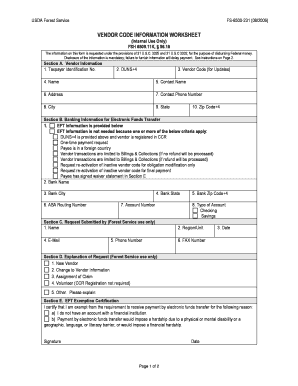
The Fs 6500 231, also known as the Vendor Code Information Worksheet, is essential for disbursing federal funds within the USDA Forest Service. This guide provides a clear, step-by-step approach to filling out the form online, ensuring all users can effectively complete it, regardless of their prior experience.

Follow the steps to successfully complete the Fs 6500 231

  1. Click the ‘Get Form’ button to obtain the form and open it in the editor.
  2. Fill out Section A, Vendor Information. Enter your taxpayer identification number, DUNS+4, vendor code for updates, name, contact name, address, contact phone number, city, state, and zip code. Ensure all details are accurate, as this information is crucial for payment processing.
  3. Move on to Section B, Banking Information for Electronic Funds Transfer. Indicate if EFT information is provided or if you are exempt from this requirement. If you provide banking details, include your bank name, city, state, zip code, ABA routing number, account number, and type of account (checking or savings).
  4. In Section C, Request Submitted by, fill out the contact details of the Forest Service personnel who is submitting the request. Provide their name, region/unit, email, fax number, phone number, and the date.
  5. Proceed to Section D, Explanation of Request. Check the reason for your request, such as new vendor, change to vendor information, or other. If applicable, provide additional explanations in the space provided.
  6. Complete Section E, EFT Exemption Certification, if you are certifying an exemption from EFT due to specific reasons such as lack of a bank account or undue hardship. Ensure your signature and date are included.
  7. Once all sections are filled out, review the form for any errors or omissions. After confirming accuracy, you can save changes, download, print, or share the completed form as needed.

Start completing the Fs 6500 231 online to ensure efficient processing of your vendor information.

Get form

Experience a faster way to fill out and sign forms on the web. Access the most extensive library of templates available.
Get form

Related content

vendor code information worksheet
FS-6500-231 (08/2006). Page 1 of 2. VENDOR CODE INFORMATION WORKSHEET ... FS-6500-231...
Learn more
2023–2024 NonCredit Catalog
Plan Code: 6500. The program provides students with the basic English literacy ... FS 600...
Learn more
YSI 6-Series Multiparameter Water Quality Sondes...
FS Area, First Upload Location, and Number of Arrays to Upload are fields that you must...
Learn more

Related links form

NEW YORK CITY HOUSING AUTHORITY Affidavit Of Compliance ... - Home Nyc Hud Supplement To Application Personal Representative Deed BLANK 29A FORM.pdf - Blog Cookcountyil

Questions & Answers

Get answers to your most pressing questions about US Legal Forms API.

Contact support

Vendor codes define the payees for payments to be issued on behalf of deduction withholdings, such as child support orders, creditor garnishments, insurance carriers, and investment administrators. Vendors also include any tax escrow vendor, any deduction escrow vendor, and any system service invoice vendor.

What is a Vendor Code? A Vendor Code identifies the vendor, producer, or insurance company that receives checks from your agency. For example, ATT might be your phone company's vendor code. The vendor code for Janet A. Smith, one of your producers, might be JAS.

Types of Vendors Manufacturer: Manufacturers turn raw materials into finished goods and sell them to wholesalers and retailers. Retailer: Retailers are companies that buy products from other vendors and sell them to consumers. For example, Target is a vendor that sells home appliances and other home products.

Registration US$140.00. A vendor number is a unique number assigned to a business that wishes to do business with the goverment, its departments, ministries, parastatals or government affiliated Non-Governmental Organisations (NGO's). It allows you to get paid after offering your goods or services.

How to create a Vendor Step 1) Enter Transaction code FK01 in SAP Command Field. Step 2) In the Initial Screen, Enter. Step 3) In the next screen, In Address Tab Enter the Following. Step 4) Next in the Account Control section page Enter the Corporate Group if the Vendor belongs to a corporate group enter the group key.

Get This Form Now!

Use professional pre-built templates to fill in and sign documents online faster. Get access to thousands of forms.
Get form
If you believe that this page should be taken down, please follow our DMCA take down processhere.

Industry-leading security and compliance

US Legal Forms protects your data by complying with industry-specific security standards.
  • In businnes since 1997
    25+ years providing professional legal documents.
  • Accredited business
    Guarantees that a business meets BBB accreditation standards in the US and Canada.
  • Secured by Braintree
    Validated Level 1 PCI DSS compliant payment gateway that accepts most major credit and debit card brands from across the globe.
Get Fs 6500 231
Get form
  • Adoption
  • Bankruptcy
  • Contractors
  • Divorce
  • Home Sales
  • Employment
  • Identity Theft
  • Incorporation
  • Landlord Tenant
  • Living Trust
  • Name Change
  • Personal Planning
  • Small Business
  • Wills & Estates
  • Packages A-Z
  • Affidavits
  • Bankruptcy
  • Bill of Sale
  • Corporate - LLC
  • Divorce
  • Employment
  • Identity Theft
  • Internet Technology
  • Landlord Tenant
  • Living Wills
  • Name Change
  • Power of Attorney
  • Real Estate
  • Small Estates
  • Wills
  • All Forms
  • Forms A-Z
  • Form Library
  • Legal Hub
  • About Us
  • Help Portal
  • Legal Resources
  • Blog
  • Affiliates
  • Contact Us
  • Delete My Account
  • Site Map
  • Industries
  • Forms in Spanish
  • Localized Forms
  • State-specific Forms
  • Forms Kit
  • Real Estate Handbook
  • All Guides
  • Notarize
  • Incorporation services
  • For Consumers
  • For Small Business
  • For Attorneys
  • USLegal
  • FormsPass
  • pdfFiller
  • signNow
  • altaFlow
  • DocHub
  • Instapage
Form Packages
  • Adoption
  • Bankruptcy
  • Contractors
  • Divorce
  • Home Sales
  • Employment
  • Identity Theft
  • Incorporation
  • Landlord Tenant
  • Living Trust
  • Name Change
  • Personal Planning
  • Small Business
  • Wills & Estates
  • Packages A-Z
Form Categories
  • Affidavits
  • Bankruptcy
  • Bill of Sale
  • Corporate - LLC
  • Divorce
  • Employment
  • Identity Theft
  • Internet Technology
  • Landlord Tenant
  • Living Wills
  • Name Change
  • Power of Attorney
  • Real Estate
  • Small Estates
  • Wills
  • All Forms
  • Forms A-Z
  • Form Library
Customer Service
  • Legal Hub
  • About Us
  • Help Portal
  • Legal Resources
  • Blog
  • Affiliates
  • Contact Us
  • Delete My Account
  • Site Map
  • Industries
  • Forms in Spanish
  • Localized Forms
  • State-specific Forms
  • Forms Kit
Legal Guides
  • Real Estate Handbook
  • All Guides
Prepared for you
  • Notarize
  • Incorporation services
Our Customers
  • For Consumers
  • For Small Business
  • For Attorneys
Our Sites
  • USLegal
  • FormsPass
  • pdfFiller
  • signNow
  • altaFlow
  • DocHub
  • Instapage
Social Media
Call us now toll free:
+1 833 426 79 33
As seen in:
© Copyright 1999-2026 airSlate Legal Forms, Inc. 3720 Flowood Dr, Flowood, Mississippi 39232
  • Your Privacy Choices
  • Terms of Service
  • Privacy Notice
  • Content Takedown Policy
  • Bug Bounty Program