We use cookies to improve security, personalize the user experience, enhance our marketing activities (including cooperating with our marketing partners) and for other business use.
Click "here" to read our Cookie Policy. By clicking "Accept" you agree to the use of cookies. Read less
Read more
Accept
Loading
Form preview
  • US Legal Forms
  • Form Library
  • More Forms
  • More Multi-State Forms
  • Module One Project Option 1 2020

Get Module One Project Option 1 2020-2025

How it works

  1. Open form

    Open form follow the instructions

  2. Easily sign form

    Easily sign the form with your finger

  3. Share form

    Send filled & signed form or save

How to fill out the Module One Project Option 1 online

This guide provides clear and concise instructions for completing the Module One Project Option 1 online. Follow these steps to ensure that you fill out the form accurately and efficiently.

Follow the steps to successfully complete your assignment.

  1. Click ‘Get Form’ button to access the form and open it in your preferred editing tool.
  2. Begin with Part 1: Understanding Volume. Provide a clear definition of volume in your own words, and include the volume formula.
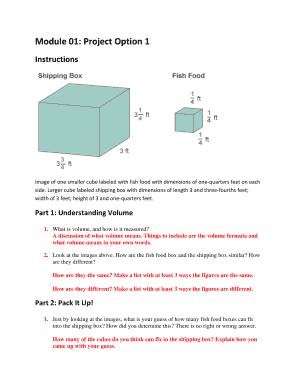
  3. In the same section, compare the fish food box and the shipping box. List at least three similarities and three differences.
  4. Move on to Part 2: Pack It Up! Make an educated guess about how many fish food boxes can fit into the shipping box and explain your reasoning.
  5. Next, calculate the number of actual fish food boxes that fit in the shipping box. Follow the steps provided, ensuring to show your work for length, width, and height calculations.
  6. For Part 3: The Space Inside, find the volume of the shipping box using both methods outlined. Make sure to show your calculations for each method.
  7. Conclude your assignment by explaining how both methods yield the same volume measurement for the shipping box.
  8. Save your work as 01_07_UnitCubesandVolume_Your Name and submit it in the Assessment Area specified for 01.07 Unit Cubes and Volume.

Complete your Module One Project Option 1 online now for an efficient and successful submission.

Get form

Experience a faster way to fill out and sign forms on the web. Access the most extensive library of templates available.
Get form

Related content

Module 1. Guidance on Preparing A QA Project Plan
This module (Athe Guidance@) is meant to provide you with a starting place for preparing...
Learn more
Optional Modules and Customizations User Guide
This is sometimes called one- to-many data collection, in which a project can have one or...
Learn more
ELC HAL Module Guide - Application Project
Nov 13, 2018 — To configure the ELC HAL module, select it in the. HAL/Common module in...
Learn more

Related links form

DOMESTIC RELATIONS INFORMATION SHEET (for Self-represented People) THIS SECTION FOR OFFICIAL USE Pdf Printable Application - Part-Time Jobs Jcf Process Recurring Premium Reimbursement Request Form - Pebp State Nv

Questions & Answers

Get answers to your most pressing questions about US Legal Forms API.

Contact support

To build only one module, locate the module you wish to work on within your development environment. Use the build command associated with that specific module, ensuring that you are focusing on the area relevant to your current work, like the Module One Project Option 1. This process aids in isolating changes and testing efficiently.

To add a module to your IntelliJ project, open the project and go to the ‘File’ menu, then select ‘New’ followed by ‘Module’. Follow the prompts to choose the type of module that best fits the Module One Project Option 1. Once completed, your new module will integrate smoothly into your existing project structure.

To build just one module in IntelliJ, right-click the module in the project view and select 'Build'. This will allow you to compile only the selected module without affecting others. Managing this effectively is key, especially in your Module One Project Option 1.

You can add a module to your IDE project by navigating through the project settings. Here, you can create a new module or import an existing one. This feature is essential for successful integration within your Module One Project Option 1.

Creating a module in a project usually requires setting up the module's structure and coding the necessary files. By doing this, you ensure strong organization of functionality. Consider using the strategies from the Module One Project Option 1 to guide your process.

To add a module to your IDE project, typically you go to 'File' and select 'New' followed by 'Module'. This allows you to specify the module’s type and its configuration. Make sure to integrate this within the framework of your Module One Project Option 1 for consistency.

To create a module in a Java project, you need to define the module name in the 'module-info.java' file. This file describes the module and its dependencies. By defining modules properly, you can structure your Module One Project Option 1 for better scalability and maintenance.

A module in a project is a self-contained unit that contains specific functionalities. For instance, in a software application, a payment processing module can handle all transactions. Incorporating such modules like the Module One Project Option 1 can streamline operations and improve code organization.

Creating a module for a project involves writing a set of functions to be organized under a namespace. This helps keep your code clean and manageable. You can integrate this module seamlessly into your Module One Project Option 1 to enhance its functionality.

To get the module version in PowerShell, you can use the 'Get-Module' cmdlet. Simply type 'Get-Module -ListAvailable' along with the module name to display its version. This way, you can easily check the details of your Module One Project Option 1.

Get This Form Now!

Use professional pre-built templates to fill in and sign documents online faster. Get access to thousands of forms.
Get form
If you believe that this page should be taken down, please follow our DMCA take down processhere.

Industry-leading security and compliance

US Legal Forms protects your data by complying with industry-specific security standards.
  • In businnes since 1997
    25+ years providing professional legal documents.
  • Accredited business
    Guarantees that a business meets BBB accreditation standards in the US and Canada.
  • Secured by Braintree
    Validated Level 1 PCI DSS compliant payment gateway that accepts most major credit and debit card brands from across the globe.
Get Module One Project Option 1
Get form
Form Packages
Adoption
Bankruptcy
Contractors
Divorce
Home Sales
Employment
Identity Theft
Incorporation
Landlord Tenant
Living Trust
Name Change
Personal Planning
Small Business
Wills & Estates
Packages A-Z
Form Categories
Affidavits
Bankruptcy
Bill of Sale
Corporate - LLC
Divorce
Employment
Identity Theft
Internet Technology
Landlord Tenant
Living Wills
Name Change
Power of Attorney
Real Estate
Small Estates
Wills
All Forms
Forms A-Z
Form Library
Customer Service
Terms of Service
Privacy Notice
Legal Hub
Content Takedown Policy
Bug Bounty Program
About Us
Blog
Affiliates
Contact Us
Delete My Account
Site Map
Industries
Forms in Spanish
Localized Forms
State-specific Forms
Forms Kit
Legal Guides
Real Estate Handbook
All Guides
Prepared for You
Notarize
Incorporation services
Our Customers
For Consumers
For Small Business
For Attorneys
Our Sites
US Legal Forms
USLegal
FormsPass
pdfFiller
signNow
airSlate WorkFlow
DocHub
Instapage
Social Media
Call us now toll free:
+1 833 426 79 33
As seen in:
  • USA Today logo picture
  • CBC News logo picture
  • LA Times logo picture
  • The Washington Post logo picture
  • AP logo picture
  • Forbes logo picture
© Copyright 1997-2025
airSlate Legal Forms, Inc.
3720 Flowood Dr, Flowood, Mississippi 39232
Form Packages
Adoption
Bankruptcy
Contractors
Divorce
Home Sales
Employment
Identity Theft
Incorporation
Landlord Tenant
Living Trust
Name Change
Personal Planning
Small Business
Wills & Estates
Packages A-Z
Form Categories
Affidavits
Bankruptcy
Bill of Sale
Corporate - LLC
Divorce
Employment
Identity Theft
Internet Technology
Landlord Tenant
Living Wills
Name Change
Power of Attorney
Real Estate
Small Estates
Wills
All Forms
Forms A-Z
Form Library
Customer Service
Terms of Service
Privacy Notice
Legal Hub
Content Takedown Policy
Bug Bounty Program
About Us
Blog
Affiliates
Contact Us
Delete My Account
Site Map
Industries
Forms in Spanish
Localized Forms
State-specific Forms
Forms Kit
Legal Guides
Real Estate Handbook
All Guides
Prepared for You
Notarize
Incorporation services
Our Customers
For Consumers
For Small Business
For Attorneys
Our Sites
US Legal Forms
USLegal
FormsPass
pdfFiller
signNow
airSlate WorkFlow
DocHub
Instapage
Social Media
Call us now toll free:
+1 833 426 79 33
As seen in:
  • USA Today logo picture
  • CBC News logo picture
  • LA Times logo picture
  • The Washington Post logo picture
  • AP logo picture
  • Forbes logo picture
© Copyright 1997-2025
airSlate Legal Forms, Inc.
3720 Flowood Dr, Flowood, Mississippi 39232