Loading
Get Mystfx
How it works
-

Open form follow the instructions
-

Easily sign the form with your finger
-

Send filled & signed form or save
How to fill out the Mystfx online
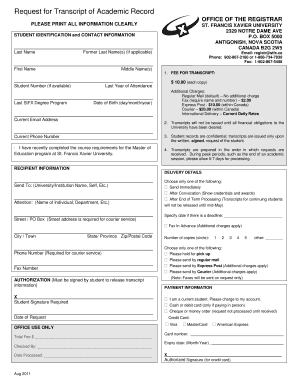
This guide provides step-by-step instructions for users on how to accurately complete the Mystfx form online. Users will find clear and supportive guidance to help navigate through each section of the document with ease.
Follow the steps to complete the form online:
- Press the ‘Get Form’ button to obtain the document and open it in your chosen editor.
- Begin by filling out your student identification and contact information. Clearly print all required information, including your last name, first name, and middle name.
- Indicate your student number, if available, and the year you last attended the university. Additionally, specify your last degree program at St. Francis Xavier University and provide your date of birth.
- Provide your current email address and phone number. This will ensure that the university can communicate with you effectively regarding your request.
- Review the fee for the transcript. Note that the cost is $10.00 for each copy, and additional charges may apply depending on your delivery preference.
- Fill out the recipient information section by specifying where you want the transcript sent. Include the name of the intended recipient, department, street address, and phone number for courier services.
- Select your delivery option: you can choose to send the transcript immediately or after convocation. Additionally, you may specify a date if there is a deadline.
- If applicable, provide a fax number for the advance fax option, noting that it incurs additional charges.
- Sign and date the authorization section to allow the university to release your transcript information.
- Finally, review your payment details. Indicate if you are a current student and select your payment method, including the option to charge the fee to your account, or use a credit card.
- Once all fields are completed, ensure you have reviewed the form for accuracy, and then save any changes, download, print, or share the completed form as necessary.
Complete your documents online today for a seamless experience.
To obtain your college transcript online, start by visiting your college’s website and navigating to the records or registrar section. Enter your student information and follow the required steps to request your transcript. Utilizing Mystfx through uslegalforms can streamline this process, making it much simpler and efficient.