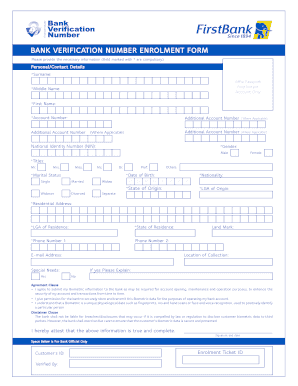
Open form follow the instructions
Easily sign the form with your finger
Send filled & signed form or save
How to fill out the Open Firstbank online
This guide provides a comprehensive overview of the online form used for Open Firstbank. It offers step-by-step instructions to assist users in accurately completing the necessary sections of the form.
Follow the steps to successfully complete the Open Firstbank form.
- Click the ‘Get Form’ button to obtain the form and open it in the editor.
- Begin by entering your personal/contact details. Fields marked with an asterisk (*) are compulsory. Fill in your surname, middle name, and first name as required.
- You will need to enter your National Identity Number (NIN), if applicable. Ensure that all information entered is accurate.
- Indicate your gender by selecting either male or female. Follow this by selecting your title from the options provided: Mr., Mrs., Miss, Ms., Dr., Prof., or others.
- Select your marital status from the options: single, married, widow, widower, or divorced.
- Input your date of birth in the specified format (DD/MM). Make sure to double-check that this information is correct.
- Fill out your nationality, state of origin, and Local Government Area (LGA) of origin. This data is crucial for your bank profile.
- Complete your residential address along with the LGA and state of residence. These details are essential for correspondence.
- Provide your primary and secondary phone numbers, and include an email address for communication purposes.
- Answer the special needs question if applicable, and provide a landmark to assist in verifying your address.
- Review the agreement and disclaimer clauses carefully, indicating your consent to the biometric data usage. Ensure you understand the implications before you sign.
- Finally, attest that the information provided is true and complete by signing and dating the form. Remember to save your changes, and you may also choose to download, print, or share the form as needed.
Complete your Open Firstbank form online today for a seamless banking experience.
Experience a faster way to fill out and sign forms on the web. Access the most extensive library of templates available.
Related content
95 domestic locations: 2 states and 0 territories. 0 in foreign locations. Consumer...
... Open a FirstRewards. Checking2 account with a FirstBank debit card by October 31...
How does First Bank protect my personal information? We collect your personal information...
Get answers to your most pressing questions about US Legal Forms API.
How do I upgrade my FirstBank savings account online?
To upgrade your FirstBank savings account online, log into your account and navigate to the account settings section. Follow the prompts to initiate the upgrade process, which may require you to provide additional information or documents. This online feature simplifies managing your account and can enhance your banking experience.
What is the maximum amount in a FirstBank savings account?
The maximum amount you can hold in a FirstBank savings account may vary based on the specific account type you choose. Generally, there is no upper limit, but be aware of the Federal Insurance limits as well. Always consult with FirstBank's guidelines to fully understand your savings potential.
Which code can I use to open my FirstBank?
You can find the specific code to open FirstBank by visiting their official website or accessing their customer service. These codes may change based on current offers or account features. Always verify these details through official channels to ensure accuracy and security.
What do I need to open my first bank account?
When preparing to open your first bank account with FirstBank, you should gather a valid photo ID, Social Security number, and proof of residency. Additionally, a small initial deposit is often required to activate your new account. Being ready with these essentials will ensure a smooth application process.
What is the code to open FirstBank?
The code to open FirstBank varies by promotions or services offered. It's best to check the FirstBank website or contact customer service for the most up-to-date information. Remember, using official resources can guide you effectively in your banking journey.
How can I open FirstBank with my phone?
To open FirstBank using your phone, download the mobile banking app or visit the FirstBank website on your device. Follow the straightforward prompts to complete your application, entering your personal details as needed. This mobile access makes banking easier than ever, allowing you to manage your finances on the go.
What is needed to open a bank account for the first time?
If you are ready to open FirstBank for the first time, ensure you have a valid ID, proof of your address, and your Social Security number. These details will not only satisfy banking requirements but also protect your identity. Having everything organized in advance sets a strong foundation for your banking journey.
What is needed when you open a bank account?
Opening FirstBank requires several key documents, including identification, proof of residence, and your Social Security number. Additionally, you may need to provide a tax identification number if you are not a U.S. citizen. Preparing these items will help you create your new account seamlessly.
What is required to open a bank account for the first time?
When you choose to open FirstBank for the first time, gather your personal identification documents, proof of income, and a minimum opening deposit. Knowing these requirements in advance helps you feel confident and prepared during the application process. Remember, ensuring you have these details on hand can speed things up.
What details do I need to open a bank account?
To open FirstBank, you will need to provide personal identification, such as a government-issued ID, Social Security number, and proof of address. Additionally, you may need an initial deposit to fund your new account. Having these documents ready can streamline the process and make your banking experience smoother.
Use professional pre-built templates to fill in and sign documents online faster. Get access to thousands of forms.
If you believe that this page should be taken down, please follow our DMCA take down process here.
This form is available in several versions. Select the version you need from the drop-down list below.