Open form follow the instructions
Easily sign the form with your finger
Send filled & signed form or save
How to fill out the CarePlus OTC online
This guide provides clear instructions for users on how to complete the CarePlus Over-the-Counter (OTC) mail order form online. By following these steps, you will be able to efficiently utilize your OTC benefit for various health and wellness products.
Follow the steps to complete your CarePlus OTC form.
- Click ‘Get Form’ button to obtain the CarePlus OTC mail order form and open it in the document editor.
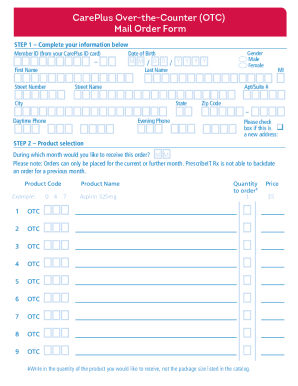
- Provide your member details in Step 1 of the form. Fill in your Member ID, date of birth, first and last name, address including street number, street name, apartment or suite number, city, state, and zip code. Additionally, include your daytime and evening phone numbers. Check the box if this is a new address.
- In Step 2, select the month for which you want to receive the order. Note that orders can only be placed for the current or a future month. Enter the product code for the items you wish to order, as well as the product name and quantity for each item.
- Calculate your total order amount, then compare it with your CarePlus monthly allowance. If your total order exceeds this allowance, include a check, money order, or your credit card information for the remaining amount due.
- For payment, go to Step 3. If applicable, provide your credit/debit card details, including the card number, expiration date, and cardholder's name and signature.
- In Step 4, if you are ordering by mail, send the completed CarePlus OTC mail order form along with payment, if needed, to PrescribeIT Rx at the provided address.
- After submitting your form, you can save any changes, download, print, or share the completed form as needed.
Start filling out your CarePlus OTC mail order form online to enjoy your monthly allowance for health and wellness products.
Experience a faster way to fill out and sign forms on the web. Access the most extensive library of templates available.
Related content
For external use only. Flammable. Keep away from heat and flame. When using this product...
Your OTC allowance allows you to select products such as cold and cough medicines...
active orthodontic care, plus one year of retention care. Retreatment for relapsed cases...
Get answers to your most pressing questions about US Legal Forms API.
How do I know my OTC balance?
Knowing your OTC balance is crucial for planning your purchases. You can find your balance by logging in to your relevant health benefits account online. Additionally, most OTC card providers also offer mobile app access, making it easy to stay updated on your Careplus OTC benefits.
How do I check the balance on my devoted OTC card?
To check your devoted OTC card balance, visit the provider's website or use their mobile app. After you log in, navigate to the balance section to see your current available funds. This way, you can confidently shop for your needs using the Careplus OTC card.
How to use OTC products?
Using OTC products is simple and efficient. Browse through the eligible items on your Careplus OTC platform, select what you need, and either order online or pick up from participating locations. Always ensure the products meet your specific health needs before making a selection.
How to check human OTC balance?
Checking your human OTC balance is straightforward. You can log into your account on the relevant health benefits website. Here, you can access information regarding your current balance and view any transactions related to your Careplus OTC purchases.
How do I check my UCard balance online?
To check your UCard balance online, go to the appropriate portal for your card provider. After logging in, find the balance inquiry section, where you can see your current balance. This allows you to manage your Careplus OTC purchases effectively.
How do I check the balance on my CCA OTC card?
You can check the balance on your CCA OTC card easily through the CCA website or mobile app. Simply log in to your account to view your remaining balance. Additionally, you can also contact customer service for assistance regarding your Careplus OTC card balance.
How to use UHC OTC online?
To use your UHC OTC benefit online, visit the official website of UnitedHealthcare. Log in to your account, then navigate to the OTC section. Here, you can browse eligible Careplus OTC products and place an order for delivery straight to your home.
What's OTC eligible?
Over-the-counter (OTC) eligible items typically include products that promote health and wellness. For Careplus OTC, you can find items like pain relievers, cold and flu medications, and first aid supplies on the approved list. Always check your specific plan details to understand which items qualify, ensuring you maximize your benefits.
How to get OTC approval?
To get OTC approval, start by reviewing the list of eligible items under your Careplus OTC benefits. If you're unsure about a specific product, contact your benefits provider for clarification. Sometimes, you may need to provide receipts or documentation, especially for larger purchases. Following the guidelines of your plan ensures you receive quick and smooth approval.
What are the rules for proper use of OTC?
To properly use your Careplus OTC benefits, you need to select items that qualify under the program. Eligible items typically include health-related products like first aid supplies, vitamins, and personal care items. Be sure to check the specifics of your plan for the exact list of eligible products. Always keep track of your spending to ensure you stay within your allotted benefits.
Use professional pre-built templates to fill in and sign documents online faster. Get access to thousands of forms.
If you believe that this page should be taken down, please follow our DMCA take down process here.