Loading
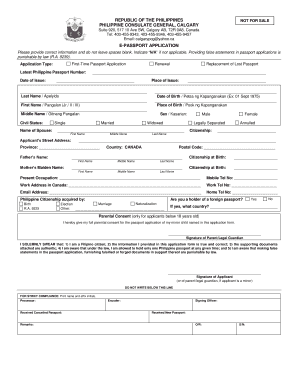
Get Philippine Consulate Calgary 2020-2026
How it works
-

Open form follow the instructions
-

Easily sign the form with your finger
-

Send filled & signed form or save
How to fill out the Philippine Consulate Calgary online
Filling out the e-passport application form for the Philippine Consulate in Calgary can seem daunting, but it is a straightforward process if you follow the right steps. This guide provides clear and concise instructions to help you complete the online form accurately.
Follow the steps to complete your application smoothly.
- Click 'Get Form' button to obtain the form and open it in the editor.
- Select the type of application you are submitting, such as first-time passport application, renewal, or replacement of a lost passport. Provide your latest Philippine passport number and date of issue if applicable.
- Fill in your personal details, starting with your last name, first name, and middle name. Ensure to enter your date of birth in the specified format (e.g., 01 Sept 1975) and your place of birth.
- Indicate your civil status, and if married, include the name of your spouse. Select your sex according to the options provided.
- Input your complete street address, postal code, province, and country (Canada). Include your parent's names, mother’s maiden name, and citizenship details.
- If you have a foreign passport, choose 'Yes' and specify the country; otherwise, select 'No.' Complete the relevant sections about your current occupation, work address, and contact details.
- If you are under 18 years old, ensure that you have your parent's consent. They will need to sign the provided section.
- Review the declaration statements carefully. By signing, you confirm that all information is accurate and acknowledge the legal implications of false information.
- After reviewing your form, you can save your changes, download a copy, print it for your records, or share it as needed.
Complete your e-passport application online today for a seamless experience.
To contact the Philippine consulate in Canada, start by checking their official website for contact information specific to each consulate. They usually provide phone numbers and email addresses for inquiries. This ensures you connect with the right office for your needs.