Loading
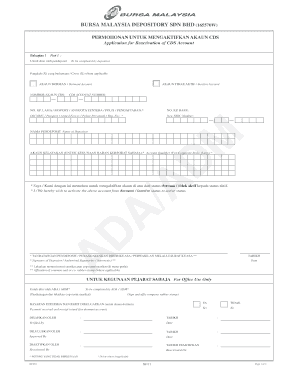
Get Akaun Cds
How it works
-

Open form follow the instructions
-

Easily sign the form with your finger
-

Send filled & signed form or save
How to fill out the Akaun Cds online
The Akaun Cds is a crucial document for users seeking to reactivate their dormant or inactive Central Depository System (CDS) accounts. This guide will provide you with clear, step-by-step instructions to ensure you can complete the form accurately and efficiently.
Follow the steps to complete your Akaun Cds form online.
- Press the ‘Get Form’ button to access the Akaun Cds form and open it in your chosen editor.
- In Part 1, indicate whether your account is dormant or inactive by marking the appropriate box.
- Enter your CDS account number in the designated field. Ensure the number is accurate to avoid any processing issues.
- Provide your old NRIC, passport, or registration number in the specified section, followed by your new NRIC number.
- Fill in the name of the depositor in the corresponding field, using clear and easy-to-read block letters.
- If applicable, input the account qualifier for corporate bodies in the relevant section.
- In the statement section, affirm your request to reactivate your account by writing or confirming the provided statement.
- Date the form accurately in the section provided.
- Affix your signature or that of an authorized signatory in the designated area, ensuring it matches the records.
- Complete the for office use only section, if applicable, during submission.
- Once you have completed all fields, review the information for accuracy, save your changes, and consider printing or sharing your completed form as needed.
Complete your Akaun Cds form online today to reactivate your account.
The format of a CDS account number typically consists of a series of digits reflecting your Akaun Cds details. This number is unique to your account and is essential for identifying your holdings and trade transactions. You can find this number on your account statements or by contacting your brokerage.