Loading

Open form follow the instructions

Easily sign the form with your finger

Send filled & signed form or save
How to fill out the Fire Watch Uwaterloo.doc online
Filling out the Fire Watch Uwaterloo.doc online is a straightforward process that ensures proper documentation during fire watch duties. This guide will lead you through each section of the form, providing clear instructions to assist you in completing it efficiently.
Follow the steps to accurately complete the form online.
- Click the ‘Get Form’ button to download the Fire Watch Log document and open it in your preferred online document editing tool.
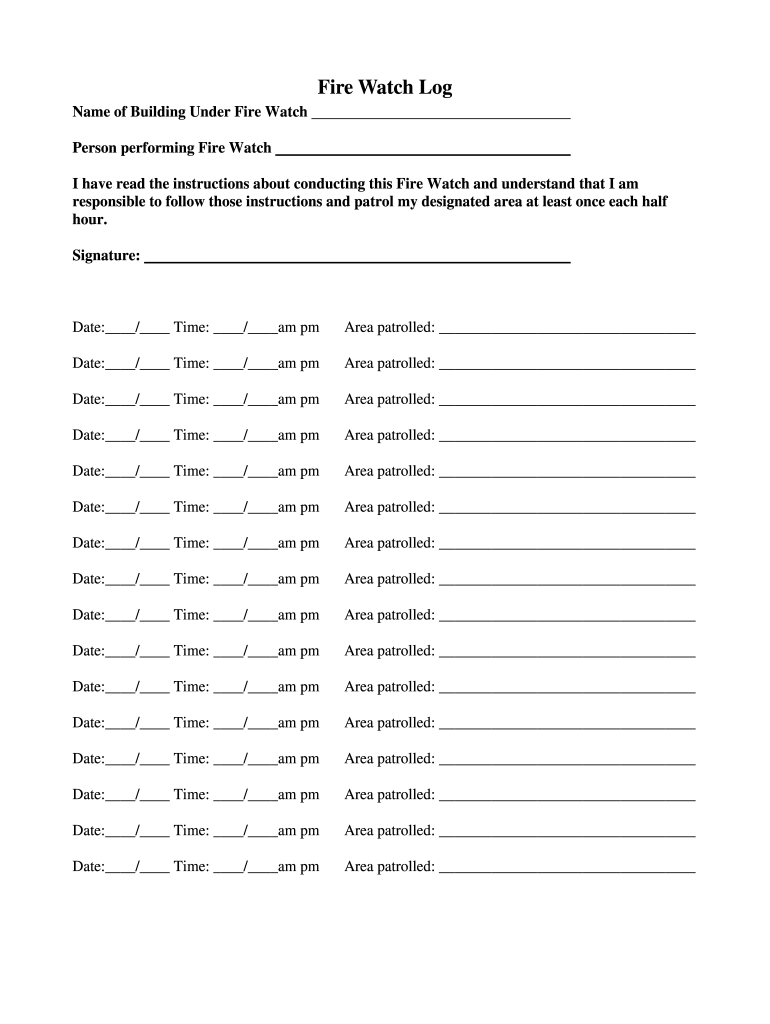
- Begin with the 'Name of Building Under Fire Watch' section. Enter the name of the building where you are performing the fire watch. This information is vital for tracking purposes.
- In the field labeled 'Person performing Fire Watch', include your name or the name of the person responsible for conducting the fire watch. This identifies who is accountable for the patrol.
- Read the provided instructions about conducting the fire watch. It is essential to understand your responsibilities and the requirement to patrol your designated area at least once every half hour.
- In the 'Signature' field, sign your name to confirm you have read and understood the instructions. This acknowledges your commitment to follow the outlined procedures.
- For the date and time fields, enter the date and the starting time of your watch duty using the format indicated (____/____ Time: ____/____am/pm). Make sure to fill in these fields accurately.
- In the 'Area patrolled' section, specify the areas you are responsible for patrolling. Fill in this information for each half-hour interval to provide a detailed account of your activities.
- Continue to fill out the date, time, and area patrolled information for each half-hour interval as required, ensuring that all fields are completed for thorough documentation.
- Once all fields are filled out, review the document for accuracy. Make any necessary corrections before finalizing your submission.
- After ensuring all information is correct, you can save your changes, download the completed form, print it for your records, or share it electronically as needed.
Complete your fire watch documentation online today to ensure safety and compliance.
Experience a faster way to fill out and sign forms on the web. Access the most extensive library of templates available.
Related content
Corbin, K.D., Investigating causes of regional variations in atmospheric carbon dioxide...
Jun 12, 2024 — Hazard Overview. Flammable liquids can be ignited easily by a flame, hot...
Nov 11, 2025 — It is a public university located in Waterloo, a city in Ontario. It is...
Get answers to your most pressing questions about US Legal Forms API.
How to view class schedule UW?
Viewing your class schedule at UW is simple. Start by logging into your Uwaterloo account and navigating to the course schedule section. You can view your classes for the current term and access additional details about each course. For further clarification on common issues, the Fire Watch Uwaterloo.doc is a great resource.
How do I log into my Uwaterloo email?
To log into your Uwaterloo email, go to the official Uwaterloo email page and enter your student credentials. Make sure you have your username and password handy. Once logged in, you can access your emails and associated applications seamlessly. For more information on navigating your account, refer to the Fire Watch Uwaterloo.doc.
How to download class schedule Waterloo?
Accessing your class schedule at Waterloo involves logging into your Uwaterloo account and locating the course schedule section. From there, look for options to download the schedule in a preferred format, like PDF or CSV. Follow the link to initiate the download. Additional information can be found in the Fire Watch Uwaterloo.doc to enhance your understanding of the process.
How to upload documents to Uwaterloo?
To upload documents to Uwaterloo, log into your student account and navigate to the document upload section. Follow the prompts to select the files you want to upload and make sure they meet the specified requirements. After uploading, confirm that your documents appear correctly in your account. If you need assistance, the Fire Watch Uwaterloo.doc offers helpful instructions.
How to download class schedule uwaterloo?
Downloading your class schedule from Uwaterloo is a straightforward process. Simply log into your account and access the course schedule tab. There should be an option to download your schedule in various formats. For a step-by-step guide, consider checking the Fire Watch Uwaterloo.doc for further clarity.
How do I download a class schedule to Google Calendar?
To download your class schedule to Google Calendar, first login to your Uwaterloo account and navigate to the course schedule section. Look for an option to export or sync your schedule, which often includes a link to add to your Google Calendar. Click this link, follow the prompts, and your schedule will be added. The Fire Watch Uwaterloo.doc may contain additional tips on managing your calendar effectively.
How do I submit a petition to Uwaterloo?
Submitting a petition to Uwaterloo involves filling out a specific form that you can find on their official website. After completing the form, make sure to gather all necessary documentation that supports your petition. Then, submit your application via the designated online portal or in person at the appropriate office. For detailed guidance, you may consult the Fire Watch Uwaterloo.doc.
How do I export my Waterloo calendar?
To export your Waterloo calendar, start by logging into your Uwaterloo account. Next, navigate to the calendar section and look for the export option in the settings menu. Once you find it, follow the prompts to download your calendar in a compatible format. Don't forget to refer to the Fire Watch Uwaterloo.doc for any specific instructions related to your events.
Use professional pre-built templates to fill in and sign documents online faster. Get access to thousands of forms.
If you believe that this page should be taken down, please follow our DMCA take down process here.