Loading
Get Well Child Exam Form For Headstart 2020-2026
How it works
-

Open form follow the instructions
-

Easily sign the form with your finger
-

Send filled & signed form or save
How to fill out the Well Child Exam Form For Headstart online
Filling out the Well Child Exam Form for Headstart is an essential step in ensuring that children receive the necessary health assessments for their growth and development. This guide will help you navigate the online form with ease, ensuring that all required information is accurately submitted.
Follow the steps to successfully complete the Well Child Exam Form.
- Press the ‘Get Form’ button to obtain the form and open it in your browser.
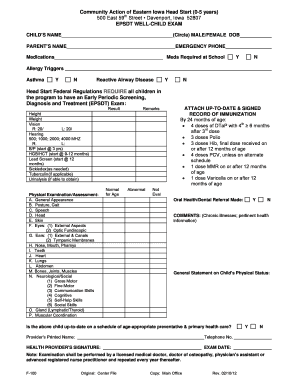
- In the first section, fill in the child's name and circle their gender (male or female). Enter the date of birth.
- Next, input the parent's name and an emergency phone number. This ensures that there is a point of contact in case of an emergency.
- List any medications that the child takes and indicate if any medications are required at school by marking 'Yes' or 'No'.
- Check for any allergy triggers by indicating if the child has asthma or reactive airway disease.
- Document the results from the Early Periodic Screening, Diagnosis and Treatment (EPSDT) exam in the provided fields, including height, weight, vision, hearing, and any other relevant assessments.
- For the physical examination section, document findings under each specified category (general appearance, posture, gait, etc.). Mark if the findings are normal or abnormal for age.
- Attach an up-to-date and signed record of immunization. Make sure all required immunizations are documented based on the provided criteria.
- Indicate whether an oral health/dental referral has been made by marking 'Yes' or 'No.'
- Provide any additional comments regarding chronic illnesses or pertinent health information in the comments section.
- Complete the general statement on the child’s physical status and verify whether the child is up-to-date on scheduled preventative and primary health care.
- Finally, input the health provider’s printed name, telephone number, and signature, along with the exam date.
- After reviewing the completed form for accuracy, you can save your changes, download it for your records, print it out, or share it as needed.
Complete the Well Child Exam Form for Headstart online today to ensure your child's health needs are met.