Open form follow the instructions
Easily sign the form with your finger
Send filled & signed form or save
How to fill out the Reg 5036 online
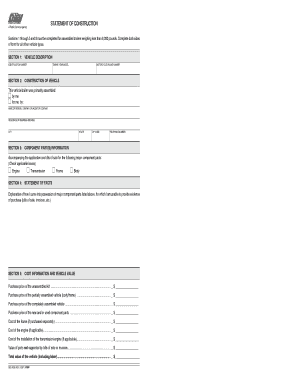
The Reg 5036 form is essential for documenting the construction of vehicles and trailers. This guide provides clear and supportive instructions to help you complete the form accurately and efficiently.
Follow the steps to successfully complete the Reg 5036 form.
- Click ‘Get Form’ button to obtain the form and open it in the editor.
- Begin with Section 1, where you will need to provide the vehicle's identification number and a detailed description of the vehicle.
- In Section 2, specify the engine year model and the motorcycle engine number, along with marking whether the vehicle was assembled by you or by someone else, including the name and address of the assembler.
- Proceed to Section 3, where you must enter the state, zip code, and telephone number, as well as include bills of sale for all major component parts that you are listing.
- In Section 4, you will provide an explanation of how you attained the major component parts without evidence of purchase.
- Section 5 requires you to outline the cost information, detailing all purchase prices related to the vehicle and its parts, ensuring to include the total value.
- Continue to Section 6, providing details about where you purchased each major component part, including names, addresses, and telephone numbers.
- Fill in Section 7, documenting when you took possession of the completed vehicle and details of the seller.
- In Section 8, complete the owner's certification by providing your name, address, signature, and telephone number, confirming the compliance of your vehicle with safety standards.
- After completing all sections, you can save the changes, download the form, print it, or share it as needed.
Complete your documents online with confidence.
Experience a faster way to fill out and sign forms on the web. Access the most extensive library of templates available.
Related content
Statement of Construction (REG 5036). This form is is used by the owner to provide...
... 5036 Politics Of Globalization (3). • INR 5037 Sem On Develop Countries (3). • INR...
After the subproject is added, you may configure the “mxupce6.reg” registry file with...
Get answers to your most pressing questions about US Legal Forms API.
What happens if you don't have your registration in your car in California?
If you don’t have your registration in your car while driving in California, you may face fines or traffic stops. California law mandates that you carry your registration at all times. It’s advisable to keep a copy of your registration, especially as per Reg 5036 requirements, to avoid any legal trouble.
Does California have temporary registration?
Yes, California offers temporary registration permits valid for up to 90 days. These permits allow you to drive your vehicle legally while finalizing the registration. Make sure to follow the guidelines established under Reg 5036 to avoid complications during this period.
How to register an out of state car in CA?
To register an out-of-state car in California, you need to visit the DMV and provide necessary documentation, including your current title, proof of identity, and a smog check if applicable. Completing the forms correctly according to state laws under Reg 5036 is essential. USLegalForms offers resources to help guide you through this registration process.
How long can I drive in California with an out of state registration?
In California, you can usually drive with an out-of-state registration for up to 20 days after becoming a resident. After this period, you must register your vehicle in California. Understanding the nuances under Reg 5036 helps you stay compliant while using your vehicle.
Can I drive in California while waiting for registration?
While waiting for your registration to process, you should generally not drive your vehicle. California law requires valid registration for operation on public roads. To avoid issues, it's wise to complete your registration quickly per Reg 5036 guidelines to ensure compliance.
How to transfer an out of state title to California?
Transferring an out-of-state title to California involves submitting specific forms to the DMV. You will need the original title, proof of your identity, and a completed application for title transfer. California's Reg 5036 outlines the process clearly, and using USLegalForms can help ensure you have all the correct paperwork.
How to register a home-built trailer in CA?
To register a home-built trailer in California, you need to complete a few steps. First, gather documentation proving ownership, such as receipts for materials. Then, submit the required forms and fees to your local DMV. Utilizing USLegalForms can simplify this process by providing the necessary documentation templates related to Reg 5036.
Is there a grace period for registration sticker in California?
In California, there is usually no grace period for registration stickers. If your registration has expired, it is crucial to renew it promptly to avoid penalties. The regulations under Reg 5036 highlight the importance of maintaining active registration. Renewing early can save you from unnecessary fees.
What to do with California license plates when moving out of state?
When moving out of state, you should return your California license plates to the DMV to officially cancel your registration. This action prevents future liabilities related to the vehicle. Additionally, it’s wise to keep a record of the cancellation for your files. Consult Reg 5036 for specific guidelines on handling such situations to ensure compliance.
What documents do I need to re-register my car in California?
For re-registering your car in California, you typically need your current registration, proof of ownership, and your California driver’s license. Don’t forget to provide proof of insurance and any emissions testing documents if required. Understanding the requirements in Reg 5036 can help facilitate the re-registration process without delays?
Use professional pre-built templates to fill in and sign documents online faster. Get access to thousands of forms.
If you believe that this page should be taken down, please follow our DMCA take down process here.