Loading
Get Zfi 2020-2026
How it works
-

Open form follow the instructions
-

Easily sign the form with your finger
-

Send filled & signed form or save
How to fill out the ZFI online
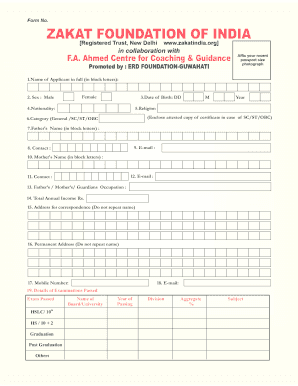
Filling out the ZFI form is a crucial step for applicants seeking coaching and guidance for civil services examinations. This guide provides clear instructions to help users complete the form accurately and efficiently, ensuring that all required information is submitted without errors.
Follow the steps to successfully complete the ZFI form online.
- Click ‘Get Form’ button to obtain the form and open it in the editor.
- Begin by filling in the full name of the applicant in block letters. Ensure that the spelling is correct for official records.
- Indicate the gender of the applicant by selecting either ‘Male’ or ‘Female’.
- Fill in the date of birth using the format DD/MM/YYYY to avoid any confusion. Ensure correctness as this will be verified.
- Provide the nationality of the applicant clearly.
- Specify the religion and be prepared to enclose an attested copy of the certificate if the applicant belongs to SC/ST/OBC categories.
- Select the category from General/SC/ST/OBC.
- Enter the father’s name in block letters.
- Provide the contact details, including email address and phone number.
- Enter the mother’s name in block letters.
- Fill in the mother's contact information.
- State the occupation of the father, mother, or guardian and the total annual income.
- Input the address for correspondence without repeating the applicant's name.
- Provide the permanent address, avoiding repetition of the applicant's name.
- Enter the mobile number for communication.
- List the email address if it differs from previous entries.
- Detail the examinations passed, providing the name of the board/university, year of passing, division, aggregate percentage, and subjects for each qualification.
- Indicate whether the applicant has previously appeared in UPSC Civil Services Examinations. If yes, provide details in ascending chronological order, including year, roll number, and results.
- If the applicant has received coaching from any other institute, mention the name and years.
- Answer whether the applicant has received a stipend for coaching from the Government of India previously, along with any relevant details.
- State the examination for which coaching is being sought from the ZFI and strike out the options that do not apply.
- Note the choice of the center for ZFI admission tests, which is Guwahati.
- List the optional subjects offered for the Civil Services Examination.
- Indicate the level up to which the optional subjects have been studied, selecting the appropriate code from high school, bachelor level, master level, or never studied.
- Specify the Indian language in which proficiency exists, as included in the Eighth Schedule.
- Select the medium of the language for the examination from the provided options.
- If applicable, fill in the UPSC roll number.
- Indicate whether a hostel facility is required by selecting ‘Yes’ or ‘No.’
- Affirm compliance with the rules and regulations of the ZFI, ensuring all information provided is accurate and complete. Finally, input the date, place, and then sign the form.
- Upon completion, users can save their changes, download the filled form for personal records, print it for submission, or share electronically as needed.
Complete the ZFI form online to take the next step in your civil services preparation!
To open a .z file in Windows, you need a compatible decompression tool such as WinZip or 7-Zip. These applications allow you to extract the contents of .z files easily. Using Zfi can further streamline your file management tasks, giving you more control and flexibility with compressed files.
Industry-leading security and compliance
US Legal Forms protects your data by complying with industry-specific security standards.
-
In businnes since 199725+ years providing professional legal documents.
-
Accredited businessGuarantees that a business meets BBB accreditation standards in the US and Canada.
-
Secured by BraintreeValidated Level 1 PCI DSS compliant payment gateway that accepts most major credit and debit card brands from across the globe.