Open form follow the instructions
Easily sign the form with your finger
Send filled & signed form or save
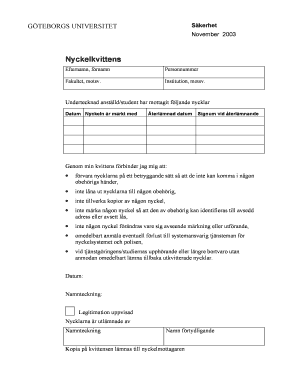
How to fill out the Nyckelkvittens Mall Excel online
Filling out the Nyckelkvittens Mall Excel is an important task for ensuring proper management of key handover processes. This guide will provide you with clear, step-by-step instructions to navigate the form effectively and securely manage your key-related responsibilities.
Follow the steps to complete the Nyckelkvittens Mall Excel online.
- Click the ‘Get Form’ button to obtain the form and open it in your online editor.
- Begin by entering your last name and first name in the designated fields under 'Nyckelkvittens.' Make sure to accurately represent your name as it may appear on official documents.
- Input your personal identification number (personnummer) in the appropriate section. This is essential for verifying your identity.
- Indicate your faculty or equivalent institution by selecting the applicable option from the list provided.
- Specify the institution or equivalent position you are affiliated with. This information helps to assign responsibility clearly.
- In the section for received keys, enter the date you received each key, and ensure that each key’s identification is marked appropriately.
- For each key, record the return date, which is when you will give back the keys.
- Upon returning the keys, make sure to sign and date the document in the 'Signum vid återlämnande' section to confirm the return.
- Acknowledge your responsibilities by reviewing the listed commitments regarding the handling and return of the keys.
- Finally, after all necessary fields are filled out, you can save your changes, download the form, print it, or share it as necessary.
Complete your Nyckelkvittens Mall Excel online to ensure secure key management.
Experience a faster way to fill out and sign forms on the web. Access the most extensive library of templates available.
Related content
Get answers to your most pressing questions about US Legal Forms API.
How to make a master file in Excel?
To make a master file in Excel, begin by creating a new workbook and aggregating data from different projects or datasets. Organize this information logically across multiple sheets, making sure to label each one for clarity. Using a Nyckelkvittens Mall Excel template can streamline this process, giving you a professional-looking file.
How to convert file extensions?
To convert file extensions, select the file on your computer, right-click it, and choose 'Rename.' Change the extension accordingly, ensuring the new format is appropriate for the content. If you need assistance, online tools or services like USLegalForms can provide support for various file types.
How to make a master plan in Excel?
Making a master plan in Excel involves outlining your goals and necessary steps within a spreadsheet. Start by creating columns for tasks, deadlines, and responsible parties. Utilizing Nyckelkvittens Mall Excel templates can provide a structured format to ensure your plan is clear and trackable.
What is a master File in Excel?
A master file in Excel is a central document that consolidates information from various sources or projects. It acts as a single point of reference for all relevant data, enhancing organization and efficiency. Using a Nyckelkvittens Mall Excel can simplify the process of creating and managing your master file.
How do I change the file extension to Excel?
To change a file extension to Excel, right-click on your file, select 'Rename,' and modify the extension to .xlsx or .xls. However, make sure the file format is compatible; otherwise, this method may not work. If you're uncertain, using a reliable service like USLegalForms can facilitate this conversion.
How to create a master Excel File?
To create a master Excel file, gather all necessary data and open Excel to start a new workbook. Arrange your data into sheets, categorizing it for better management. This approach ensures your master file is comprehensive and functional, especially when utilizing a Nyckelkvittens Mall Excel template.
How to make a master File?
Creating a master file involves compiling all your essential data into a single document. Start by collecting relevant information from various sources and then organize it accordingly within a spreadsheet software. Using Nyckelkvittens Mall Excel will help you manage this data effectively, offering tools to maintain clarity.
How to display file location in Excel?
To display the file location in Excel, utilize the formula =CELL("filename"). This formula returns the complete path of your current workbook, allowing you to maintain better organization within your Nyckelkvittens Mall Excel. Keeping track of file locations can streamline your workflow.
How to use macro files in Excel?
Using macro files in Excel can enhance your productivity significantly. First, enable the Developer tab, then click 'Record Macro' to start capturing your actions. After saving the macro, you can run it anytime to automate tasks in your Nyckelkvittens Mall Excel, saving you time and effort.
How do I convert a .txt file to Excel?
Converting a .txt file to Excel is straightforward. Open Excel, then go to 'File,' select 'Open,' and choose your .txt file. Follow the prompts in the Text Import Wizard to organize your data into columns, making it easy to utilize in your Nyckelkvittens Mall Excel.
Use professional pre-built templates to fill in and sign documents online faster. Get access to thousands of forms.
If you believe that this page should be taken down, please follow our DMCA take down process here.