Loading
Get Mywfg 2020-2026
How it works
-

Open form follow the instructions
-

Easily sign the form with your finger
-

Send filled & signed form or save
How to fill out the Mywfg online
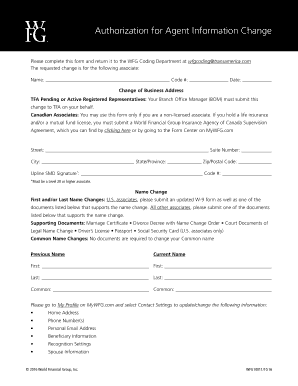
This guide provides a clear and comprehensive approach for completing the Mywfg form for authorization of agent information change. Whether you are submitting a business address change or a name change, this guide will walk you through the necessary steps to ensure accurate completion.
Follow the steps to successfully fill out the Mywfg form online.
- Press the ‘Get Form’ button to access the form and open it in your chosen editor.
- Begin by entering the associate's name in the designated field, followed by their code number and the current date.
- If you are changing your business address, fill in the street address, suite number (if applicable), city, state or province, and zip or postal code. Note that TFA pending or active registered representatives must have their Branch Office Manager submit this change on their behalf.
- For name changes, indicate the previous and current names in the appropriate fields. U.S. associates must include an updated W-9 form and one of the supporting documents listed, while all other associates must submit one supporting document.
- You can provide common name changes without any required documentation. Ensure you complete the relevant fields for both previous and current names.
- If you need to update personal information such as home address, phone numbers, personal email address, beneficiary information, recognition settings, or spouse information, please visit 'My Profile' to access the 'Contact Settings' section.
- Lastly, after reviewing all entries for accuracy, you have the option to save your changes, download the completed form, print it, or share it as needed.
Take the next step towards efficient document management by completing your forms online.
To file AOC 5, gather your financial data and ensure you meet the eligibility criteria. The Mywfg platform streamlines this process by offering user-friendly tools to assist you in completing the filing accurately. By following the provided guidelines, you can ensure a smooth submission experience.