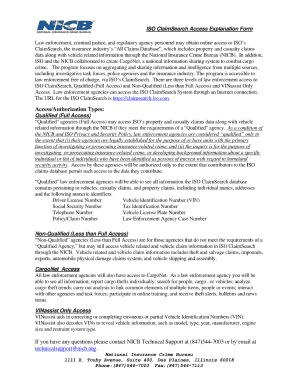
ISO ClaimSearch Access Explanation Form Law enforcement, criminal justice, and regulatory agency personnel may obtain online access to ISO's ClaimSearch, the insurance industry's "All Claims.

How it works
  • Open form

    Open form follow the instructions

  • Easily sign form

    Easily sign the form with your finger

  • Share form

    Send filled & signed form or save

How to fill out the Iso Claimsearch Agency Administrator Form online

Filling out the Iso Claimsearch Agency Administrator Form online can be a straightforward process if you follow the right steps. This guide aims to provide users with clear instructions to complete the form efficiently.

Follow the steps to successfully complete your form online.

  1. Click ‘Get Form’ button to obtain the form and open it in the online editor.
  2. Review the instructions provided within the form to understand each section's requirements.
  3. Start by entering your organization’s name in the designated field, ensuring you provide the official name as registered.
  4. Fill in the agency administrator’s contact information, including email address and phone number, making sure these details are current and accurate.
  5. Provide any additional information requested in the form, such as agency registration details or operational licenses, as required.
  6. After completing all sections, review the entire form for any errors or missing information.
  7. Once satisfied with the information entered, you can save changes, download, print, or share the form as needed.

Complete your Iso Claimsearch Agency Administrator Form online today!

Get form

Experience a faster way to fill out and sign forms on the web. Access the most extensive library of templates available.

Related content

Options to Participate in the Insurance Match...

Jun 2, 2023 — Use the Insurance Services Office (ISO). ClaimSearch® participants...

Learn more
ISO Cla;m5earch Agency Administrator Form

The form is for a senior management person to obligate an agency for access to ISO...

Learn more
Questions & Answers

Get answers to your most pressing questions about US Legal Forms API.

Contact support

What is ISO in insurance claims?

ISO, or Insurance Services Office, plays a crucial role in the insurance industry by providing data services that support claims management and fraud detection. ISO helps insurance professionals access standardized data regarding claims, which streamlines their operational workflows. To fully leverage ISO's benefits, having access through the Iso Claimsearch Agency Administrator Form is essential.

ISO reports can be generated by authorized personnel within the insurance sector, such as agents and claims adjusters. These professionals require the appropriate permissions and access to the ISO ClaimSearch system. By filling out the Iso Claimsearch Agency Administrator Form, they secure their capability to run ISO reports and improve their claims handling processes.

ISO ClaimSearch serves as an essential tool for the insurance industry, allowing users to retrieve and analyze claims information efficiently. It supports investigative processes, aiding in fraud detection and claims assessment. By completing the Iso Claimsearch Agency Administrator Form, users can harness the full potential of ISO ClaimSearch for optimal results.

ISO ClaimSearch is a comprehensive database that aggregates claims data for the insurance industry. It allows authorized users to access a plethora of information related to insurance claims, incidents, and history. To make the most of this resource, it is crucial to fill out the Iso Claimsearch Agency Administrator Form, which facilitates secure access and effective claims management.

An ISO report provides detailed information about an insurance claim, including data relevant to the claim's history and related incidents. These reports help insurance professionals make informed decisions regarding claims management. Utilizing the information from an ISO report, users can streamline their processes, and completing the Iso Claimsearch Agency Administrator Form can grant access to this valuable data.

An ISO search can be conducted by licensed insurance professionals who have authorization to access the system. This includes claims adjusters and other insurance personnel responsible for managing or investigating claims. To run an ISO search, users must complete the Iso Claimsearch Agency Administrator Form to verify their credentials and ensure compliance with regulations.

Access to ISO ClaimSearch is granted to authorized users, including insurance adjusters, underwriters, and representatives from participating insurance companies. To gain access, individuals typically need to fill out the Iso Claimsearch Agency Administrator Form. This form helps establish the user's legitimacy and allows the organization to manage access efficiently.

ISO ClaimSearch is typically accessible to insurance companies, agents, and other authorized personnel involved in the claims process. If you are associated with an insurance organization that uses ISO ClaimSearch, you will likely have access. It's important to ensure that you have the necessary credentials and an Iso Claimsearch Agency Administrator Form to facilitate your access.

Verisk ClaimSearch, now known as ISO ClaimSearch, is a service that assists insurance professionals by offering insights into claims data. This system helps identify potential fraud and facilitates better claims management. Essentially, it acts as a comprehensive database for insurance claims, enhancing the efficiency of handling claims processes.

ISO standards are developed and maintained by the International Organization for Standardization, a global network of national standards bodies. These standards guide practices in industries like insurance to ensure consistency and quality. Understanding these standards often requires effective use of tools like ISO ClaimSearch, and the Iso Claimsearch Agency Administrator Form can help streamline user access during this process.

Get This Form Now!

Use professional pre-built templates to fill in and sign documents online faster. Get access to thousands of forms.

If you believe that this page should be taken down, please follow our DMCA take down process here.

Get Iso Claimsearch Agency Administrator Form