Loading

Open form follow the instructions

Easily sign the form with your finger

Send filled & signed form or save
How to fill out the Maricopa County Summons Form online
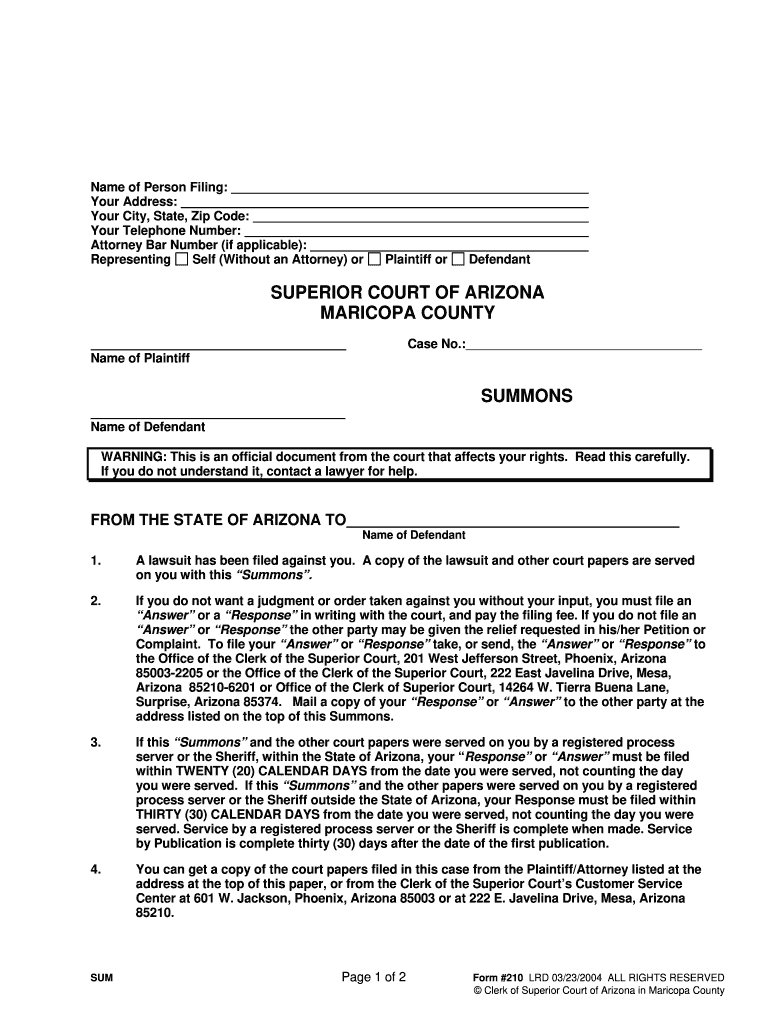
This guide provides clear and detailed instructions for users on how to complete the Maricopa County Summons Form online. Whether you are new to legal documents or have some experience, this resource will assist you in navigating the process effectively.
Follow the steps to complete the Maricopa County Summons Form online.
- Click the ‘Get Form’ button to obtain the form and open it in your chosen editor.
- In the first section, input your name and contact information. Fill in your address, including your city, state, and zip code. Enter your telephone number and attorney bar number if you are represented by an attorney. Select your status by indicating whether you are filing as a person without legal representation or as a representative.
- Next, provide the names of the plaintiff and the defendant in the relevant fields. Verify the spellings and ensure they match those in the case documents.
- Read the warning section carefully. It outlines the seriousness of the summons and advises you to seek legal assistance if needed. Ensure you understand the stipulations to protect your rights.
- Fill in case number details if known. This number is crucial for the court's reference to your case. If available, ensure that it matches with the court records.
- In the service details, indicate how the summons was served to you and the relevant dates. Make sure to follow the provided timelines for responding, either within 20 or 30 calendar days depending on your situation.
- Review the instructions regarding obtaining copies of other court papers from the plaintiff or the Clerk of the Superior Court. Make a note of the addresses provided.
- Complete any additional fields presented in the form, ensuring all information is accurate and up to date.
- Once all sections are completed to your satisfaction, save your changes. You can then download, print, or share the completed form as needed.
Complete your Maricopa County Summons Form online today to ensure your legal rights are protected.
Experience a faster way to fill out and sign forms on the web. Access the most extensive library of templates available.
Related content
1. A lawsuit has been filed against you. A copy of the lawsuit and other court papers are...
Aug 23, 2022 — Process must be served at the District Office Building, 2411 West 14th...
Oct 3, 2013 — The information required by Part III of this Form 10-K, to the extent not...
Get answers to your most pressing questions about US Legal Forms API.
What is a writ of execution in Arizona?
In Arizona, a writ of execution is an official document issued by the court to enforce a judgment when a debt remains unpaid. It enables creditors to collect funds by seizing assets or garnishing wages, thereby facilitating fulfillment of the court's decision. Knowing your rights and obligations in this process is essential for all parties involved. To navigate these legal waters smoothly, consider utilizing resources from US Legal Forms, including the Maricopa County Summons Form.
What is a writ of execution in Maricopa County?
A writ of execution in Maricopa County is a court order that allows a creditor to enforce a judgment. It empowers the creditor to take certain actions, such as seizing property or garnishing wages, to recover the owed amount. Understanding this process is crucial for both creditors and debtors, as it determines how legal judgments are enforced. For those seeking assistance, the platform at US Legal Forms offers helpful resources, including the Maricopa County Summons Form.
Does a summons have to be served in person in Arizona?
In Arizona, a summons typically needs to be served in person to ensure the recipient receives it directly. This process allows the court to confirm that the individual knows about the legal action being taken. However, if personal service is not possible, there may be alternatives, such as serving by mail or publication, depending on the circumstances. Using the Maricopa County Summons Form can help simplify this process and guide you through the legal requirements.
What types of services does Maricopa County provide to their citizens?
Maricopa County offers a variety of services to its citizens including public health programs, legal assistance, and community resources. These services are designed to support citizens in various aspects of life, including legal matters. If you need to understand your rights and access legal forms like the Maricopa County Summons Form, utilizing county resources can be beneficial.
What is the initial appearance court in Maricopa County?
The initial appearance court in Maricopa County is the first step in a criminal case after a person has been arrested. During this court session, the judge informs the defendant of the charges, their rights, and sets bail if applicable. It is critical for individuals to understand the Maricopa County Summons Form, as it contains important information regarding their case and court obligations.
How to get Maricopa County court records?
To obtain Maricopa County court records, you can visit the Maricopa County Superior Court website or the Clerk of the Court’s office. These records can typically be accessed online or requested in person. If you are navigating a legal matter, using a Maricopa County Summons Form will guide you through the required documentation and processes to effectively retrieve the information you need.
What is the small claims limit in Maricopa County?
The small claims limit in Maricopa County is currently set at $3,500, which includes amounts owed for many types of disputes. This limit allows individuals to resolve disputes quickly and affordably without the need for an attorney. If you're considering pursuing a claim, using a Maricopa County Summons Form can streamline your process and help ensure that you meet all necessary requirements.
How do I collect a Judgement in AZ?
Enforcing a Judgment. A copy of the written decision (judgment) will be mailed to each party. After you have received your copy of the judgment, make a written demand of the other party to pay the judgment amount. If they do not pay, at your request the court may provide you with forms you may file to try to collect.
How do I access court documents in Maricopa County?
The most efficient method for customers to obtain records remotely is by submitting an online form or emailing the Clerk's Office. To obtain copies of public records by phone, please call (602) 37-CLERK, or (602) 372-5375.
Where can I record a document in Maricopa County?
Hours & Locations Recorder's Office. Phone: 602-506-1511. Elections MCTEC Office. 510 S. Third Ave. Phoenix AZ 85003. By appointment only. Call for services. Hours: 8:00 A.M. - 5:00 P.M. Monday - Friday. Phone: 602-506-1511. T.D.D. 602-506-2348.
Use professional pre-built templates to fill in and sign documents online faster. Get access to thousands of forms.
If you believe that this page should be taken down, please follow our DMCA take down process here.