Loading
Form preview
  • US Legal Forms
  • Other Templates
  • More Forms
  • More Multi-State Forms
  • Lift Incident Report 2020

Get Lift Incident Report 2020-2026

How it works

  1. Open form

    Open form follow the instructions

  2. Easily sign form

    Easily sign the form with your finger

  3. Share form

    Send filled & signed form or save

How to fill out the Lift Incident Report online

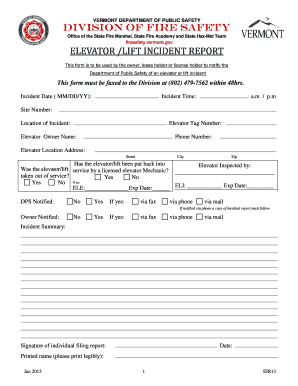
Filing a Lift Incident Report is essential for notifying the Department of Public Safety of any elevator or lift incidents. This guide provides clear, step-by-step instructions to help you complete the online form accurately and effectively.

Follow the steps to accurately complete the form

  1. Click the ‘Get Form’ button to access the Lift Incident Report and open it in your preferred online editor.
  2. Enter the incident date in the specified format (MM/DD/YY). This is important for record-keeping purposes.
  3. Indicate the exact time of the incident by selecting between a.m. or p.m. accordingly.
  4. Fill in the site number where the incident occurred.
  5. Provide the location of the incident, including the elevator tag number, owner name, and their contact phone number.
  6. Include the elevator location address, comprising street, city, and zip code.
  7. Specify if the elevator or lift has been taken out of service by selecting 'Yes' or 'No.'
  8. Mention if the elevator was inspected by a licensed elevator mechanic and fill in their details if applicable.
  9. Indicate whether the Department of Public Safety was notified, and provide details on how notification was made.
  10. Complete the owner notification section in the same manner as the Department notification.
  11. Summarize the incident in the summary section clearly and concisely.
  12. Sign and date the report, ensuring that you print your name legibly for clarity.
  13. For witnesses or injured parties, complete the respective sections with their names, contact information, and details of the incidents or injuries.
  14. Review all provided information for accuracy before submitting the report.
  15. Once completed, save your changes, and choose to download, print, or share the Lift Incident Report as needed.

Take action now by filling out the Lift Incident Report online to ensure compliance and proper incident documentation.

Get form

Experience a faster way to fill out and sign forms on the web. Access the most extensive library of templates available.
Get form

Related content

Elevator Incident Reporting Form
This form is provided to assist in filing a report of accidents or damage to elevator...
Learn more
Investigation Report - Aerial Lift Accident
Apr 18, 2011 — Notre Dame Incident Report. Summary Sio. I am an independent safety...
Learn more
INSTRUCTIONS FOR COMPLETING THE FLORIDA ...
Traffic crashes can be reported by the use of a long or short form Florida Traffic Crash...
Learn more

Related links form

Sinopsis De Auditoria Administrativa Joaquin Rodriguez Valencia Pdf Hydraulic Pressure Booster (hpb ) - Fluid Equipment Development ... If We Are So Rich, Why Aren't We Happy 7 Eleven Employee Website

Questions & Answers

Get answers to your most pressing questions about US Legal Forms API.

Contact support

Filling out a Lift Incident Report example follows a few key steps. Start with factual information, describing the incident clearly and including relevant details such as involved parties. Review the report for accuracy, making necessary adjustments before it's submitted for further evaluation.

The procedure for completing a Lift Incident Report begins with gathering all necessary information immediately following the incident. Next, fill in the details systematically, ensuring that each section is comprehensive. Finally, submit the report to the relevant department for review and follow any additional protocols as required.

The format for a Lift Incident Report typically starts with a title, followed by the date, time, and location of the incident. Next, include a detailed narrative of the incident, witness information, and any actions taken. Conclude with your name and position to authenticate the report.

To fill up a Lift Incident Report, begin by identifying the basic facts of the incident, such as who was involved, what happened, and where it occurred. Then, add any supportive evidence like photographs or witness statements that enhance the report's credibility. Finally, submit the report to the appropriate authority for further action.

When completing a security Lift Incident Report, start by noting essential incident details like date, time, and location. Describe the nature of the security breach or event and include any involved parties and witnesses. Ensure that you document any immediate actions taken to address the situation.

Filling in a Lift Incident Report form involves detailing the incident specifics, including who was involved and what occurred. Use clear, straightforward language to convey the facts. Don’t forget to include any follow-up actions taken, which adds context and completeness to the report.

To complete a Lift Incident Report example, start by gathering all relevant details, such as the date, time, and location of the incident. Describe the events leading up to the incident, including any witnesses and their statements. Finally, review the report for clarity and accuracy before submission.

Filing an incident report is straightforward with the Lyft app or website. In the 'Help' section, look for 'Report an Incident,' and complete the Lift Incident Report form with as much detail as possible. By accurately detailing the situation, you help Lyft understand and resolve the matter.

To complain to Lyft directly, use the app or website to access the 'Help' section. Choose an appropriate category and explain your issue clearly while filling out the Lift Incident Report. This form allows Lyft to address your complaint effectively, so include all pertinent details for the best response.

The five rules of incident reporting include documenting facts clearly, reporting incidents promptly, ensuring accuracy of information, notifying appropriate parties, and keeping a record of all communications. Following these guidelines creates a reliable Lift Incident Report. This helps ensure accountability and improves future safety protocols.

Get This Form Now!

Use professional pre-built templates to fill in and sign documents online faster. Get access to thousands of forms.
Get form
If you believe that this page should be taken down, please follow our DMCA take down processhere.
Get Lift Incident Report
Get form
  • Adoption
  • Bankruptcy
  • Contractors
  • Divorce
  • Home Sales
  • Employment
  • Identity Theft
  • Incorporation
  • Landlord Tenant
  • Living Trust
  • Name Change
  • Personal Planning
  • Small Business
  • Wills & Estates
  • Packages A-Z
  • Affidavits
  • Bankruptcy
  • Bill of Sale
  • Corporate - LLC
  • Divorce
  • Employment
  • Identity Theft
  • Internet Technology
  • Landlord Tenant
  • Living Wills
  • Name Change
  • Power of Attorney
  • Real Estate
  • Small Estates
  • Wills
  • All Forms
  • Forms A-Z
  • Other Templates
  • Legal Hub
  • About Us
  • Help Portal
  • Legal Resources
  • Blog
  • Affiliates
  • Contact Us
  • Delete My Account
  • Site Map
  • Industries
  • Forms in Spanish
  • Localized Forms
  • State-specific Forms
  • Forms Kit
  • Real Estate Handbook
  • All Guides
  • Notarize
  • Incorporation services
  • For Consumers
  • For Small Business
  • For Attorneys
  • USLegal
  • FormsPass
  • pdfFiller
  • signNow
  • altaFlow
  • DocHub
  • Instapage
Form Packages
  • Adoption
  • Bankruptcy
  • Contractors
  • Divorce
  • Home Sales
  • Employment
  • Identity Theft
  • Incorporation
  • Landlord Tenant
  • Living Trust
  • Name Change
  • Personal Planning
  • Small Business
  • Wills & Estates
  • Packages A-Z
Form Categories
  • Affidavits
  • Bankruptcy
  • Bill of Sale
  • Corporate - LLC
  • Divorce
  • Employment
  • Identity Theft
  • Internet Technology
  • Landlord Tenant
  • Living Wills
  • Name Change
  • Power of Attorney
  • Real Estate
  • Small Estates
  • Wills
  • All Forms
  • Forms A-Z
  • Other Templates
Customer Service
  • Legal Hub
  • About Us
  • Help Portal
  • Legal Resources
  • Blog
  • Affiliates
  • Contact Us
  • Delete My Account
  • Site Map
  • Industries
  • Forms in Spanish
  • Localized Forms
  • State-specific Forms
  • Forms Kit
Legal Guides
  • Real Estate Handbook
  • All Guides
Prepared for you
  • Notarize
  • Incorporation services
Our Customers
  • For Consumers
  • For Small Business
  • For Attorneys
Our Sites
  • USLegal
  • FormsPass
  • pdfFiller
  • signNow
  • altaFlow
  • DocHub
  • Instapage
Social Media
Call us now toll free:
+1 833 426 79 33
As seen in:
© Copyright 1999-2026 airSlate Legal Forms, Inc. 17 Station Street, Ste. 203, Brookline, MA 02445
  • Your Privacy Choices
  • Terms of Service
  • Privacy Notice
  • Content Takedown Policy
  • Bug Bounty Program