We use cookies to improve security, personalize the user experience, enhance our marketing activities (including cooperating with our marketing partners) and for other business use.
Click "here" to read our Cookie Policy. By clicking "Accept" you agree to the use of cookies. Read less
Read more
Accept
Loading
Form preview
  • US Legal Forms
  • Form Library
  • More Forms
  • More Multi-State Forms
  • Canada Day Vendor Registration Form 2020

Get Canada Day Vendor Registration Form 2020-2025

How it works

  1. Open form

    Open form follow the instructions

  2. Easily sign form

    Easily sign the form with your finger

  3. Share form

    Send filled & signed form or save

How to fill out the Canada Day Vendor Registration Form online

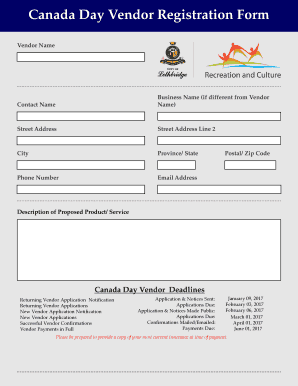
Filling out the Canada Day Vendor Registration Form online is a straightforward process that allows you to participate in the Canada Day celebrations as a vendor. This guide provides step-by-step instructions to ensure that you complete the form accurately and efficiently.

Follow the steps to successfully complete the registration form.

  1. Click ‘Get Form’ button to obtain the form and open it in the online editor.
  2. Enter your vendor name in the designated field, followed by your contact name if it differs from the vendor name. Ensure both are entered accurately.
  3. If your business name is different from your vendor name, provide the business name in the corresponding section.
  4. Fill in your street address, including any necessary details such as street address line 2, city, province/state, and postal/zip code.
  5. Input your phone number and email address to ensure effective communication regarding your application.
  6. Provide a detailed description of the product or service you plan to offer during the event.
  7. Select your preferred vendor booth space from the options provided: small, medium, or large, and be mindful of pricing and included specifications.
  8. Indicate if you need any additional outlets or wish to apply for the 'Divertible Materials Rebate' for sustainable practices.
  9. Complete the additional booth information section by detailing required dimensions, wattage preferences, and any power type needs.
  10. Read and acknowledge the conditions of use by signing in the provided section. This can be done physically or with digital initials.
  11. Submit your application and ensure that you save a copy for your records. You may choose to download or print the completed form.

Begin your application process and secure your vendor space by filling out the Canada Day Vendor Registration Form online today.

Get form

Experience a faster way to fill out and sign forms on the web. Access the most extensive library of templates available.
Get form

Related content

Vendor Engagement Request Form
Fill out the below electronic form to ensure that each request can be submitted to the...
Learn more
Vendors | Student Life
Complete a Vendor Application at least 7 BUSINESS DAYS before you wish to come to campus...
Learn more
MDB / ICP - NAMA
Introduction. 2. Operational and Application Notes. 3. Levels and Options. Section 2...
Learn more

Related links form

Employee Exit Form - Mercedes ISD TENDER DOCUMENT - Development Support Agency Of Gujarat Bank Alfalah Credit Card Electronic Funds Authorization American General Life Insurance Company (AGL) AIG Life Insurance

Questions & Answers

Get answers to your most pressing questions about US Legal Forms API.

Contact support

Creating a vendor agreement involves outlining the terms and conditions between you and your vendors. Be sure to include details about fees, responsibilities, and compliance requirements. For a Canada Day Vendor Registration Form, use uslegalforms to access templates that ensure your agreements are comprehensive and legally sound, protecting both your interests and those of your vendors.

To create a Google form for vendor registration, go to Google Forms and select a blank form to start. For a Canada Day Vendor Registration Form, add fields for important details like business name, contact number, and product description. Google Forms is user-friendly, and you can customize it easily, but uslegalforms offers a more professional solution if you need additional legal considerations.

Making vendor registration is straightforward when you follow a structured approach. Start by collecting necessary information for a Canada Day Vendor Registration Form and ensure that you check for compliance with local regulations. Using uslegalforms allows you to simplify the entire process, from registration to approval, making it efficient for both you and your vendors.

To create a vendor registration form, begin by defining what details you need from vendors. Essential components for a Canada Day Vendor Registration Form include vendor name, booth requirements, and special requests. Uslegalforms offers templates that can help you customize your form to fit the unique needs of your event and vendors.

Creating a simple registration form starts with outlining the information you need from participants. For a Canada Day Vendor Registration Form, include fields for name, contact details, and business information. You can use platforms like uslegalforms to streamline this process, ensuring that your form meets legal requirements and is easy to fill out.

On July 1st, Montrealers celebrate Canada Day in the Old Port of Montreal.

Saint-Jean-Baptiste Day, also known as St. John the Baptist Day, is an annual celebration honouring the patron saint of Québec, Saint John the Baptist, and Québécois culture. It is one of the most significant national holidays in the province and is marked by lively festivities throughout Québec.

Simple Vendor Application Form Template Enter the vendor applicant's tax ID, organization type (e.g., corporation, LLC, individual/sole proprietor, etc.), and contact and payment information. This easy-to-use, fully customizable template also includes a section exclusively for accounting purposes.

Given the federal nature of the anniversary, celebrating Canada Day can be a cause of friction in the province of Quebec, where the holiday is overshadowed by the province's Saint-Jean-Baptiste Day (Fête nationale), on June 24.

It is celebrated with parades, displays of the flag, the singing of the national anthem, “O Canada,” and fireworks. When July 1 falls on a Sunday, the holiday is observed on the following day. The Editors of Encyclopaedia Britannica This article was most recently revised and updated by Amy Tikkanen.

Get This Form Now!

Use professional pre-built templates to fill in and sign documents online faster. Get access to thousands of forms.
Get form
If you believe that this page should be taken down, please follow our DMCA take down processhere.

Industry-leading security and compliance

US Legal Forms protects your data by complying with industry-specific security standards.
  • In businnes since 1997
    25+ years providing professional legal documents.
  • Accredited business
    Guarantees that a business meets BBB accreditation standards in the US and Canada.
  • Secured by Braintree
    Validated Level 1 PCI DSS compliant payment gateway that accepts most major credit and debit card brands from across the globe.
Get Canada Day Vendor Registration Form
Get form
Form Packages
Adoption
Bankruptcy
Contractors
Divorce
Home Sales
Employment
Identity Theft
Incorporation
Landlord Tenant
Living Trust
Name Change
Personal Planning
Small Business
Wills & Estates
Packages A-Z
Form Categories
Affidavits
Bankruptcy
Bill of Sale
Corporate - LLC
Divorce
Employment
Identity Theft
Internet Technology
Landlord Tenant
Living Wills
Name Change
Power of Attorney
Real Estate
Small Estates
Wills
All Forms
Forms A-Z
Form Library
Customer Service
Terms of Service
Privacy Notice
Legal Hub
Content Takedown Policy
Bug Bounty Program
About Us
Help Portal
Legal Resources
Blog
Affiliates
Contact Us
Delete My Account
Site Map
Industries
Forms in Spanish
Localized Forms
State-specific Forms
Forms Kit
Legal Guides
Real Estate Handbook
All Guides
Prepared for You
Notarize
Incorporation services
Our Customers
For Consumers
For Small Business
For Attorneys
Our Sites
US Legal Forms
USLegal
FormsPass
pdfFiller
signNow
airSlate WorkFlow
DocHub
Instapage
Social Media
Call us now toll free:
+1 833 426 79 33
As seen in:
  • USA Today logo picture
  • CBC News logo picture
  • LA Times logo picture
  • The Washington Post logo picture
  • AP logo picture
  • Forbes logo picture
© Copyright 1997-2025
airSlate Legal Forms, Inc.
3720 Flowood Dr, Flowood, Mississippi 39232
Form Packages
Adoption
Bankruptcy
Contractors
Divorce
Home Sales
Employment
Identity Theft
Incorporation
Landlord Tenant
Living Trust
Name Change
Personal Planning
Small Business
Wills & Estates
Packages A-Z
Form Categories
Affidavits
Bankruptcy
Bill of Sale
Corporate - LLC
Divorce
Employment
Identity Theft
Internet Technology
Landlord Tenant
Living Wills
Name Change
Power of Attorney
Real Estate
Small Estates
Wills
All Forms
Forms A-Z
Form Library
Customer Service
Terms of Service
Privacy Notice
Legal Hub
Content Takedown Policy
Bug Bounty Program
About Us
Help Portal
Legal Resources
Blog
Affiliates
Contact Us
Delete My Account
Site Map
Industries
Forms in Spanish
Localized Forms
State-specific Forms
Forms Kit
Legal Guides
Real Estate Handbook
All Guides
Prepared for You
Notarize
Incorporation services
Our Customers
For Consumers
For Small Business
For Attorneys
Our Sites
US Legal Forms
USLegal
FormsPass
pdfFiller
signNow
airSlate WorkFlow
DocHub
Instapage
Social Media
Call us now toll free:
+1 833 426 79 33
As seen in:
  • USA Today logo picture
  • CBC News logo picture
  • LA Times logo picture
  • The Washington Post logo picture
  • AP logo picture
  • Forbes logo picture
© Copyright 1997-2025
airSlate Legal Forms, Inc.
3720 Flowood Dr, Flowood, Mississippi 39232