Loading
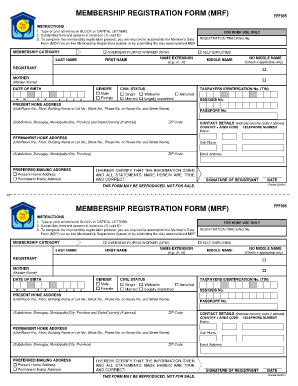
Get Pag Ibig Online Registration
How it works
-

Open form follow the instructions
-

Easily sign the form with your finger
-

Send filled & signed form or save
How to fill out the Pag Ibig Online Registration online
Registering for Pag Ibig membership can be a straightforward process when you follow the right steps. This guide will assist users in effectively completing the Pag Ibig Online Registration form with clarity and ease.
Follow the steps to complete your Pag Ibig online registration.
- Click the ‘Get Form’ button to access the Pag Ibig Online Registration form and open it in your preferred editor.
- Fill in your membership category by selecting either 'Overseas Filipino Worker (OFW)' or 'Self-Employed'.
- Enter your last name, first name, any name extension (like Jr. or III), and middle name. If you have no middle name, check the appropriate box.
- Provide your mother's maiden name in the designated section.
- Indicate your civil status by choosing from the options: single, married, widow/widower, legally separated, or annulled.
- Enter your date of birth in the format MM/DD/YYYY.
- Select your gender by marking either male or female.
- Fill in your present home address, including unit/room number, building name, street name, and any relevant codes.
- Input your Taxpayer Identification Number (TIN), SSS/GSIS number, and Passport number if applicable.
- Provide your permanent home address details similarly to your present home address.
- Fill in your contact details, including your home telephone number, cell phone number, and email address, ensuring to indicate the country code if you are abroad.
- Select your preferred mailing address by choosing either your present home address or your permanent home address.
- Certify that all provided information is true and correct by signing in the designated area and noting the date.
- Once completed, you can save changes, download, print, or share the filled form as needed.
Begin your Pag Ibig Online Registration today by filling out your application online!
To claim your Pag-Ibig MP2 savings online, you can log into your Virtual Pag-IBIG account. Navigate to the claims section and follow the instructions provided to submit your request. This efficient process allows you to manage your savings from the comfort of your home.