We use cookies to improve security, personalize the user experience, enhance our marketing activities (including cooperating with our marketing partners) and for other business use.
Click "here" to read our Cookie Policy. By clicking "Accept" you agree to the use of cookies. Read less
Read more
Accept
Loading
Form preview
  • US Legal Forms
  • Form Library
  • More Forms
  • More Multi-State Forms
  • Kelly Web Time 2020

Get Kelly Web Time 2020-2025

How it works

  1. Open form

    Open form follow the instructions

  2. Easily sign form

    Easily sign the form with your finger

  3. Share form

    Send filled & signed form or save

How to fill out the Kelly Web Time online

Kelly Web Time is a user-friendly online time-keeping system that allows users to easily submit and track their timesheets. This guide provides a step-by-step approach to filling out the Kelly Web Time form, ensuring clarity and efficiency throughout the process.

Follow the steps to successfully complete your Kelly Web Time form.

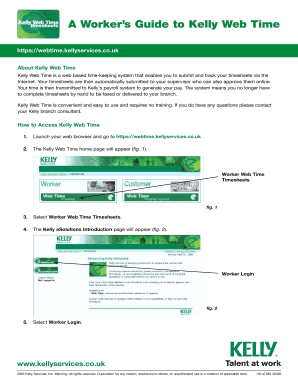
  1. Click the ‘Get Form’ button to access the Kelly Web Time form. This will open the form in your web browser.
  2. Select the Worker Web Time Timesheets option on the home page to navigate to the timesheet section.
  3. Proceed to the Worker Login page. Enter the Reference Number and Password assigned to you by your Kelly branch.
  4. Click Submit to log into the system and access your Profile Information Summary page.
  5. Navigate to the Timesheets section, where you will have the option to create a new timesheet.
  6. Choose New Timesheet to begin the timesheet creation process. Select the Order Number that corresponds with your job assignment.
  7. Confirm that the correct Week Ending date is displayed. If needed, alter the date to fit the dd/mm/yyyy format.
  8. Fill in your start times, lunch/break unpaid times, and finish times using the 24-hour clock format. The system will automatically round times to the nearest 15 minutes.
  9. Once you have entered all necessary time entries, select Submit to send your completed timesheet to your supervisor for approval.
  10. After submission, a confirmation page will appear, notifying you that your timesheet has been successfully submitted.
  11. To review submitted timesheets, select Timesheets from your profile and check the status of each entry.
  12. If you need to update your profile information or change your password, navigate to the respective sections and follow the prompts to submit your changes.
  13. For forgotten login details, follow the recovery process by selecting the Forgotten Reference No./Password link and entering the required information.
  14. Once all changes are confirmed, you can either save your entries, download, print, or share your timesheet as needed.

Complete your documents online with ease using Kelly Web Time today!

Get form

Experience a faster way to fill out and sign forms on the web. Access the most extensive library of templates available.
Get form

Related content

Fact Sheet #8: Law Enforcement and Fire Protection...
Fact Sheet #8: Law Enforcement and Fire Protection Employees Under the Fair Labor...
Learn more
Kelly Services Time Entrysupport And Help Search...
You can now access employment and candidate tools, information, and resources on. On the...
Learn more
Time-Telepictures Television
Time-Telepictures Television was a joint-venture production unit of Time, Inc. and...
Learn more

Related links form

Hud 407512 Rev Form Deed Of Trust CIV-725 Notice To Quit - Alaska Court System Cafta Dr Certificate Of Origin Template

Questions & Answers

Get answers to your most pressing questions about US Legal Forms API.

Contact support

Web time means managing your work hours in an online environment, typically through specific applications that assist in tracking time. This solution is beneficial for remote workers, freelancers, and businesses seeking efficiency. By leveraging Kelly Web Time, you can enjoy a clear overview of your working hours and improve your reporting processes.

Bullhorn time and expense is a platform designed for tracking and managing employee time and expenses efficiently. It integrates with various applications to streamline reporting for payroll and project management. By using Kelly Web Time, you can complement your efforts with precise time tracking, ensuring accurate billing and client satisfaction.

Web time is the digital representation of time management conducted through internet applications. It allows users to log, track, and manage their working hours from various devices. Adopting Kelly Web Time gives you a streamlined solution to handle your time efficiently, enhancing productivity in your workplace.

Internet time often refers to the universal timekeeping system that allows users around the world to synchronize their activities. This concept became popular with the advent of online communication and global connectivity. With Kelly Web Time, you can easily integrate your local time while managing your hours effectively on an international scale.

Biel mean time is a term referring to the time standard based on the city of Biel, Switzerland, which uses a specific time zone. While it may sound complex, utilizing tools like Kelly Web Time can help you align your work hours with various time zones, ensuring accuracy and coordination with teams across the globe.

Web time entry refers to the online process of inputting and managing work hours. This method allows users to efficiently record time entries directly via web-based platforms. Utilizing Kelly Web Time enhances this process, making it straightforward to submit your hours from anywhere at any time.

A web clock is a digital tool that allows you to track your time online easily. It provides a user-friendly interface for logging hours worked from any location with internet access. With Kelly Web Time, you can simplify your time tracking and ensure accuracy for payroll purposes.

To view your Kelly paystub, log into the Kelly Web Time portal. Once logged in, navigate to the 'Paystub' section, where all your paystubs are archived for easy access. This system simplifies the way you access important payroll documents, ensuring you have everything at your fingertips.

Viewing your paystub is simple. You can check your email if your employer sends paystubs electronically. Alternatively, you may also log into your company’s payroll system or platform for access. Integrating Kelly Web Time with your payroll provider can enhance your experience, allowing for seamless paystub access.

To view your paystub on QuickBooks, first log into your QuickBooks account. Navigate to the 'Reports' section, and select 'Payroll Reports.' From there, you can find your paystub listed under 'Paychecks.' Remember, using Kelly Web Time can streamline this process, making it easier for you to access your payroll information.

Get This Form Now!

Use professional pre-built templates to fill in and sign documents online faster. Get access to thousands of forms.
Get form
If you believe that this page should be taken down, please follow our DMCA take down processhere.

Industry-leading security and compliance

US Legal Forms protects your data by complying with industry-specific security standards.
  • In businnes since 1997
    25+ years providing professional legal documents.
  • Accredited business
    Guarantees that a business meets BBB accreditation standards in the US and Canada.
  • Secured by Braintree
    Validated Level 1 PCI DSS compliant payment gateway that accepts most major credit and debit card brands from across the globe.
Get Kelly Web Time
Get form
Form Packages
Adoption
Bankruptcy
Contractors
Divorce
Home Sales
Employment
Identity Theft
Incorporation
Landlord Tenant
Living Trust
Name Change
Personal Planning
Small Business
Wills & Estates
Packages A-Z
Form Categories
Affidavits
Bankruptcy
Bill of Sale
Corporate - LLC
Divorce
Employment
Identity Theft
Internet Technology
Landlord Tenant
Living Wills
Name Change
Power of Attorney
Real Estate
Small Estates
Wills
All Forms
Forms A-Z
Form Library
Customer Service
Terms of Service
Privacy Notice
Legal Hub
Content Takedown Policy
Bug Bounty Program
About Us
Help Portal
Legal Resources
Blog
Affiliates
Contact Us
Delete My Account
Site Map
Industries
Forms in Spanish
Localized Forms
State-specific Forms
Forms Kit
Legal Guides
Real Estate Handbook
All Guides
Prepared for You
Notarize
Incorporation services
Our Customers
For Consumers
For Small Business
For Attorneys
Our Sites
US Legal Forms
USLegal
FormsPass
pdfFiller
signNow
altaFlow
DocHub
Instapage
Social Media
Call us now toll free:
+1 833 426 79 33
As seen in:
  • USA Today logo picture
  • CBC News logo picture
  • LA Times logo picture
  • The Washington Post logo picture
  • AP logo picture
  • Forbes logo picture
© Copyright 1997-2025
airSlate Legal Forms, Inc.
3720 Flowood Dr, Flowood, Mississippi 39232
Form Packages
Adoption
Bankruptcy
Contractors
Divorce
Home Sales
Employment
Identity Theft
Incorporation
Landlord Tenant
Living Trust
Name Change
Personal Planning
Small Business
Wills & Estates
Packages A-Z
Form Categories
Affidavits
Bankruptcy
Bill of Sale
Corporate - LLC
Divorce
Employment
Identity Theft
Internet Technology
Landlord Tenant
Living Wills
Name Change
Power of Attorney
Real Estate
Small Estates
Wills
All Forms
Forms A-Z
Form Library
Customer Service
Terms of Service
Privacy Notice
Legal Hub
Content Takedown Policy
Bug Bounty Program
About Us
Help Portal
Legal Resources
Blog
Affiliates
Contact Us
Delete My Account
Site Map
Industries
Forms in Spanish
Localized Forms
State-specific Forms
Forms Kit
Legal Guides
Real Estate Handbook
All Guides
Prepared for You
Notarize
Incorporation services
Our Customers
For Consumers
For Small Business
For Attorneys
Our Sites
US Legal Forms
USLegal
FormsPass
pdfFiller
signNow
altaFlow
DocHub
Instapage
Social Media
Call us now toll free:
+1 833 426 79 33
As seen in:
  • USA Today logo picture
  • CBC News logo picture
  • LA Times logo picture
  • The Washington Post logo picture
  • AP logo picture
  • Forbes logo picture
© Copyright 1997-2025
airSlate Legal Forms, Inc.
3720 Flowood Dr, Flowood, Mississippi 39232