Loading
Form preview
  • US Legal Forms
  • Form Library
  • More Forms
  • More Uncategorized Forms
  • Nsw Statutory Declaration

Get Nsw Statutory Declaration

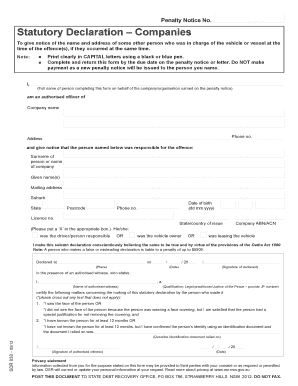
Penalty Notice No. Statutory Declaration Companies To give notice of the name and address of some other person who was in charge of the vehicle or vessel at the time of the offence(s), if they occurred.

How it works

  1. Open form

    Open form follow the instructions

  2. Easily sign form

    Easily sign the form with your finger

  3. Share form

    Send filled & signed form or save

How to fill out the Nsw Statutory Declaration online

The Nsw Statutory Declaration is a crucial document for notifying the relevant authorities about the responsibility for a penalty notice. This guide provides straightforward, step-by-step instructions to assist you in completing the form accurately online.

Follow the steps to complete the Nsw Statutory Declaration.

  1. Click ‘Get Form’ button to obtain the form and open it in the editor.
  2. Begin by clearly printing your full name in CAPITAL letters at the top of the form. This is the name of the person completing the declaration on behalf of the company or organisation named on the penalty notice.
  3. Next, indicate the company name and provide a contact phone number. Follow this by entering the company address.
  4. In this section, you will need to specify the individual or company responsible for the offence. Fill in the surname and given names of the responsible person or the name of the company, along with their mailing address, suburb, state, date of birth, and postcode.
  5. Provide the phone number and licence number of the responsible person in the designated fields.
  6. Mark the applicable box to indicate whether the responsible party was the driver or the vehicle owner or if they were leasing the vehicle.
  7. You must now make the declaration, stating that you believe the information provided is true. Today's date and the location where the declaration is made should be filled in.
  8. The form requires your signature at the bottom to validate the declaration. Ensure the signature is affixed in the presence of an authorised witness.
  9. The authorised witness will need to provide their name, qualification, and signature. They should also confirm how they identified you, including any identification document relied on.
  10. Finally, review the completed form for accuracy. You can then save your changes, download the form, or print it for submission.

Complete your Nsw Statutory Declaration online today.

Get form

Experience a faster way to fill out and sign forms on the web. Access the most extensive library of templates available.
Get form

Related content

Form
* As the services of a qualified witness cannot be provided at lodgment, the declaration...
Learn more
A handbook for Justices of the Peace in New South...
This handbook serves as a comprehensive guide for Justices of the Peace (JPs) in New South...
Learn more
Important Safety and Product Information
Hereby, Garmin declares that this product is in compliance with the relevant statutory...
Learn more

Related links form

Georgia Fillable Tax Forms Patient Registration Form Residential Lease - Goldberg Group Property Management LLC Ss 4245

Questions & Answers

Get answers to your most pressing questions about US Legal Forms API.

Contact support

A completed statutory declaration form includes all essential information about the declarant, the facts being attested, and the signature of the declarant along with the witnessing signature. In the case of a NSW Statutory Declaration, it's vital to follow the prescribed format to ensure its acceptance in legal contexts. If you need help creating this form, platforms like uslegalforms can provide effective solutions.

For partner visa applicants in Australia, a statutory declaration serves as a crucial document that states the nature of the relationship. This declaration helps prove the authenticity of your partnership, addressing aspects like shared responsibilities and cohabitation. Utilizing a NSW Statutory Declaration can greatly support your visa application process by providing substantial evidence.

Yes, a NSW statutory declaration can indeed be witnessed electronically, as long as the procedures outlined in the Electronic Witnessing Act NSW are followed. This allows for flexibility, enabling individuals to engage witnesses remotely, which can be particularly helpful in the current climate. Services like uslegalforms can assist you in navigating this process efficiently.

The Electronic Witnessing Act NSW allows for legal documents, including statutory declarations, to be witnessed using electronic methods. This act was introduced to accommodate changing technologies and improve accessibility. It is crucial to follow the guidelines of this act to ensure that your NSW statutory declaration is valid and enforceable.

Yes, electronic witnessing is permissible under certain conditions in NSW. The witness must be present through audio-visual means during the signing. This option enhances accessibility and allows you to complete your statutory declaration conveniently, especially with tools provided by uslegalforms that facilitate electronic witnessing.

To complete a statutory declaration in NSW, start by drafting the declaration, including your personal information and the facts you wish to declare. Next, have it witnessed by an authorized individual, ensuring both of you sign the document. Once signed, you can submit the statutory declaration as needed, and platforms like uslegalforms can provide assistance in the process.

Yes, NSW statutory declarations can be signed electronically, given that they comply with the relevant legal requirements. Electronic signatures hold the same legal weight as traditional signatures when the Electronic Transactions Act is observed. It is advisable to use recognized platforms, like uslegalforms, to ensure compliance and proper handling throughout the process.

A statutory declaration of change of name is a legal document that allows an individual to formally announce their change of name. This declaration is particularly important in NSW, as it serves to provide official recognition of the name change for legal purposes. Using platforms like USLegalForms can help simplify the process of creating this document and ensuring compliance with legal standards.

A statutory declaration is a written statement that an individual declares to be true, made in the presence of an authorized witness. This document is recognized as legally binding in NSW and is used in various contexts, such as legal proceedings or governmental applications. The significance of a statutory declaration lies in its ability to verify the truthfulness of the content presented.

A declaration form serves the purpose of providing a formal way to assert facts or intentions. In the context of a NSW statutory declaration, the form is used to create verified statements for legal proceedings or official requirements. By utilizing a declaration form, individuals can provide clear evidence while adhering to legal standards.

Get This Form Now!

Use professional pre-built templates to fill in and sign documents online faster. Get access to thousands of forms.
Get form
If you believe that this page should be taken down, please follow our DMCA take down processhere.

Industry-leading security and compliance

US Legal Forms protects your data by complying with industry-specific security standards.
  • In businnes since 1997
    25+ years providing professional legal documents.
  • Accredited business
    Guarantees that a business meets BBB accreditation standards in the US and Canada.
  • Secured by Braintree
    Validated Level 1 PCI DSS compliant payment gateway that accepts most major credit and debit card brands from across the globe.
Get Nsw Statutory Declaration
Get form
  • Adoption
  • Bankruptcy
  • Contractors
  • Divorce
  • Home Sales
  • Employment
  • Identity Theft
  • Incorporation
  • Landlord Tenant
  • Living Trust
  • Name Change
  • Personal Planning
  • Small Business
  • Wills & Estates
  • Packages A-Z
  • Affidavits
  • Bankruptcy
  • Bill of Sale
  • Corporate - LLC
  • Divorce
  • Employment
  • Identity Theft
  • Internet Technology
  • Landlord Tenant
  • Living Wills
  • Name Change
  • Power of Attorney
  • Real Estate
  • Small Estates
  • Wills
  • All Forms
  • Forms A-Z
  • Form Library
  • Legal Hub
  • About Us
  • Help Portal
  • Legal Resources
  • Blog
  • Affiliates
  • Contact Us
  • Delete My Account
  • Site Map
  • Industries
  • Forms in Spanish
  • Localized Forms
  • State-specific Forms
  • Forms Kit
  • Real Estate Handbook
  • All Guides
  • Notarize
  • Incorporation services
  • For Consumers
  • For Small Business
  • For Attorneys
  • USLegal
  • FormsPass
  • pdfFiller
  • signNow
  • altaFlow
  • DocHub
  • Instapage
Form Packages
  • Adoption
  • Bankruptcy
  • Contractors
  • Divorce
  • Home Sales
  • Employment
  • Identity Theft
  • Incorporation
  • Landlord Tenant
  • Living Trust
  • Name Change
  • Personal Planning
  • Small Business
  • Wills & Estates
  • Packages A-Z
Form Categories
  • Affidavits
  • Bankruptcy
  • Bill of Sale
  • Corporate - LLC
  • Divorce
  • Employment
  • Identity Theft
  • Internet Technology
  • Landlord Tenant
  • Living Wills
  • Name Change
  • Power of Attorney
  • Real Estate
  • Small Estates
  • Wills
  • All Forms
  • Forms A-Z
  • Form Library
Customer Service
  • Legal Hub
  • About Us
  • Help Portal
  • Legal Resources
  • Blog
  • Affiliates
  • Contact Us
  • Delete My Account
  • Site Map
  • Industries
  • Forms in Spanish
  • Localized Forms
  • State-specific Forms
  • Forms Kit
Legal Guides
  • Real Estate Handbook
  • All Guides
Prepared for you
  • Notarize
  • Incorporation services
Our Customers
  • For Consumers
  • For Small Business
  • For Attorneys
Our Sites
  • USLegal
  • FormsPass
  • pdfFiller
  • signNow
  • altaFlow
  • DocHub
  • Instapage
Social Media
Call us now toll free:
+1 833 426 79 33
As seen in:
© Copyright 1999-2026 airSlate Legal Forms, Inc. 3720 Flowood Dr, Flowood, Mississippi 39232
  • Your Privacy Choices
  • Terms of Service
  • Privacy Notice
  • Content Takedown Policy
  • Bug Bounty Program