Loading
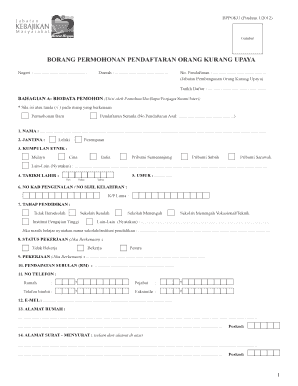
Get Borang Permohonan Pendaftaran Orang Kurang Upaya 2020-2025
How it works
-

Open form follow the instructions
-

Easily sign the form with your finger
-

Send filled & signed form or save
How to fill out the Borang Permohonan Pendaftaran Orang Kurang Upaya online
This guide provides comprehensive instructions on how to complete the Borang Permohonan Pendaftaran Orang Kurang Upaya online. Whether you are a first-time applicant or seeking to renew your registration, this step-by-step process will assist you in accurately filling out the required form.
Follow the steps to successfully complete your application.
- Click ‘Get Form’ button to obtain the form and open it in the editor.
- Fill out the 'BAHAGIAN A: BIODATA PEMOHON' section. This includes entering your personal information such as name, gender, ethnic group, date of birth, age, identification number, education level, employment status, income, contact information, and address. Ensure to mark 'Permohonan Baru' or 'Pendaftaran Semula' as applicable.
- Complete the 'MAKLUMAT IBU/BAPA/PENJAGA/SUAMI/ISTERI' section, providing the relevant details for the guardian or spouse, including name, relationship, nationality, and contact information.
- In 'BAHAGIAN B: KEIZINAN MENGELUARKAN MAKLUMAT PERUBATAN', indicate your consent for medical information to be shared with the relevant authorities. This section requires your signature and date.
- Navigate to 'BAHAGIAN C: PENGESAHAN PERMOHONAN PENDAFTARAN' and determine if a medical officer’s verification is necessary based on the severity of the disability.
- Complete 'BAHAGIAN D: MAKLUMAT BERKAITAN PENYAKIT' where a medical professional will document any relevant medical diagnosis.
- In 'BAHAGIAN E: MAKLUMAT BERKENAAN KETIDAKUPAYAAN', select the type of disability that applies and provide detailed information as directed.
- Fill in sections 'BAHAGIAN F', 'BAHAGIAN G', 'BAHAGIAN H', 'BAHAGIAN I', and 'BAHAGIAN J', ensuring all disability classifications and levels of functional capability are accurately completed by a medical professional.
- Add any proposed assistive measures or educational placements in 'BAHAGIAN K' and 'BAHAGIAN L' as determined by the medical assessment.
- Ensure all sections are completed, and any required medical signatures are obtained. Finally, save your changes, download the completed form, and retain copies for your records and any necessary submittals.
Complete your documents online today to ensure a smooth application process.
Industry-leading security and compliance
US Legal Forms protects your data by complying with industry-specific security standards.
-
In businnes since 199725+ years providing professional legal documents.
-
Accredited businessGuarantees that a business meets BBB accreditation standards in the US and Canada.
-
Secured by BraintreeValidated Level 1 PCI DSS compliant payment gateway that accepts most major credit and debit card brands from across the globe.