Loading
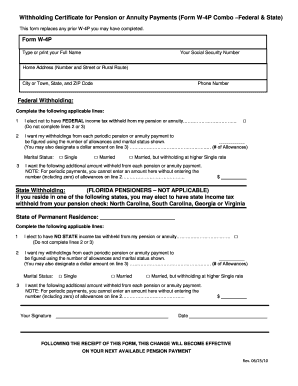
Get Form W4p South Carolina
How it works
-

Open form follow the instructions
-

Easily sign the form with your finger
-

Send filled & signed form or save
How to fill out the Form W4p South Carolina online
Filling out the Form W4p is essential for managing your federal and state tax withholding on pension and annuity payments. This guide provides clear, step-by-step instructions to help you complete the form online effectively.
Follow the steps to fill out the Form W4p online.
- Click ‘Get Form’ button to obtain the form and open it in the editor.
- Type or print your full name in the designated field at the top of the form.
- For federal withholding, choose one option from the federal withholding section. Select line 1 if you prefer not to have federal income tax withheld. If you want withholdings based on allowances, complete line 2 by entering the number of allowances, and indicate your marital status on line 3.
- In the state withholding section (if applicable), identify your state of permanent residence and choose your preference for state tax withholding.
- Sign and date the form to authenticate your choices.
Start filling out your Form W4p online today to manage your tax withholdings effectively.
To obtain a 1099-G form in South Carolina, you can visit the South Carolina Department of Revenue's website. They provide access to electronic copies of your 1099-G form once you verify your identity. This form is essential for reporting income, especially when reviewing your tax obligations alongside your Form W4p South Carolina.