Open form follow the instructions
Easily sign the form with your finger
Send filled & signed form or save
How to fill out the Third Party Request For Personal Claims History Information online
This guide provides a straightforward approach to completing the Third Party Request For Personal Claims History Information. By following the outlined steps, users can ensure that their requests are processed efficiently and accurately.
Follow the steps to complete your request successfully.
- Press the ‘Get Form’ button to access the document and open it in an online form editor.
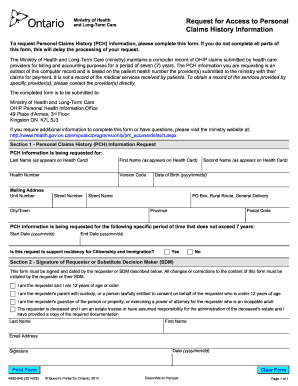
- In Section 1, enter the personal claims history (PCH) information. Begin by providing your last name, first name, and health number as they appear on your health card. Include the version code and your mailing address, ensuring accuracy in the unit number, street number, street name, city/town, province, and postal code.
- Next, in the same section, indicate your date of birth following the format yyyy/mm/dd. If applicable, add a second name as it appears on your health card. This is particularly important for accurate identification.
- Specify the time period for the PCH information you are requesting. Enter the start and end dates, ensuring they do not exceed the past seven years.
- Indicate if this request supports residency for Citizenship and Immigration by selecting 'Yes' or 'No.' This step is important for the processing of your request.
- Move to Section 2, where you must provide your signature or that of a substitute decision maker (SDM). Select the appropriate description of your relationship to the requester. Fill in your last name, first name, email address, and the date using the format yyyy/mm/dd. Finally, sign the document to validate your request.
- After thoroughly reviewing the completed form for accuracy, you can save your changes, download, print, or share the form as needed.
Complete your document requests online today to ensure timely processing.
Experience a faster way to fill out and sign forms on the web. Access the most extensive library of templates available.
Related content
May 30, 2025 — The Privacy Rule provides individuals with a legal, enforceable right to...
Follow the steps to request a certificate of insurance: Download and complete the form...
Aug 9, 2018 — Claims must be submitted within 90 days of service, 60 days for errors, 30...
Get answers to your most pressing questions about US Legal Forms API.
What type of information is required to file for third-party claims?
To file for third-party claims, include the names and contact details of all parties involved, incident reports, and documentation of any damages. Accurate information not only assists in the filing process but also supports your Third Party Request For Personal Claims History Information. Utilizing resources like uslegalforms can enhance your filing accuracy.
How do you do a third-party claim?
To initiate a third-party claim, begin by contacting your insurance company or the entity responsible for coverage. Next, submit all necessary information and documents related to the incident. Using a clear framework helps ensure your Third Party Request For Personal Claims History Information is respected throughout the process.
What information is needed to complete a third-party claim?
When completing a third-party claim, you need to provide details about the incident, the parties involved, and any incurred damages. Additionally, supporting documentation such as photos, medical records, and reports can strengthen your case. This comprehensive approach ensures your Third Party Request For Personal Claims History Information is accurate and complete.
What information do I need to make a claim?
To make a claim, you should gather essential details such as your personal information, policy number, and the specifics of the incident. It’s important to also include any relevant documents or evidence related to your claim. By having this information on hand, you can streamline your Third Party Request For Personal Claims History Information process.
How long does it take for Ontario health card to be mailed?
Cost and delivery. Renewing an Ontario health card is free. The renewed card will be mailed to you in approximately 4 to 6 weeks.
How do I check the status of my health card in Ontario?
You can check whether your card is valid by calling ServiceOntario at 1-866-532-3161. If it is no longer valid, you will need to update your health card registration by visiting a ServiceOntario centre.
Have not received my Ontario health Card?
Renewals: If you have not received or have misplaced your renewal form, you may go in person to your nearest ServiceOntario centre, or download the health card renewal application from ServiceOntario's website.
How can I access my medical records in Ontario?
How do I access my health records? Contact the custodian of your health records, such as a doctor, clinic or hospital, to request access. The custodian might ask you to make a formal request, in writing. You can write a letter or use this Request to Access Personal Health Information Form.
Who is eligible for health card in Ontario?
To be eligible for OHIP you must: Be a Canadian citizen or have immigration status as set out in Ontario's Health Insurance Act. Have your permanent and main home in Ontario. Be physically present in Ontario for 153 days in any 12-month period.
Can you get your Ontario health Card online?
You must apply for OHIP in person at a ServiceOntario centre.
Use professional pre-built templates to fill in and sign documents online faster. Get access to thousands of forms.
If you believe that this page should be taken down, please follow our DMCA take down process here.