Loading
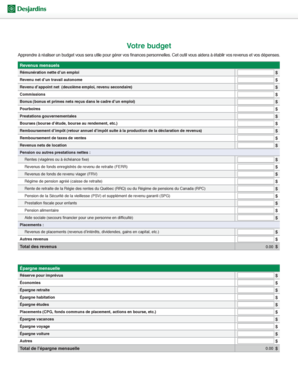
Get Budget Desjardins 2020-2026
How it works
-

Open form follow the instructions
-

Easily sign the form with your finger
-

Send filled & signed form or save
How to use or fill out the Budget Desjardins online
Filling out the Budget Desjardins form online can assist you in understanding and managing your personal finances effectively. This guide provides detailed, step-by-step instructions tailored to your needs, ensuring you can confidently complete the form.
Follow the steps to fill out the Budget Desjardins form online.
- Press the ‘Get Form’ button to access the Budget Desjardins document and open it for editing.
- Begin by entering your monthly income details. This includes your net pay from employment, self-employment income, tips, bonuses, and any government benefits. Ensure that each income source is accurately represented.
- Next, input any pension or other net benefits, detailing pensions from various sources, retirement funds, and social security benefits.
- Compile your total income by adding all the entries from your income sections. Make sure every source is accounted for to represent a comprehensive overview of your financial situation.
- Proceed to the savings section. Outline your monthly savings, including unexpected expenses reserves and other savings goals such as retirement, housing, education, travel, and others.
- Now, move to the expenses section, starting with housing costs. Include rent or mortgage payments, taxes, utilities, and any related home expenses.
- Fill in your personal insurance expenses, including life, disability, and health insurance.
- Document your transportation expenses next, detailing car payments, public transport costs, gas, maintenance, and insurance.
- Subsequently, account for your telecommunications expenses, including phone services, internet, and cable.
- Record your food expenses, which should encompass groceries and dining out.
- Then, enter your health-related expenses, covering medical and pharmacy costs.
- List leisure and education expenses such as tuition, sports, hobbies, and subscription services.
- Add your debt repayments, including any credit card, personal, and student loans.
- Include any additional expenses, from clothing to personal care, ensuring you account for all regular outflows.
- Calculate your total monthly expenses by summing all the categories listed.
- Finally, review the budget summary, ensuring your total income exceeds your total expenses. If you have a surplus, consider investing it for future growth.
- After completing the form, save your changes, download the document, print a copy, or share it as needed.
Take control of your finances by completing the Budget Desjardins document online today!
Related links form
Creating a budget file using Budget Desjardins is a practical way to keep your finances organized. You can start by selecting a digital format that suits you, like a spreadsheet or document template. Input your income and expenses in separate sections for better visibility. Regularly update this file to reflect changes in your financial situation, ensuring you stay informed and in control.