Loading
Form preview
  • US Legal Forms
  • Other Templates
  • More Forms
  • More Uncategorized Forms
  • Coaguchek Physician Order Form

Get Coaguchek Physician Order Form

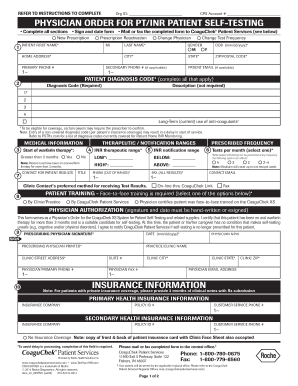
REFER TO INCLUDED INSTRUCTION SHEET TO COMPLETE CPS Account # PHYSICIAN ORDER FOR PT/INR PATIENT SELF-TESTING Complete all sections? Sign and date form? Mail or fax the completed form to CoaguChek.

How it works

  1. Open form

    Open form follow the instructions

  2. Easily sign form

    Easily sign the form with your finger

  3. Share form

    Send filled & signed form or save

How to fill out the Coaguchek Physician Order Form online

Filling out the Coaguchek Physician Order Form online is an essential process for facilitating patient self-testing for PT/INR. This comprehensive guide provides clear instructions on how to complete each section of the form effectively.

Follow the steps to complete the Coaguchek Physician Order Form online.

  1. Press the ‘Get Form’ button to retrieve the Coaguchek Physician Order Form and open it in your preferred editor.
  2. Complete the patient information section by entering the patient's first and last name, gender, home address, primary and secondary phone numbers, date of birth, and email address if available. Ensure all mandatory fields are filled out.
  3. In the patient diagnosis code section, input all applicable diagnosis codes from the provided list. This is crucial as inaccurate entries could lead to processing delays.
  4. Fill in the medical information section by specifying the therapeutic and notification ranges for INR testing. Indicate whether the patient has been on therapy for more than three months by selecting yes or no.
  5. Indicate the contact person for receiving patient results, including their title, phone number, fax number, and email address. Choose the preferred method for receiving test results.
  6. Select the prescribed frequency for INR tests, noting that Medicare covers up to one home INR test per week.
  7. In the patient training section, select the training option that applies, confirming that face-to-face training has been completed.
  8. In the physician authorization section, ensure that the prescribing physician signs and dates the form, and fills in their printed name and contact information.
  9. Complete the insurance information section. Provide details of the primary and secondary health insurance companies, policy IDs, and customer service phone numbers if applicable.
  10. Finally, review all sections for accuracy, ensuring that all required fields are completed. Save the changes, download, print, or share the completed form as necessary.

Complete your documents online for seamless processing.

Get form

Experience a faster way to fill out and sign forms on the web. Access the most extensive library of templates available.
Get form

Related content

Home PT/INR Monitoring (G0249) Billing and Coding
This NCD provides coverage for home testing of the PT/INR for those beneficiaries who meet...
Learn more
CoaguChek XS PT/INR Strips Update
Complete the Henry Schein Important Product Notification Response Form and return as...
Learn more

Related links form

Dfeh Complaint Form Mi Giv Uia Suntrust Hsa Vtr 265 S

Questions & Answers

Get answers to your most pressing questions about US Legal Forms API.

Contact support

The PT INR test, often performed using CoaguChek, is indeed considered a CLIA-waived test. This allows healthcare professionals to administer the test swiftly and efficiently in various clinical situations. Leveraging the Coaguchek Physician Order Form can streamline this process, ensuring that the test is performed correctly while promoting patient safety and rapid results.

Yes, weekly quality control (QC) testing is recommended for CoaguChek to ensure accurate results. Routine QC helps maintain the reliability of the testing process, which is crucial for patient safety. By including QC protocols in your Coaguchek Physician Order Form procedures, you can provide a higher standard of care. This practice aids in avoiding inaccurate measurements and potential health risks.

CoaguChek testing is typically covered by Medicare, particularly for patients diagnosed with conditions requiring monitoring of anticoagulation therapy. To process claims successfully, you must have the Coaguchek Physician Order Form signed by a physician. This documentation helps validate the necessity for the test, alleviating potential billing challenges and ensuring patient access to needed care.

Indeed, CoaguChek qualifies as a waived test under the Clinical Laboratory Improvement Amendments. This designation indicates that the test is simple to perform and poses a low risk for erroneous results. When you fill out the Coaguchek Physician Order Form, you affirm the ease of use and accessibility of the test, enhancing patient care in a variety of clinical environments.

Yes, CoaguChek is a CLIA-waived test, making it suitable for use in various settings without extensive laboratory requirements. This simplifies the testing process, allowing healthcare providers to conduct tests right in their office or clinic. By using the Coaguchek Physician Order Form, you can ensure compliance and facilitate easier access to testing. This is beneficial for both providers and patients.

The CPT code for CoaguChek is 85610, which you can use for billing purposes. This code specifically refers to prothrombin time tests that measure how long it takes for blood to clot. When utilizing the Coaguchek Physician Order Form, be sure to include this information for accurate processing. Keeping track of CPT codes can streamline your billing practices.

The CoaguChek XS PT test strips provide test results if the INR value is 0.8 and 8.0. If the result falls outside of this range, the meter displays < (less than) 0.8 or > (greater than) 8.0.

Coaguchek Xs System is a non-prescription medical device, so it is not covered as a prescription drug.

The PT/INR test performed with the CoaguChek XS System for Professional Use by CLIA-waived and non-waived laboratories is billed under CPT code 85610 with or without the QW modifier, as explained below.

For more information call CoaguChek Patient Services at 1-800-780-0675.

Get This Form Now!

Use professional pre-built templates to fill in and sign documents online faster. Get access to thousands of forms.
Get form
If you believe that this page should be taken down, please follow our DMCA take down processhere.
Get Coaguchek Physician Order Form
Get form
  • Adoption
  • Bankruptcy
  • Contractors
  • Divorce
  • Home Sales
  • Employment
  • Identity Theft
  • Incorporation
  • Landlord Tenant
  • Living Trust
  • Name Change
  • Personal Planning
  • Small Business
  • Wills & Estates
  • Packages A-Z
  • Affidavits
  • Bankruptcy
  • Bill of Sale
  • Corporate - LLC
  • Divorce
  • Employment
  • Identity Theft
  • Internet Technology
  • Landlord Tenant
  • Living Wills
  • Name Change
  • Power of Attorney
  • Real Estate
  • Small Estates
  • Wills
  • All Forms
  • Forms A-Z
  • Other Templates
  • Legal Hub
  • About Us
  • Help Portal
  • Legal Resources
  • Blog
  • Affiliates
  • Contact Us
  • Delete My Account
  • Site Map
  • Industries
  • Forms in Spanish
  • Localized Forms
  • State-specific Forms
  • Forms Kit
  • Real Estate Handbook
  • All Guides
  • Notarize
  • Incorporation services
  • For Consumers
  • For Small Business
  • For Attorneys
  • USLegal
  • FormsPass
  • pdfFiller
  • signNow
  • altaFlow
  • DocHub
  • Instapage
Form Packages
  • Adoption
  • Bankruptcy
  • Contractors
  • Divorce
  • Home Sales
  • Employment
  • Identity Theft
  • Incorporation
  • Landlord Tenant
  • Living Trust
  • Name Change
  • Personal Planning
  • Small Business
  • Wills & Estates
  • Packages A-Z
Form Categories
  • Affidavits
  • Bankruptcy
  • Bill of Sale
  • Corporate - LLC
  • Divorce
  • Employment
  • Identity Theft
  • Internet Technology
  • Landlord Tenant
  • Living Wills
  • Name Change
  • Power of Attorney
  • Real Estate
  • Small Estates
  • Wills
  • All Forms
  • Forms A-Z
  • Other Templates
Customer Service
  • Legal Hub
  • About Us
  • Help Portal
  • Legal Resources
  • Blog
  • Affiliates
  • Contact Us
  • Delete My Account
  • Site Map
  • Industries
  • Forms in Spanish
  • Localized Forms
  • State-specific Forms
  • Forms Kit
Legal Guides
  • Real Estate Handbook
  • All Guides
Prepared for you
  • Notarize
  • Incorporation services
Our Customers
  • For Consumers
  • For Small Business
  • For Attorneys
Our Sites
  • USLegal
  • FormsPass
  • pdfFiller
  • signNow
  • altaFlow
  • DocHub
  • Instapage
Social Media
Call us now toll free:
+1 833 426 79 33
As seen in:
© Copyright 1999-2026 airSlate Legal Forms, Inc. 17 Station Street, Suite 303, Brookline, MA 02445
  • Your Privacy Choices
  • Terms of Service
  • Privacy Notice
  • Content Takedown Policy
  • Bug Bounty Program