Loading
Get Medical Illness Certificate
How it works
-

Open form follow the instructions
-

Easily sign the form with your finger
-

Send filled & signed form or save
How to fill out the Medical Illness Certificate online
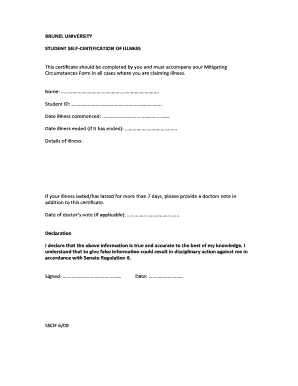
This guide provides clear and concise instructions on how to complete the Medical Illness Certificate online. This essential document is required to support your Mitigating Circumstances Form when claiming illness.
Follow the steps to complete your Medical Illness Certificate online.
- Click ‘Get Form’ button to access the Medical Illness Certificate and open it in a suitable editor.
- Enter your full name in the designated field. Ensure that you provide your legal name as it appears in your student records.
- Input your student ID number accurately. This information helps to identify your records within the university system.
- Specify the date when your illness began. Use the format requested to maintain clarity.
- If your illness has ended, include the date it ceased. If it is ongoing, you can leave this field blank.
- In the details of illness section, briefly describe your illness, providing as much relevant information as possible.
- If your illness lasted more than 7 days, remember to indicate that you will attach a doctor's note to your submission and enter the date of the note if applicable.
- Read and understand the declaration regarding the accuracy of the information provided.
- Sign the form using your full name and date it to validate the entries made.
- Once all fields are complete, save your changes, then download, print, or share the completed form as needed.
Complete your Medical Illness Certificate online today for a seamless submission.
To craft a medical case report example, start with a brief introduction of the patient’s background and medical history. Present the case clearly, detailing symptoms, diagnostics, and treatment outcomes. Referencing existing Medical Illness Certificates can provide a framework to follow, ensuring your report is organized and professional.