Loading
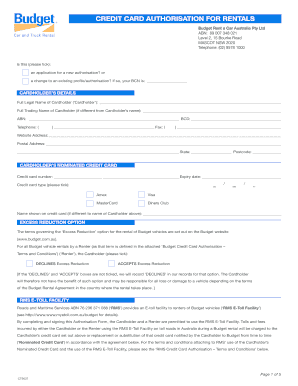
Get Credit Card Authorisation Form - Budget Rent A Car
How it works
-

Open form follow the instructions
-

Easily sign the form with your finger
-

Send filled & signed form or save
How to fill out the Credit Card Authorisation Form - Budget Rent A Car online
Completing the Credit Card Authorisation Form for Budget Rent A Car is a straightforward process. This guide will walk you through each section of the form, ensuring that you provide all the necessary information accurately and efficiently.
Follow the steps to successfully complete the form online.
- Click ‘Get Form’ button to obtain the form and open it in the editor.
- Begin with the 'Is this' section, where you need to indicate if this is a new authorisation or a change to an existing profile. Tick the appropriate box and, if applicable, enter your Budget Customer Number (BCN).
- Fill in the 'Cardholder’s Details' section. Include the full legal name of the cardholder, any different trading name, ABN, preferred contact numbers, fax number, website address, and the postal address including state and postcode.
- In 'Cardholder’s Nominated Credit Card', input the credit card number and select the card type (Diners Club, Amex, Visa, MasterCard) while also specifying the expiry date. If the name on the card differs from the cardholder's name, include it here.
- In the 'Excess Reduction Option' section, indicate whether you accept or decline the Excess Reduction. It is crucial to tick one of the boxes to ensure accurate processing.
- Review the 'RMS E-Toll Facility' terms and confirm that acceptance of charges incurred through this facility during the rental period is acknowledged by signing and dating the form.
- At the bottom of the form, sign to confirm that you have the authority to bind the cardholder, fill in your name and title, then date the document.
- After filling out the form, you can save your changes, download, print, or share the completed form as required.
Complete your Credit Card Authorisation Form online today for a smooth rental experience with Budget Rent A Car.
To claim credit card rental car insurance, you typically need to follow your credit card provider's specific process. Gather necessary documents, such as the rental agreement and accident report. Providing this documentation alongside the Credit Card Authorisation Form - Budget Rent A Car may facilitate the claims process and ensure you receive the benefits of your coverage.