We use cookies to improve security, personalize the user experience, enhance our marketing activities (including cooperating with our marketing partners) and for other business use.
Click "here" to read our Cookie Policy. By clicking "Accept" you agree to the use of cookies. Read less
Read more
Accept
Loading
Form preview
  • US Legal Forms
  • Form Library
  • More Forms
  • More Uncategorized Forms
  • Lesson Plan Template - Tpr - Teaching Performance

Get Lesson Plan Template - Tpr - Teaching Performance

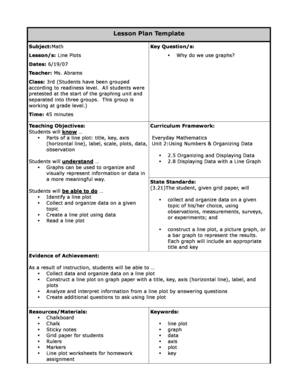
Lesson Plan Template Subject:Math Key Question/s: Lesson/s: Line Plots Why do we use graphs? Dates: 6/19/07 Teacher: Ms. Abrams Class: 3rd (Students have been grouped according to readiness level.

How it works

  1. Open form

    Open form follow the instructions

  2. Easily sign form

    Easily sign the form with your finger

  3. Share form

    Send filled & signed form or save

How to fill out the Lesson Plan Template - TPR - Teaching Performance online

Filling out the Lesson Plan Template - TPR - Teaching Performance is essential for educators aiming to structure their lessons effectively. This guide will provide you with a clear, step-by-step approach to complete the template online, helping you ensure all necessary components are included for a successful teaching experience.

Follow the steps to fill out the Lesson Plan Template smoothly.

  1. Click the ‘Get Form’ button to retrieve the Lesson Plan Template - TPR - Teaching Performance and open it for editing.
  2. Begin by filling in the subject section at the top of the template. Specify the subject of your lesson, such as 'Math', to provide clarity on the topic being covered.
  3. In the 'Key Questions' field, list relevant questions that will guide your lesson. For example, you might include questions like, 'Why do we use graphs?' to engage students.
  4. Under 'Lessons', state the specific lesson topics, such as 'Line Plots', that you will be teaching. This helps to delineate what students will focus on during the lesson.
  5. Fill in the date of the lesson, the teacher's name, and the class information. For instance, you could enter '6/19/07', 'Ms. Abrams', and '3rd' to identify the lesson details.
  6. Allocate time for the lesson within the designated field. Specify the duration, such as '45 minutes', ensuring that you have planned enough time for each segment of your lesson.
  7. Define your teaching objectives and curriculum framework. Write down what students will know and understand by the end of the lesson. Include important standards that relate to your subject area.
  8. List the evidence of achievement. Describe the skills students will demonstrate upon successful completion of the lesson. For example, they might be able to construct a line plot correctly.
  9. Identify the resources and materials that will be necessary for the lesson. Specify items such as 'chalkboard', 'grid paper', 'rulers', or any other materials needed to facilitate the lesson.
  10. After filling in all sections, review your entries for accuracy. Once satisfied, you can save your changes, download, print, or share the completed lesson plan template.

Complete your Lesson Plan Template - TPR - Teaching Performance online today to enhance your teaching effectiveness.

Get form

Experience a faster way to fill out and sign forms on the web. Access the most extensive library of templates available.
Get form

Related content

ED 393 324 ABSTRACT a sample lesson plan that...
by IS Carolina · 1994 — An effective approach to language teaching organizes...
Learn more
2015 TEACHER Program Curriculum Template
Jul 24, 2015 — Planning. (P6) I use the backward design process to plan lessons that...
Learn more
1502219_APL_Reference_May83.pdf
APL is a general-purpose language that can be used in many applications, such as...
Learn more

Related links form

17a Inschrijving Print Wis Clear Ontbinding Vennootschap, Rechtspersoon Of Maatschap Waarom Dit Cipet Haldia Sc St Job Training Of W B E-Verify - Employer Wizard - Company Information - Collier County Download Presentation - MISHRM Conference - Mishrmconference

Questions & Answers

Get answers to your most pressing questions about US Legal Forms API.

Contact support

To create a project-based lesson plan, start by selecting a real-world problem or question that requires student investigation. Align this project with learning objectives and use the Lesson Plan Template - TPR - Teaching Performance to outline key components, including project tasks, timelines, and evaluation methods. Emphasize collaboration and critical thinking while guiding students through their projects to ensure a meaningful learning experience.

To make a DLP lesson plan, first identify specific learning goals for the lesson. Use the Lesson Plan Template - TPR - Teaching Performance to organize your plan, detailing materials, teaching methods, and assessments. Include a reflection section to analyze the lesson's effectiveness after teaching. This structured approach helps ensure you meet your students’ needs effectively.

To create a demo lesson plan, begin with a clear objective that illustrates what you want the audience to learn. Use the Lesson Plan Template - TPR - Teaching Performance to outline the structure, including introduction, activities, and assessment. Be sure to include interactive components that engage your audience. This ensures that your demonstration showcases effective teaching practices.

A Daily Lesson Plan (DLP) is a structured outline that educators use to map out a specific lesson for a single day. It includes objectives, necessary materials, and the instructional process. Utilizing the Lesson Plan Template - TPR - Teaching Performance within this framework can enhance teaching effectiveness and student learning. A well-crafted DLP keeps both teachers and students on track throughout the day.

The five parts of a DLP, or Daily Lesson Plan, include objectives, materials, procedure, assessment, and reflection. Start with defining what students should accomplish by the lesson's end. Then, list all materials needed to facilitate the learning process. Follow this with a step-by-step procedure that outlines how you will deliver the lesson, incorporating the Lesson Plan Template - TPR - Teaching Performance for clarity.

To create a lesson plan using brisk teaching, begin by defining clear learning objectives. Next, structure the lesson with a robust introduction, engaging activities, and a concise conclusion. Incorporate the Lesson Plan Template - TPR - Teaching Performance for effective pacing and student engagement. This approach ensures that learners stay focused and retain information.

To write teacher activity in a lesson plan, clearly articulate what the teacher will do during the lesson. Use a Lesson Plan Template - TPR - Teaching Performance to outline the key actions, such as instructions given, questions posed, and feedback provided. Be specific about timing and methods used to engage students. A clear teacher activity section helps keep the lesson on track.

Writing a teaching activity involves defining its purpose, expected outcomes, and procedures. In a Lesson Plan Template - TPR - Teaching Performance, detail how the activity aligns with learning objectives and how students will participate. Include materials needed and steps to guide students through the activity. A well-thought-out teaching activity enhances the overall learning experience.

An example of TPR could be a lesson where students follow commands like 'jump' or 'spin' while learning new vocabulary. By using a Lesson Plan Template - TPR - Teaching Performance, teachers can structure such activities to integrate language with movement. This method helps students associate actions with words, enhancing their understanding and retention. TPR activities can be both fun and educational.

A performance objective specifies what a student should be able to do after a lesson. For instance, in a lesson plan using a Lesson Plan Template - TPR - Teaching Performance, an objective could state that students will demonstrate understanding of new vocabulary by acting it out. These objectives guide both teaching and assessment. Clear goals help ensure that students achieve desired learning outcomes.

Get This Form Now!

Use professional pre-built templates to fill in and sign documents online faster. Get access to thousands of forms.
Get form
If you believe that this page should be taken down, please follow our DMCA take down processhere.

Industry-leading security and compliance

US Legal Forms protects your data by complying with industry-specific security standards.
  • In businnes since 1997
    25+ years providing professional legal documents.
  • Accredited business
    Guarantees that a business meets BBB accreditation standards in the US and Canada.
  • Secured by Braintree
    Validated Level 1 PCI DSS compliant payment gateway that accepts most major credit and debit card brands from across the globe.
Get Lesson Plan Template - TPR - Teaching Performance
Get form
Form Packages
Adoption
Bankruptcy
Contractors
Divorce
Home Sales
Employment
Identity Theft
Incorporation
Landlord Tenant
Living Trust
Name Change
Personal Planning
Small Business
Wills & Estates
Packages A-Z
Form Categories
Affidavits
Bankruptcy
Bill of Sale
Corporate - LLC
Divorce
Employment
Identity Theft
Internet Technology
Landlord Tenant
Living Wills
Name Change
Power of Attorney
Real Estate
Small Estates
Wills
All Forms
Forms A-Z
Form Library
Customer Service
Terms of Service
Privacy Notice
Legal Hub
Content Takedown Policy
Bug Bounty Program
About Us
Blog
Affiliates
Contact Us
Delete My Account
Site Map
Industries
Forms in Spanish
Localized Forms
State-specific Forms
Forms Kit
Legal Guides
Real Estate Handbook
All Guides
Prepared for You
Notarize
Incorporation services
Our Customers
For Consumers
For Small Business
For Attorneys
Our Sites
US Legal Forms
USLegal
FormsPass
pdfFiller
signNow
airSlate WorkFlow
DocHub
Instapage
Social Media
Call us now toll free:
+1 833 426 79 33
As seen in:
  • USA Today logo picture
  • CBC News logo picture
  • LA Times logo picture
  • The Washington Post logo picture
  • AP logo picture
  • Forbes logo picture
© Copyright 1997-2025
airSlate Legal Forms, Inc.
3720 Flowood Dr, Flowood, Mississippi 39232
Form Packages
Adoption
Bankruptcy
Contractors
Divorce
Home Sales
Employment
Identity Theft
Incorporation
Landlord Tenant
Living Trust
Name Change
Personal Planning
Small Business
Wills & Estates
Packages A-Z
Form Categories
Affidavits
Bankruptcy
Bill of Sale
Corporate - LLC
Divorce
Employment
Identity Theft
Internet Technology
Landlord Tenant
Living Wills
Name Change
Power of Attorney
Real Estate
Small Estates
Wills
All Forms
Forms A-Z
Form Library
Customer Service
Terms of Service
Privacy Notice
Legal Hub
Content Takedown Policy
Bug Bounty Program
About Us
Blog
Affiliates
Contact Us
Delete My Account
Site Map
Industries
Forms in Spanish
Localized Forms
State-specific Forms
Forms Kit
Legal Guides
Real Estate Handbook
All Guides
Prepared for You
Notarize
Incorporation services
Our Customers
For Consumers
For Small Business
For Attorneys
Our Sites
US Legal Forms
USLegal
FormsPass
pdfFiller
signNow
airSlate WorkFlow
DocHub
Instapage
Social Media
Call us now toll free:
+1 833 426 79 33
As seen in:
  • USA Today logo picture
  • CBC News logo picture
  • LA Times logo picture
  • The Washington Post logo picture
  • AP logo picture
  • Forbes logo picture
© Copyright 1997-2025
airSlate Legal Forms, Inc.
3720 Flowood Dr, Flowood, Mississippi 39232