How it works
  • Open form

    Open form follow the instructions

  • Easily sign form

    Easily sign the form with your finger

  • Share form

    Send filled & signed form or save

How to fill out the Multiplication Table Michigan online

The Multiplication Table Michigan is a valuable resource for students in grade 4 and above who require accommodations during the M-STEP Math test. This guide will provide you with clear and concise instructions on how to effectively complete this form online.

Follow the steps to complete the Multiplication Table Michigan online.

  1. Click ‘Get Form’ button to obtain the form and open it for completion.
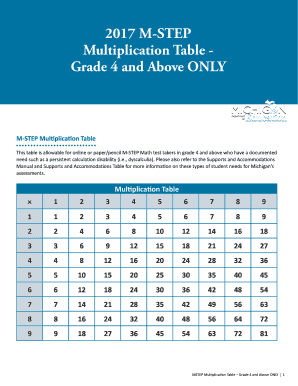
  2. Begin by reviewing the Multiplication Table presented in the form. This table consists of a grid where each cell contains the product of the numbers from the left column and the top row.
  3. Identify the specific multiplication problems you may need assistance with during the test. Utilize the table to find the products you require.
  4. Make sure to include any necessary documentation if required for your accommodation request to utilize the table during the test.
  5. Once you have filled out all applicable sections, save your changes to ensure no information is lost.
  6. Finally, download or print the completed form for your records and to have ready for use during the M-STEP Math test.

Complete your documents online today for a seamless assessment experience.

Get form

Experience a faster way to fill out and sign forms on the web. Access the most extensive library of templates available.

Related content

Multiplication Table Guidance - OEAA

The table must be requested annually during the Multiplication Table Request window in the...

Learn more
Accommodations Toolkit | Math Charts/Tables

Multiplication Table (Math Grades 3-8): A paper-based (digits 1-12) Multiplication Table...

Learn more
2014 Form 940 (Schedule A)

The table below provides the two-letter postal abbreviations used on ... Michigan. MI...

Learn more
Questions & Answers

Get answers to your most pressing questions about US Legal Forms API.

Contact support

How to fill out a table in math?

Filling out a table in math requires understanding the data represented. For a multiplication table, clearly identify the numbers for multiplication along the axes, then calculate and fill in the results in the corresponding cells. The Multiplication Table Michigan serves as an excellent tool to aid in this process. Consistent practice will enhance your mathematical skills.

Completing a multiplication table involves filling in all the cells with the correct products of the row and column numbers. Begin by working through smaller sections of the table before moving on to more complex numbers. Using the Multiplication Table Michigan can simplify this task and make learning fun. Regular practice will help you complete tables more confidently.

To fill out a multiplication table, start by identifying the range of numbers you want to multiply, typically from 1 to 12. Write the numbers across the top and down the side of the table. Then, for each cell, multiply the numbers from the corresponding row and column, filling in the table with their products. Keep the Multiplication Table Michigan handy for reference.

The M-STEP (Michigan Student Test of Educational Progress) assesses students in grades 3 through 8, focusing on mathematics, including multiplication skills. Knowing how multiplication fits into the M-STEP can guide your child’s study plan, especially with the Multiplication Table Michigan. Supporting your child with practice materials is key to their success.

To solve a multiplication table puzzle, start by understanding the given numbers and their placements on the table. Look for patterns or relationships between numbers to find the products. Often, visualizing the Multiplication Table Michigan can help you arrive at the correct answers. Practice solving various puzzles, and you'll improve your skills.

Filling a multiplication chart involves a similar process to a grid. Label the top of the chart with one set of numbers and the side with another set. For each cell, multiply the numbers from the corresponding row and column, then write the result in that cell. Using the Multiplication Table Michigan can guide you in this task.

To fill in a multiplication grid, start by labeling the rows and columns with the numbers you want to multiply. Begin at the intersection of a row and column, multiply the two numbers, and write the product in the corresponding cell. This process helps you visualize the patterns in the Multiplication Table Michigan. Keep practicing, and you will become more comfortable with multiplication.

To remember 9x7, you can use patterns and techniques such as finger tricks or visualization. Recognize that 9x7 equals 63, and relate it to real-world examples or personal experiences for better retention. Engaging with the multiplication table Michigan can help internalize these facts. Regular practice will then naturally reinforce this knowledge.

Finding a multiplication table is straightforward with online resources and educational tools available. Websites often provide printable tables for convenience, focusing on the multiplication table Michigan. You can also use educational software or apps that assist learners in finding and understanding these tables. Leveraging various resources can enhance learning and retention.

Creating a multiplication times table involves charting out rows and columns for the numbers being multiplied. Use a clear format to show the relationship between numbers. Resources like educational websites focusing on the multiplication table Michigan can provide templates and examples. This structured approach aids both teaching and learning.

Get This Form Now!

Use professional pre-built templates to fill in and sign documents online faster. Get access to thousands of forms.

If you believe that this page should be taken down, please follow our DMCA take down process here.

Get Multiplication Table Michigan