How it works
  • Open form

    Open form follow the instructions

  • Easily sign form

    Easily sign the form with your finger

  • Share form

    Send filled & signed form or save

How to fill out the Pavilions Club Card online

This guide provides step-by-step instructions for completing the Pavilions Club Card application online. By following this guide, users can efficiently fill out the form while ensuring all necessary information is accurately provided.

Follow the steps to complete the Pavilions Club Card application.

  1. Click ‘Get Form’ button to obtain the form and open it for editing.
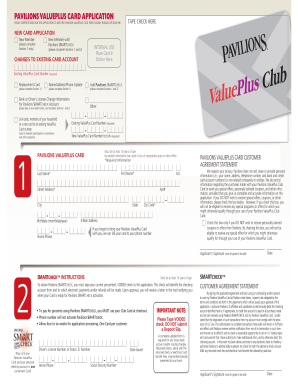
  2. Select the type of application you are completing: New Card Application, Changes to Existing Card Account, or SMARTCHECK instructions. Provide the necessary information based on your selection.
  3. Complete Section 1 by filling in your first name, last name, middle initial (if applicable), address, birthdate, email address, and home phone number. Ensure all required fields are filled out clearly.
  4. If you are applying for the Pavilions SMARTCHECK, tape a voided check on the application as instructed. Make sure to include your bank or driver's license information if applicable.
  5. Review the Pavilions ValuePlus Card customer agreement statement. If you do not wish to receive special offers, check the appropriate box before proceeding.
  6. Sign the application where indicated; your signature is required for the application to be valid.
  7. Once all sections of the form are completed, save any changes you have made. You may now choose to download, print, or share the completed form.

Complete your Pavilions Club Card application online today to take advantage of exclusive benefits.

Get form

Experience a faster way to fill out and sign forms on the web. Access the most extensive library of templates available.

Related content

Pavilions - Burns Park - City of North Little Rock

(Note: Effective September 1, 2025, the2.5% fee on all credit/debit card transactions will...

Learn more
Membership Types and Prices | Recreational Sports

One-day Membership It requires a current OSU ID card and allows come-and-go access within...

Learn more
Rumour Grinding (Guide)

Blemmigan on the card The Urchins' Games; requires having opened a station at the...

Learn more
Questions & Answers

Get answers to your most pressing questions about US Legal Forms API.

Contact support

Are Pavilions and Vons the same?

Pavilions and Vons are indeed closely related as they operate under the same parent company, Albertsons. While both offer similar services and loyalty programs, each may have its unique atmosphere and product selection. Rest assured, you can enjoy the benefits of the Pavilions Club Card at either store.

To remove the password from your HP Pavilion, you need to access the user accounts settings. From there, you can manage your password settings and choose to remove it entirely. This method simplifies your login process, making it quicker for you to access your laptop.

To reset your Pavilions password, visit the Pavilions website and click on the 'Forgot Password?' link. You'll then provide the required information to receive a password reset email. Following the instructions in that email will allow you to create a new password quickly, so you can continue enjoying your Pavilions Club Card benefits.

Absolutely, you can use your Vons card at Pavilions. The loyalty programs for both stores are connected, so any savings you earn with your card will also apply at Pavilions. Utilizing the Pavilions Club Card alongside your Vons card maximizes your rewards and discounts while you shop.

To reset your computer password if you forgot it, you can start at the login screen and select 'Reset Password' if that option appears. If you have not set any recovery options, you may need to use a password reset disk or recovery media. For a more comprehensive solution, consider contacting support for further assistance.

Yes, you can use your Albertsons card at Pavilions. The Pavilions Club Card integrates with Albertsons programs, allowing you to earn points and redeem rewards seamlessly. This feature makes it easy for you to maximize your savings, whether you prefer shopping at Albertsons or Pavilions.

Pavilions and Vons are sister brands, both under the Albertsons umbrella. While they share many similarities, including the same loyalty program and shopping benefits, they may differ slightly in product selection and store layout. When shopping at either, you can still enjoy the same rewards through the Pavilions Club Card.

To factory reset your HP Pavilion laptop without a password, start by turning it off, then power it back on and repeatedly press the F11 key. This will take you to the recovery manager. From there, choose 'System Recovery' and follow the prompts to reset your laptop. Remember, this will erase all data, so use it only as a last resort.

To unlock your HP Pavilion if you forgot your password, you can use the password reset option at the login screen. Alternatively, you may access recovery options if you set up security questions previously. If these methods do not work, consider using your Windows installation media for a full reset. This process is straightforward and can get you back to using your laptop quickly.

Yes, you can use your Vons card at Pavilions. The Pavilions Club Card, like the Vons card, allows you to earn rewards and discounts. By linking your Vons card, you enhance your savings while shopping at Pavilions. It's a seamless way to enjoy benefits at both stores.

Get This Form Now!

Use professional pre-built templates to fill in and sign documents online faster. Get access to thousands of forms.

If you believe that this page should be taken down, please follow our DMCA take down process here.

Get Pavilions Club Card