Open form follow the instructions
Easily sign the form with your finger
Send filled & signed form or save
How to fill out the Driver Warning Notice online
Filling out the Driver Warning Notice online is an essential process for documenting employee infractions in a clear and organized manner. This guide provides step-by-step instructions to help users complete the form accurately and efficiently.
Follow the steps to complete the form correctly
- Click the ‘Get Form’ button to access the Driver Warning Notice form and open it in your available document editor.
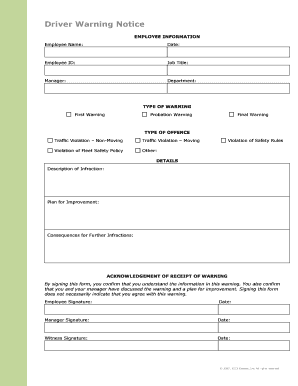
- Enter the employee information in the provided fields. Fill in the employee's name, date, employee ID, job title, manager's name, and department accurately to ensure proper identification.
- Select the type of warning being issued. Choose from the options provided: First Warning, Probation Warning, or Final Warning. Ensure the selected warning type reflects the situation accurately.
- Identify the type of offence by marking the appropriate option. Choose from categories such as Traffic Violation – Non-Moving, Traffic Violation – Moving, Violation of Fleet Safety Policy, Other, or Violation of Safety Rules.
- Provide detailed descriptions in the Details section. Clearly describe the infraction, outline a plan for improvement, and state the consequences for further infractions to facilitate understanding.
- Acknowledge receipt of the warning by having the employee, manager, and witness sign and date the form. Each signature confirms that discussions have occurred regarding the warning.
- Finally, after reviewing all entered information for accuracy, save changes to the document. You can also download, print, or share the completed form as necessary.
Start completing your Driver Warning Notice online today for clear documentation.
Experience a faster way to fill out and sign forms on the web. Access the most extensive library of templates available.
Related content
Level I (Warning Letter). You will receive a warning letter if you have accumulated a...
N.J. Admin. Code § 13:19-10.6 - Restoration; official warning; completion of Driver...
The Driver Attention Warning system is operable, when driving speed is above 40 mph...
Get answers to your most pressing questions about US Legal Forms API.
How to get rid of warning known issues with graphics driver?
To resolve warning issues with your graphics driver, start by updating the driver software. You can usually do this through the device manager on your computer. If problems persist, consider uninstalling the driver completely and then reinstalling it. This action often clears up persistent warnings, allowing you to maintain optimal performance.
What triggers the driver alert?
The driver alert is triggered by factors like unusual steering patterns or excessive driving time without breaks. These behaviors raise a signal that you may be becoming fatigued or distracted. The driver's alert system aims to promote awareness, sending a driver warning notice as a prompt to stop for rest. Staying attentive ensures safer travel for everyone.
What triggers a VW driver alert?
A VW driver alert is typically triggered by specific driving behaviors that indicate fatigue or distraction. The vehicle's systems monitor inputs such as steering movements and the time spent driving continuously. If your actions suggest a decline in alertness, you'll receive a driver warning notice to take a break. This feature helps enhance your safety and that of others on the road.
How do I warn other drivers?
To warn other drivers, you can use your vehicle's hazard lights or signals effectively. Flashing lights or tapping your horn can also communicate an alert. It’s important to be aware of your surroundings and ensure the warning is visible and clear to others. By doing so, you contribute to overall road safety and awareness.
How does my car know I'm tired?
Your car uses a combination of sensors and algorithms to assess your level of alertness. It monitors your driving patterns, such as how you steer and how long you've been driving. If it detects signs suggesting fatigue, such as frequent corrections or prolonged inactivity, it issues a driver alert warning. This is aimed at ensuring your safety on the road.
What triggers the driver alert warning?
The driver alert warning is triggered by several factors, primarily focusing on driver behavior. If the system detects erratic steering or prolonged driving without breaks, it may issue a warning. This technology serves as an important driver warning notice, encouraging you to rest when needed. Staying alert is essential for safe driving.
Why does my car say driver alert warning rest now?
If your car displays a driver alert warning to rest now, it typically means the vehicle's system detects signs of driver fatigue. This feature monitors aspects such as steering behavior and duration of driving. Taking breaks is crucial to maintain focus and safety on the road. Adhering to this notice enhances both your well-being and driving performance.
How to write a written warning?
To write a driver warning notice, start by clearly stating the issue at hand. Use straightforward language to outline the specific behavior or incident that prompted the warning. Be factual, and include any relevant dates and details to provide context. Make sure to maintain a professional tone throughout.
How do you issue a warning?
Issuing a warning, like a Driver Warning Notice, is about clarity and transparency. Gather all necessary documentation to support your concerns. Prepare your notice with specific details and a professional tone before delivering it personally or via certified mail. This ensures that the recipient understands the seriousness of the situation.
How do you give someone a warning?
Giving someone a Driver Warning Notice involves a thoughtful dialogue. Begin by selecting an appropriate time and place for the discussion. Clearly explain the situation, presenting the warning as a proactive tool for improvement rather than a punishment. This will help the recipient see the notice in a constructive light.
Use professional pre-built templates to fill in and sign documents online faster. Get access to thousands of forms.
If you believe that this page should be taken down, please follow our DMCA take down process here.