Loading
Get Cafesalud Incapacidades Liquidadas
How it works
-

Open form follow the instructions
-

Easily sign the form with your finger
-

Send filled & signed form or save
How to fill out the Cafesalud Incapacidades Liquidadas online
This guide provides step-by-step instructions for filling out the Cafesalud Incapacidades Liquidadas form online. Whether you are a first-time user or need a refresher, this comprehensive guide will help ensure your application is complete and accurate.
Follow the steps to successfully complete your application.
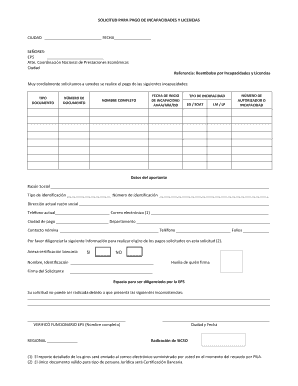
- Click the ‘Get Form’ button to access the Cafesalud Incapacidades Liquidadas form and open it in your digital document editor.
- Fill in the city and date at the top of the form. This information helps identify where the application is being submitted and when.
- Address the form to the EPS, including their name and the office location, followed by a professional greeting.
- In the section titled 'Reembolso por Incapacidades y Licencias', clearly state your request for payment concerning the incapacity details.
- Fill in the type of incapacity and document number associated with the payments being requested. Ensure this information matches the certificates issued by your healthcare provider.
- Provide the full name of the individual for whom the incapacity is claimed, along with the start date of the incapacity formatted as YYYY/MM/DD.
- Indicate the type of incapacity by selecting between options such as EG or SOAT, and include the number of the authorizer or incapacity reference.
- Complete the section with the contributor's data, including the official business name, ID type, identification number, current address, phone number, and email address.
- In the 'Payment City' and 'Department' section, specify the locations for processing the payment request.
- Enter the number of pages or documents submitted in the 'Folios' field, and provide contact information for follow-up.
- If applicable, indicate whether a bank certification is attached by marking 'Yes' or 'No'.
- Ensure to include your signature and thumbprint in the designated areas. This step verifies your identity for the application.
- Review the information you entered for accuracy and ensure all relevant documentation is attached before submitting.
- Upon completing all fields, save your changes, and consider downloading or printing the form for your records.
Begin completing your Cafesalud Incapacidades Liquidadas form online today to ensure a smooth application process.
Ya inició el proceso de empalme y acompañamiento a los usuarios para que reconozcan la marca.