Loading
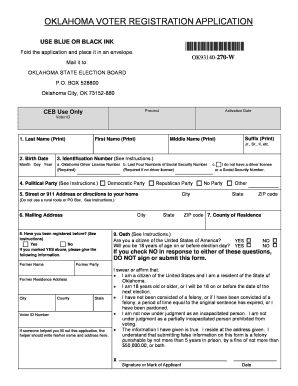
Get Voter Registration Application - Oklahoma - Ok
How it works
-

Open form follow the instructions
-

Easily sign the form with your finger
-

Send filled & signed form or save
How to fill out the Voter Registration Application - Oklahoma - Ok online
Registering to vote is a crucial step in participating in the democratic process. This guide provides step-by-step instructions on how to effectively complete the Voter Registration Application for Oklahoma online, ensuring that all users can navigate the process smoothly.
Follow the steps to complete your voter registration application.
- Click ‘Get Form’ button to access the application form and open it in the editor.
- In Section 1, provide your full legal name as required on the application.
- In Section 2, enter your birth date. Ensure the format is month, day, and year.
- For Section 3, choose a valid identification number from the options provided: your Oklahoma driver license number, the last four digits of your Social Security number, or mark the appropriate box if you do not have either.
- In Section 4, select your political party preference. Options include the Democratic Party, Republican Party, or mark as No Party if you prefer to remain independent.
- Section 5 requires your street or 911 address. Note that this must be your residence address; rural routes or post office boxes are not acceptable.
- Complete Section 6 with your mailing address if it differs from your residence address.
- In Section 8, indicate if you have been registered before. If you answer 'Yes,' provide details regarding your former registration.
- Read through Section 9 carefully, then sign and date the oath to affirm the accuracy of the information provided.
- After completing the form, save your changes. You may choose to download, print, or share the application as needed before mailing it to the Oklahoma State Election Board.
Take the next step towards voting—complete your voter registration application online today.