Get St370 Form Arkansas 2020-2026
How it works
-

Open form follow the instructions
-

Easily sign the form with your finger
-

Send filled & signed form or save
How to fill out the St370 Form Arkansas online
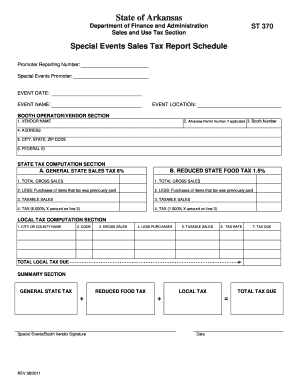
The St370 Form Arkansas is essential for Special Events Promoters and booth operators to report sales tax earnings from events. This guide provides you with comprehensive, step-by-step instructions on how to accurately complete the form online.
Follow the steps to fill out the St370 Form effectively.
- Click ‘Get Form’ button to access the St370 Form and open it in your editor.
- Fill in the promoter's reporting number in the designated section. This information identifies the specific promoter for the event.
- Enter the name of the Special Events Promoter in the appropriate field. If preferred, a rubber stamp can be used for this.
- Specify the event date in the provided field to indicate when the sales occurred.
- Insert the name of the event, such as 'Big Event Festival', to clarify what event the sales relate to.
- Provide the city and state where the event is taking place in the event location section.
- In the Booth Operator/Vendor Section, input the vendor's name in the designated line.
- If applicable, include the Arkansas permit number for the vendor. This number confirms their permission to operate.
- Fill in the booth number to facilitate tracking of sales collections.
- Provide the mailing address for the vendor in the address field.
- Insert city, state, and ZIP code in the address section as required.
- Fill in the vendor's federal identification number in the appropriate field.
- For state tax computation, input total gross sales (excluding food items) in Line A1.
- Enter the cost of previously purchased items on which sales tax has been paid in Line A2.
- Calculate and subtract the value in Line A2 from Line A1 to determine taxable sales, and input this value in Line A3.
- Calculate the state tax by multiplying the taxable sales (Line A3) by the state tax rate of 6%, then enter this amount in Line A4.
- For food sales, fill in total gross food sales in Line B1.
- Enter the cost of food items on which tax has been previously paid in Line B2.
- Subtract the value in Line B2 from Line B1 for taxable food sales, enter this value in Line B3.
- Calculate the reduced food tax by multiplying the taxable sales (Line B3) by the reduced tax rate of 1.5%, and place this amount in Line B4.
- In the local tax computation section, enter the city or county name where the event occurred.
- Input the local code for the city or county provided by the Special Events Promoter.
- Enter the total gross sales amount in Column 3 as a recap of sales.
- Fill in Column 4 with the total cost of goods sold on which sales tax has been paid.
- Subtract Column 4 from Column 3 for taxable sales, input the result in Column 5.
- Input the local tax rate in Column 6, as provided by the promoter.
- Multiply the taxable sales in Column 5 by the local tax rate in Column 6 for the tax due, and enter this in Column 7.
- Calculate the total local tax due by summing amounts in Column 7 and record in the designated area.
- In the summary section, transfer the state tax amount from Line A4 and local tax amount to their respective blocks, and compute the total tax due.
- Once completed, save your changes, and choose to download, print, or share the St370 Form as needed.
Complete your St370 Form online today to ensure accurate reporting of your special event sales tax!
In Arkansas, a quitclaim deed must be notarized to be legally effective. Notarization helps to verify the identities of the parties involved and adds an extra layer of legitimacy to the transaction. After notarization, ensure the deed is filed with the appropriate county recorder's office. For further assistance, online platforms like US Legal Forms can facilitate access to the necessary documents, including the St370 Form Arkansas.