Loading
Get Roofing Receipt 2020-2026
How it works
-

Open form follow the instructions
-

Easily sign the form with your finger
-

Send filled & signed form or save
How to fill out the Roofing Receipt online
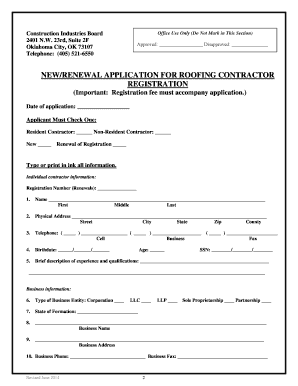
This guide provides clear instructions on how to effectively fill out the Roofing Receipt online. Whether you are submitting a new application or renewing your registration, this comprehensive guide will walk you through each section of the form with ease.
Follow the steps to complete your Roofing Receipt online
- Press the ‘Get Form’ button to obtain the Roofing Receipt and open it in your browser or document editor.
- Indicate the date of your application by entering the current date in the provided field.
- Select whether you are applying as a resident or non-resident contractor by checking the appropriate box.
- Choose if this is a new registration or a renewal by marking the corresponding box.
- Fill out your personal information, including your name, physical address, and contact numbers. Ensure you input your information clearly.
- Provide your birthdate and include a brief description of your experience and qualifications in the designated area.
- In the business information section, specify the type of business entity you are applying under by selecting from the options provided.
- If applicable, fill in your business name and address accurately, ensuring that all details are correct.
- List any authorized persons who can act on behalf of your business, including their contact information.
- Answer questions regarding previous registrations and your legal background truthfully, providing thorough details where required.
- Sign and date the form at the designated section, affirming the truthfulness of the information provided.
- Attach all required documents, including insurance certificates and affidavits, before submission.
- Once completed, save your changes, then proceed to download, print, or share the form as necessary.
Complete your Roofing Receipt online today for a smooth registration process.
Creating your own receipt involves designing a format that includes essential details such as your name, transaction date, and the amount charged. You can choose to prepare this information in a word processor or use specialized templates. A Roofing Receipt template can offer you a ready-made solution to ensure all necessary components are included.