Loading
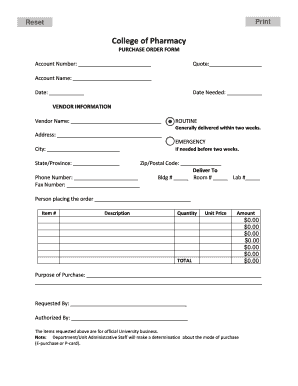
Get Pharmacy Purchase Order
How it works
-

Open form follow the instructions
-

Easily sign the form with your finger
-

Send filled & signed form or save
How to fill out the Pharmacy Purchase Order online
Filling out the Pharmacy Purchase Order online is an essential process for initiating purchases in the pharmacy sector. This guide provides step-by-step instructions to ensure accuracy and compliance throughout the form-filling process.
Follow the steps to complete your Pharmacy Purchase Order efficiently.
- Click ‘Get Form’ button to access the Pharmacy Purchase Order form and open it in your preferred editor.
- Begin filling in the account number, which is essential for processing your order. This information helps track your purchases.
- Input the quote number next to the Quote field. A quote number is often provided by the vendor and ensures your order corresponds to the agreed pricing.
- Enter the account name associated with your purchase to help identify the purchasing entity.
- Include the current date in the Date field to indicate when the order is being made.
- For the Date Needed field, specify when you require the items to arrive. This helps prioritize the order's processing.
- In the Vendor Information section, write the vendor's name from whom you are purchasing the items.
- Fill out the vendor’s address, ensuring that the location is accurate for delivery.
- Input the city, state or province, and zip or postal code of the vendor's location.
- Provide the vendor's phone number for any necessary follow-ups regarding the order.
- If you have a specific building, room, or lab number where the items should be delivered, include that information in the Deliver To section.
- Add the name of the person placing the order for record-keeping purposes.
- For each item you wish to purchase, enter the item number, description, quantity, unit price, and amount. Ensure that the total amount for each item is accurately calculated.
- Specify the purpose of the purchase by explaining why the items are needed, providing context for the request.
- Fill in the requested by and authorized by fields with the names of the individuals making and approving the order respectively.
- After completing the form, review all entries for accuracy and completeness. Then, you can save changes, download, print, or share the form as needed.
Complete your Pharmacy Purchase Order online today to streamline your procurement process.
The four types of purchase orders are: Standard Purchase Orders (PO) Planned Purchase Orders (PPO) Blanket Purchase Orders (BPO) (Also referred to as a “Standing Order”) Contract Purchase Orders (CPO)
Industry-leading security and compliance
US Legal Forms protects your data by complying with industry-specific security standards.
-
In businnes since 199725+ years providing professional legal documents.
-
Accredited businessGuarantees that a business meets BBB accreditation standards in the US and Canada.
-
Secured by BraintreeValidated Level 1 PCI DSS compliant payment gateway that accepts most major credit and debit card brands from across the globe.