Loading
Open form follow the instructions
Easily sign the form with your finger
Send filled & signed form or save
How to fill out the Isp1200 online
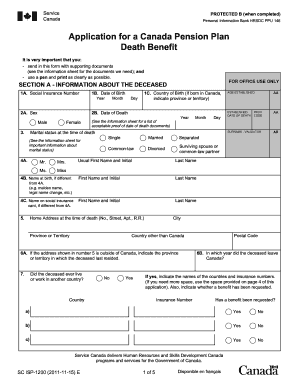
Completing the Isp1200 form for a Canada Pension Plan Death Benefit can seem daunting, but this guide will simplify the process. With clear instructions for each section and field, you can easily navigate through the form and submit it with confidence.
Follow the steps to accurately complete the Isp1200 form.
- Click the 'Get Form' button to access the Isp1200 online form and open it in your preferred editor.
- Begin by filling out Section A, which includes information about the deceased. You will need their Social Insurance Number, date of birth, date of death, country of birth, and marital status at the time of death. Be sure to print clearly and accurately.
- Complete the deceased's name as it appears on legal documents, including any changes from name at birth. Provide the home address at the time of death and indicate if the deceased lived or worked outside Canada.
- In Section B, provide information regarding estate settlement. If there is a will, include details about the executor. If there is no will, specify your relationship to the deceased.
- Moving to Section C, fill in information about yourself, the applicant. This includes your name, relationship to the deceased, and mailing address.
- In Section D, sign and date the applicant's declaration, ensuring that the information you provided is true and complete.
- If applicable, have a witness complete Section E if you signed with a mark. The witness must provide their personal details and signature.
- Lastly, review the completed form for accuracy. You can then save your changes, download, print, or share the Isp1200 form as needed.
Take the first step and complete the Isp1200 online today for a smooth application process.
Experience a faster way to fill out and sign forms on the web. Access the most extensive library of templates available.
Related content
by G Hanley · 1978 · Cited by 30 — Resistoj.et thrusters were discarded because their...
An Isp of 1,200 seconds would significantly reduce the required volume of LH2, but also...
Get answers to your most pressing questions about US Legal Forms API.
Can I update my address with USCIS online?
You can update your address with USCIS online by using their dedicated portal. After logging in, follow the prompts to complete your address update. This process is important for ensuring USCIS can reach you regarding your cases and aligns with the Isp1200 standards for immigration updates.
How to file a death claim in SSS?
To file a death claim in the Social Security System (SSS), begin by gathering the required documents such as the death certificate. You need to submit these documents at your nearest SSS branch. Following the procedures recommended in Isp1200 can help ensure that your claim is processed smoothly and efficiently.
How to file a 10IEA filing?
To file a 10IEA, you typically need to download the necessary forms from the appropriate government website. Complete the form, ensuring you follow the instructions carefully. While resources like Isp1200 can offer guidance, seeking assistance from platforms that specialize in legal forms can further streamline your filing process.
Can I submit documents to USCIS online?
Yes, certain documents can be submitted to USCIS online through their official website. Once you log into your USCIS account, you can upload the required files directly related to your application. This process adheres to the Isp1200 standards, making it easier for you to manage your immigration journey efficiently.
Do I get my husband's CPP after he dies?
Yes, you may be eligible to receive your husband’s Canada Pension Plan (CPP) benefits after he passes away. Eligibility depends on various factors including your relationship to the deceased and the length of contributions. For specific details and to navigate this process effectively, consider consulting the guidelines set forth in the Isp1200 documentation.
Can you file i751 online?
You can file Form I-751 online, which is the application to remove conditions on your residency. Begin by creating an account on the USCIS website, then follow the prompts to complete your application. This digital submission not only streamlines your process but also aligns with the Isp1200 framework for efficient immigration services.
Can I submit an AR-11 form online?
Yes, you can submit an AR-11 form online through the USCIS online portal. This method simplifies the process and saves time, allowing you to update your address quickly. Ensure that your personal information is accurate while completing the AR-11 form to comply with Isp1200 regulations.
How to file an AR-11 form online?
To file an AR-11 form online, you need to visit the USCIS website. You’ll create an account or log into your existing account. The online platform will guide you through the necessary steps to complete and submit your AR-11 form, ensuring an organized process for your address change, which aligns with the Isp1200 guidelines.
How to fill out a customs declaration?
Filling out a customs declaration requires careful attention to detail. You should accurately describe each item, state their value, and include your contact information. Following the Isp1200 guidelines can enhance your understanding of customs requirements and ensure that your declaration is complete.
How to fill out the customs declaration form?
To fill out the customs declaration form, clearly enter the necessary details about the items being declared, their values, and your information as the sender or receiver. Accuracy is key to ensuring proper processing. The Isp1200 can also provide you useful guidance for seamless completion of such forms.
Use professional pre-built templates to fill in and sign documents online faster. Get access to thousands of forms.
If you believe that this page should be taken down, please follow our DMCA take down process here.