Loading
Form preview
  • US Legal Forms
  • Form Library
  • More Forms
  • More Multi-State Forms
  • Eft Mandate Duly Certified By Bank

Get Eft Mandate Duly Certified By Bank

How it works

  1. Open form

    Open form follow the instructions

  2. Easily sign form

    Easily sign the form with your finger

  3. Share form

    Send filled & signed form or save

How to fill out the Eft Mandate Duly Certified By Bank online

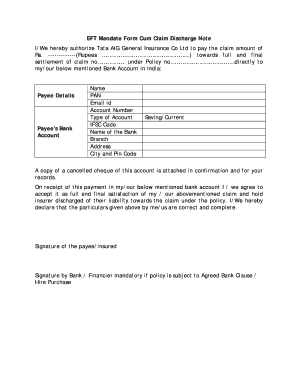
Filling out the Eft Mandate Duly Certified By Bank is a critical step in ensuring a smooth transaction process for receiving your insurance claim. This guide provides detailed, step-by-step instructions tailored to help users confidently complete the form online.

Follow the steps to complete your Eft Mandate Duly Certified By Bank form.

  1. Click ‘Get Form’ button to obtain the form and open it in the editor.
  2. In the 'Payee Details' section, enter your name as the payee who is receiving the claim amount. Ensure that the name matches the one on your bank account.
  3. Fill in your PAN (Permanent Account Number), which is necessary for tax purposes and identification.
  4. Provide your email ID to facilitate communication regarding the payment.
  5. Enter your bank account number accurately. Be sure to double-check it for errors to prevent issues with the payment.
  6. Select the type of account you hold, either 'Saving' or 'Current.' This classification helps identify the nature of your account.
  7. Input the IFSC Code for your bank branch. This code is crucial for initiating electronic transfers.
  8. Specify the name of your bank in the allotted space.
  9. Fill in the branch address of your bank as required.
  10. Complete the city and pin code fields to ensure proper identification of your bank's location.
  11. Attach a copy of a cancelled cheque from your account to confirm the details you have provided.
  12. Read the declaration statement carefully and acknowledge it by confirming that the particulars are correct and complete.
  13. Add your signature in the designated area as the payee/insured individual.
  14. If applicable, obtain a signature from the bank or financier, especially if the policy is subject to the Agreed Bank Clause or Hire Purchase.
  15. Once all steps are complete, save your changes, and download, print, or share the completed form as needed.

Start filling out your Eft Mandate Duly Certified By Bank online today to streamline your claim payment process.

Get form

Experience a faster way to fill out and sign forms on the web. Access the most extensive library of templates available.
Get form

Related content

Payee Setup and Maintenance - Treasury Financial...
Payee Setup and Maintenance establishes and maintains federal and nonfederal payee...
Learn more
Article III
This Policy articulates the requirements and guidelines related to cash control and chain...
Learn more
PLANET FITNESS, INC.
Jun 22, 2015 — provincial legislation and certification requirements governing EFT...
Learn more

Related links form

Postfinance Basisvertrag EFTPOS Avec PostFinance Card Direct Terminaux De La Technologie Ep2 - Postfinance Dma 3137 Icd 10 Transition Form MercyOneSource Provider Registration 20151019 MercyOneSource Provider Registration 20151019

Questions & Answers

Get answers to your most pressing questions about US Legal Forms API.

Contact support

A bank mandate certificate is a formal document that grants authorization to manage a bank account. It typically specifies who can access the account and carry out transactions. For more straightforward transfers, an EFT mandate duly certified by bank offers a more convenient option without complexities.

The bank EFT form is a specific document provided by your financial institution that facilitates electronic transfers. Completing this form allows banks to execute transactions efficiently and accurately. Ensuring that your bank EFT form is duly certified by bank can significantly improve your transaction's reliability.

An EFT form is a document that authorizes your bank to transfer funds electronically from your account. This form contains essential information, such as account details and transfer amounts. Ensuring that this form is filled out correctly and is duly certified by bank is vital for successful transactions.

Filling out an EFT involves supplying details such as the account number, routing information, and your consent to initiate payments. Make sure to review all information for accuracy before submitting. For an efficient process, consider using a comprehensive service like USLegalForms, which guides you through the EFT mandate duly certified by bank.

To send an EFT payment to a bank account, you need to initiate the transfer through your online banking platform. Enter the recipient's account details, including their account number and IFSC code. If you have an EFT mandate duly certified by bank, this will facilitate a smoother transaction process, ensuring that funds reach the intended recipient without delays.

When filling a mandate form for electronic transfer of claim payments, first indicate your claim number and personal details. Next, mention your bank account information along with the amount to be transferred. It's important to ensure that the form is signed correctly, as your EFT mandate duly certified by bank must represent your intent to authorize these transactions.

Filling out a bank mandate form involves providing your essential information, like account details and banking instructions. You should also specify the purpose of the mandate and any applicable timelines for transactions. Once completed, submit the form to your bank to establish your EFT mandate duly certified by bank.

To fill out a mandate form, start by entering your personal information such as your name and address. Next, include details about the funds, like the amount and frequency of the payments. Lastly, be sure to sign and date the form correctly, as an EFT mandate duly certified by bank requires your authorized signature for validation.

A mandate for electronic payment to a vendor is an authorization that allows your bank to transfer funds electronically to a vendor's account. This document outlines the specifics of the payment arrangement, ensuring both parties agree on payment terms. Using an EFT mandate duly certified by bank can simplify these transactions by providing assurance of compliance and legitimacy.

You can download a bank mandate form from your bank's website or mobile application. Look for the section labeled 'Downloads' or 'Forms'. If you prefer convenience, you might also consider using platforms like US Legal Forms, which offer an easy and reliable way to access the EFT mandate duly certified by bank.

Get This Form Now!

Use professional pre-built templates to fill in and sign documents online faster. Get access to thousands of forms.
Get form
If you believe that this page should be taken down, please follow our DMCA take down processhere.
Get Eft Mandate Duly Certified By Bank
Get form
  • Adoption
  • Bankruptcy
  • Contractors
  • Divorce
  • Home Sales
  • Employment
  • Identity Theft
  • Incorporation
  • Landlord Tenant
  • Living Trust
  • Name Change
  • Personal Planning
  • Small Business
  • Wills & Estates
  • Packages A-Z
  • Affidavits
  • Bankruptcy
  • Bill of Sale
  • Corporate - LLC
  • Divorce
  • Employment
  • Identity Theft
  • Internet Technology
  • Landlord Tenant
  • Living Wills
  • Name Change
  • Power of Attorney
  • Real Estate
  • Small Estates
  • Wills
  • All Forms
  • Forms A-Z
  • Form Library
  • Legal Hub
  • About Us
  • Help Portal
  • Legal Resources
  • Blog
  • Affiliates
  • Contact Us
  • Delete My Account
  • Site Map
  • Industries
  • Forms in Spanish
  • Localized Forms
  • State-specific Forms
  • Forms Kit
  • Real Estate Handbook
  • All Guides
  • Notarize
  • Incorporation services
  • For Consumers
  • For Small Business
  • For Attorneys
  • USLegal
  • FormsPass
  • pdfFiller
  • signNow
  • altaFlow
  • DocHub
  • Instapage
Form Packages
  • Adoption
  • Bankruptcy
  • Contractors
  • Divorce
  • Home Sales
  • Employment
  • Identity Theft
  • Incorporation
  • Landlord Tenant
  • Living Trust
  • Name Change
  • Personal Planning
  • Small Business
  • Wills & Estates
  • Packages A-Z
Form Categories
  • Affidavits
  • Bankruptcy
  • Bill of Sale
  • Corporate - LLC
  • Divorce
  • Employment
  • Identity Theft
  • Internet Technology
  • Landlord Tenant
  • Living Wills
  • Name Change
  • Power of Attorney
  • Real Estate
  • Small Estates
  • Wills
  • All Forms
  • Forms A-Z
  • Form Library
Customer Service
  • Legal Hub
  • About Us
  • Help Portal
  • Legal Resources
  • Blog
  • Affiliates
  • Contact Us
  • Delete My Account
  • Site Map
  • Industries
  • Forms in Spanish
  • Localized Forms
  • State-specific Forms
  • Forms Kit
Legal Guides
  • Real Estate Handbook
  • All Guides
Prepared for you
  • Notarize
  • Incorporation services
Our Customers
  • For Consumers
  • For Small Business
  • For Attorneys
Our Sites
  • USLegal
  • FormsPass
  • pdfFiller
  • signNow
  • altaFlow
  • DocHub
  • Instapage
Social Media
Call us now toll free:
+1 833 426 79 33
As seen in:
© Copyright 1999-2026 airSlate Legal Forms, Inc. 3720 Flowood Dr, Flowood, Mississippi 39232
  • Your Privacy Choices
  • Terms of Service
  • Privacy Notice
  • Content Takedown Policy
  • Bug Bounty Program