Loading
Get Registration Form For Membership Drive Phase Ii 4th Part 2020-2026
How it works
-

Open form follow the instructions
-

Easily sign the form with your finger
-

Send filled & signed form or save
How to fill out the Registration Form For Membership Drive Phase Ii 4th Part online
Filling out the Registration Form For Membership Drive Phase Ii 4th Part online is a straightforward process that ensures your application is considered for membership in this important initiative. This guide provides detailed instructions to assist you in completing the form accurately and efficiently.
Follow the steps to successfully complete the registration form online.
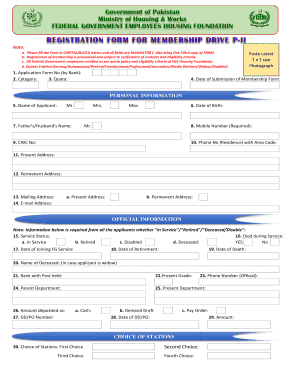
- Click ‘Get Form’ button to access the form and open it in your chosen editing tool.
- Fill in the application form number provided by the bank in the designated field.
- Select your category and quota from the options provided, ensuring you meet the eligibility criteria.
- Paste a recent 1 x 1 size photograph in the allocated space on the form.
- Enter the date of submission of the membership form.
- Provide your personal information, including your name, father's or partner's name, date of birth, mobile number, CNIC number, residence phone number, and addresses (present, permanent, and mailing).
- Indicate your service status and if applicable, provide details on your date of joining, retirement, or death, based on your situation.
- Fill in the details regarding your rank, post held, present grade, and departments (parent and present).
- Specify the amount deposited and provide the DD/PO number alongside the date, ensuring accuracy in financial details.
- List your stations of preference in order from first to fourth choice.
- Attach colored photocopies of the front and back of your CNIC to the form.
- Certify the information provided in the form is correct by signing and dating the verification section.
- Ensure that the verification by your parent department includes the name and signature of an official along with their stamp.
- Review all entered information for accuracy and completeness before submission.
- Save changes and download the completed form for your records, ensuring you have a copy to print or share as needed.
Begin filling out the Registration Form For Membership Drive Phase Ii 4th Part online now!