We use cookies to improve security, personalize the user experience, enhance our marketing activities (including cooperating with our marketing partners) and for other business use.
Click "here" to read our Cookie Policy. By clicking "Accept" you agree to the use of cookies. Read less
Read more
Accept
Loading
Form preview
  • US Legal Forms
  • Form Library
  • More Forms
  • More Multi-State Forms
  • Passport Purchase Of Service Invoice Form 2020

Get Passport Purchase Of Service Invoice Form 2020-2025

How it works

  1. Open form

    Open form follow the instructions

  2. Easily sign form

    Easily sign the form with your finger

  3. Share form

    Send filled & signed form or save

How to fill out the Passport Purchase Of Service Invoice Form online

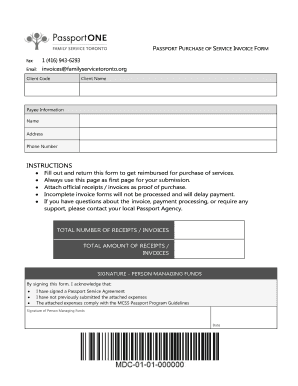
The Passport Purchase Of Service Invoice Form is an important document for users seeking reimbursement for services. This guide provides step-by-step instructions for filling out this form online, ensuring a smooth and efficient submission process.

Follow the steps to accurately complete the invoice form.

  1. Click ‘Get Form’ button to obtain the form and open it in the editor.
  2. Enter your client code and client name in the designated fields. These details are essential for identifying your account and ensuring accurate processing.
  3. Provide your payee information, including the name, address, and phone number. This information is critical for issuing payment.
  4. In the instructions section, ensure to review the requirements for submission carefully. Note that you must attach official receipts or invoices as proof of purchase.
  5. Indicate the total number of receipts or invoices you are submitting, along with the total amount for reimbursement. This summary aids in the processing of your claim.
  6. The signature section requires the name and signature of the person managing the funds. This confirms that they have adhered to the Passport Program Guidelines.
  7. Fill out the detailed invoice or receipt information for each service provided. Include specific details such as the name of the service provider, service type, start and end dates, hours, and rates.
  8. Accurately report mileage, if applicable. Enter the start and end dates, distance traveled, rate, and total amount for any mileage claims.
  9. Complete any additional claims, if relevant. This section allows users to specify other expenses incurred.
  10. Review your completed form for any incomplete fields. Incomplete forms may delay payment.
  11. Once all information is accurate, save your changes. You can download a copy, print it, or share the form as needed.

Complete your Passport Purchase Of Service Invoice Form online today for a seamless reimbursement process.

Get form

Experience a faster way to fill out and sign forms on the web. Access the most extensive library of templates available.
Get form

Related content

Submit Invoice | MOCS
Nov 17, 2023 — Organizations can create and submit invoices for their active contracts...
Learn more
Finance + Travel Forms - Intranet - University of...
We can assist with various financial transactions, including but not limited to...
Learn more
Contrat Passport Advantage international
Le présent Contrat Passport Advantage international IBM (le «contrat») régit les...
Learn more

Related links form

Iccms Financial Addendum - Kirkland Proline Application9-2014 - Websitepdf - Stark Area Regional Cincinnati Bell Buy Out

Questions & Answers

Get answers to your most pressing questions about US Legal Forms API.

Contact support

Filling up a new service invoice requires clarity and organization. Start with your business’s name and contact information at the top. Then, add the client’s information along with an invoice number and date. Detail the services rendered, including prices for each, and provide the total amount due along with payment instructions.

Filling up an invoice is straightforward. Start by entering your business name, address, and contact details. Next, input the client's name and address, the invoice number, and date. Be diligent about detailing the services provided along with their costs, and then calculate the total amount due, ensuring to clarify payment terms.

Filling out a contract invoice involves several key steps. First, include your business details and the client’s information. Specify the contract's terms by listing services provided, deadlines, and agreed payments. Ensure to calculate the total amount accurately and provide your preferred payment methods.

To fill out a billing invoice sample, begin by entering your company name and contact information at the top. Next, add the client's name and address, followed by a unique invoice number and date. Clearly list the services rendered, including quantities and prices. Finally, make sure to include the total amount due and any payment terms.

Fax or Email Paper Claims You will email the POS form and all receipts to PassportOne in Toronto at invoices@familyservicetoronto.org or via fax to 1-416-943-6293. On Page 1 of your preprinted claims form it will have the name and code number of the Passport recipient.

Download: Download and complete your eClaim form. Submit: Upload your eClaim form and any required invoices/receipts. Status: You can track your claim and submission history to see if your claim is in process, has been reimbursed, or if there is action required.

PassportONE, administered by Family Service Toronto, is the single agency in Ontario responsible for processing all Passport related invoice/payments. All invoices and receipts will be processed by PassportONE.

Payee Information Form This form indicates who will be the person that will receive the reimbursements into their bank account. The person named as Payee could be the Passport recipient themselves, a parent, a primary care giver, or other, but it cannot be a Support Worker for the recipient.

MyDirectPlan (MDP) is a free online tool designed to help you manage your Passport and Special Services at Home (SSAH) funding.

If you have questions about the Passport Program, please leave us your contact information and a detailed message at 1-866-288-9659 or email us at passport@contacthamilton.ca and one of our Passport Coordinators will contact you.

Get This Form Now!

Use professional pre-built templates to fill in and sign documents online faster. Get access to thousands of forms.
Get form
If you believe that this page should be taken down, please follow our DMCA take down processhere.

Industry-leading security and compliance

US Legal Forms protects your data by complying with industry-specific security standards.
  • In businnes since 1997
    25+ years providing professional legal documents.
  • Accredited business
    Guarantees that a business meets BBB accreditation standards in the US and Canada.
  • Secured by Braintree
    Validated Level 1 PCI DSS compliant payment gateway that accepts most major credit and debit card brands from across the globe.
Get Passport Purchase Of Service Invoice Form
Get form
Form Packages
Adoption
Bankruptcy
Contractors
Divorce
Home Sales
Employment
Identity Theft
Incorporation
Landlord Tenant
Living Trust
Name Change
Personal Planning
Small Business
Wills & Estates
Packages A-Z
Form Categories
Affidavits
Bankruptcy
Bill of Sale
Corporate - LLC
Divorce
Employment
Identity Theft
Internet Technology
Landlord Tenant
Living Wills
Name Change
Power of Attorney
Real Estate
Small Estates
Wills
All Forms
Forms A-Z
Form Library
Customer Service
Terms of Service
Privacy Notice
Legal Hub
Content Takedown Policy
Bug Bounty Program
About Us
Help Portal
Legal Resources
Blog
Affiliates
Contact Us
Delete My Account
Site Map
Industries
Forms in Spanish
Localized Forms
State-specific Forms
Forms Kit
Legal Guides
Real Estate Handbook
All Guides
Prepared for You
Notarize
Incorporation services
Our Customers
For Consumers
For Small Business
For Attorneys
Our Sites
US Legal Forms
USLegal
FormsPass
pdfFiller
signNow
airSlate WorkFlow
DocHub
Instapage
Social Media
Call us now toll free:
+1 833 426 79 33
As seen in:
  • USA Today logo picture
  • CBC News logo picture
  • LA Times logo picture
  • The Washington Post logo picture
  • AP logo picture
  • Forbes logo picture
© Copyright 1997-2025
airSlate Legal Forms, Inc.
3720 Flowood Dr, Flowood, Mississippi 39232
Form Packages
Adoption
Bankruptcy
Contractors
Divorce
Home Sales
Employment
Identity Theft
Incorporation
Landlord Tenant
Living Trust
Name Change
Personal Planning
Small Business
Wills & Estates
Packages A-Z
Form Categories
Affidavits
Bankruptcy
Bill of Sale
Corporate - LLC
Divorce
Employment
Identity Theft
Internet Technology
Landlord Tenant
Living Wills
Name Change
Power of Attorney
Real Estate
Small Estates
Wills
All Forms
Forms A-Z
Form Library
Customer Service
Terms of Service
Privacy Notice
Legal Hub
Content Takedown Policy
Bug Bounty Program
About Us
Help Portal
Legal Resources
Blog
Affiliates
Contact Us
Delete My Account
Site Map
Industries
Forms in Spanish
Localized Forms
State-specific Forms
Forms Kit
Legal Guides
Real Estate Handbook
All Guides
Prepared for You
Notarize
Incorporation services
Our Customers
For Consumers
For Small Business
For Attorneys
Our Sites
US Legal Forms
USLegal
FormsPass
pdfFiller
signNow
airSlate WorkFlow
DocHub
Instapage
Social Media
Call us now toll free:
+1 833 426 79 33
As seen in:
  • USA Today logo picture
  • CBC News logo picture
  • LA Times logo picture
  • The Washington Post logo picture
  • AP logo picture
  • Forbes logo picture
© Copyright 1997-2025
airSlate Legal Forms, Inc.
3720 Flowood Dr, Flowood, Mississippi 39232