Loading
Form preview
  • US Legal Forms
  • Other Templates
  • More Forms
  • More Multi-State Forms
  • Asic Form 492 2020

Get Asic Form 492 2020-2026

How it works

  1. Open form

    Open form follow the instructions

  2. Easily sign form

    Easily sign the form with your finger

  3. Share form

    Send filled & signed form or save

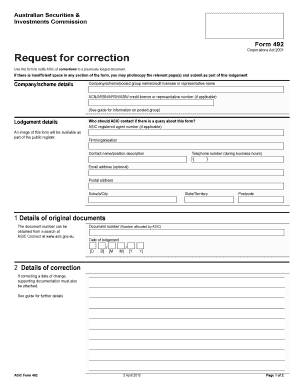
How to fill out the Asic Form 492 online

Filling out the Asic Form 492 is a straightforward process designed to notify the Australian Securities and Investments Commission of corrections to previously lodged documents. This guide provides clear, step-by-step instructions to help you complete the form accurately and efficiently.

Follow the steps to complete the Asic Form 492 online

  1. Press the ‘Get Form’ button to access the Asic Form 492 and open it in your document editor.
  2. In the ‘Company/scheme details’ section, enter the name of the company or scheme along with the relevant identification numbers such as ACN, ARBN, ARSN, ABN, or credit license number if applicable.
  3. Provide lodgement details by indicating who ASIC should contact regarding any queries. Include the ASIC registered agent number if applicable, the firm's name, the contact person's name and position, telephone number, and optional email address.
  4. Fill in the ‘Details of original documents’ section by entering the document number, which can be obtained from a search at ASIC Connect, and the date of lodgement in the specified format.
  5. In the ‘Details of correction’ section, specify the nature of the correction. If correcting a date of change, ensure that you attach supporting documentation as required.
  6. Proceed to the signature section. The form must be signed by a current director, secretary, local agent, or external administrator, confirming that the information provided is true and complete. Enter the signatory's name, capacity, and the date signed.
  7. Review the completed form for accuracy. Once satisfied with the details, save your changes and consider options for printing or sharing the form as necessary.

Complete your Asic Form 492 online today to streamline your document management process.

Get form

Experience a faster way to fill out and sign forms on the web. Access the most extensive library of templates available.
Get form

Related content

Request for correction
Please change the. 'Beneficially Held' status to 'no'. Thankyou. This form must be signed...
Learn more
ReRAM Compute ASIC Fabrication
Problem: ○ Our advisor & client are interested in ReRAM (resistive RAM) for it's...
Learn more
Command Line Interface User Guide
When a ACL bind to interface, it needs ASIC PIE resource to help to filter packet. An ASIC...
Learn more

Related links form

NJ Dog Park Application - City Of Cape May 2018 NJ Dog Park Application - City Of Cape May 2014 OK Cardiology Northwest Canine Echocardiogram Report 2014 PA 3800-PM-WSFR0083v 2010

Questions & Answers

Get answers to your most pressing questions about US Legal Forms API.

Contact support

To get access to ASIC, you can visit ASIC's official website where you'll find various resources and tools. You can register for an account that allows you to submit forms, check company details, and access reports. This platform facilitates business operations, making it easier for you to manage your compliance tasks efficiently. Understanding how to navigate ASIC's online portal is essential for effective company management.

Yes, ASIC Form 492 is one of the forms that can be lodged online through the ASIC portal. This online lodging option simplifies the submission process and provides confirmation of lodgment. It is particularly useful for business owners needing to quickly update their company information. Relying on online submissions helps you maintain timely compliance.

Absolutely, you can lodge various ASIC forms, including ASIC Form 492, online. This online facility streamlines the process and minimizes the time needed for submissions. Clients appreciate the efficiency of lodging forms digitally, as it reduces postal delays and keeps records more organized. By leveraging this online option, you ensure your company stays compliant with less hassle.

Yes, ASIC forms can be electronically signed, making the submission process more efficient. Using electronic signatures reflects a modern approach, reducing paperwork while ensuring authenticity. This feature enhances usability, especially when submitting forms like ASIC Form 492. Always ensure that your electronic signature complies with ASIC's requirements for valid submissions.

Yes, you can lodge ASIC Form 492 online through the ASIC website. This online submission process is user-friendly and enables quick processing of your form. By using the online platform, you can save time and ensure your changes are reported to ASIC promptly. It’s a convenient option for business owners who want to maintain compliance efficiently.

To obtain a company extract report from ASIC, you can visit their official website and navigate to the search tools provided. You need to enter the relevant details about the company, such as the name or ACN. This process allows you to access a comprehensive report that includes essential details about the company's registration, status, and structure. Utilizing ASIC resources ensures you get the most accurate and updated information.

ASIC Form 492 is a document used to notify the Australian Securities and Investments Commission (ASIC) of certain changes in a company's details. This form is crucial for maintaining accurate and up-to-date records with ASIC. If you're looking to keep your company compliant, understanding Form 492 is essential. It captures important information about your organization, including changes to registered office and principal place of business.

Yes, if your company falls under the reporting obligations, you must lodge financial statements with ASIC. This requirement applies to various entities, including public companies and certain private companies. Filing these statements, like the Asic Form 492, helps maintain proper corporate governance and public trust.

Form 388 is a notification form that companies use to communicate changes to ASIC, such as updates to their details or structure. It is not directly related to financial statements like the Asic Form 492. However, understanding the different forms available can help you navigate your regulatory responsibilities more effectively.

To lodge financial statements with ASIC, you usually need to complete the Asic Form 492. This form is specifically designed for submitting the required financial documents by companies and other entities. Be sure your statements adhere to the proper standards, as this is crucial for compliance.

Get This Form Now!

Use professional pre-built templates to fill in and sign documents online faster. Get access to thousands of forms.
Get form
If you believe that this page should be taken down, please follow our DMCA take down processhere.
Get Asic Form 492
Get form
  • Adoption
  • Bankruptcy
  • Contractors
  • Divorce
  • Home Sales
  • Employment
  • Identity Theft
  • Incorporation
  • Landlord Tenant
  • Living Trust
  • Name Change
  • Personal Planning
  • Small Business
  • Wills & Estates
  • Packages A-Z
  • Affidavits
  • Bankruptcy
  • Bill of Sale
  • Corporate - LLC
  • Divorce
  • Employment
  • Identity Theft
  • Internet Technology
  • Landlord Tenant
  • Living Wills
  • Name Change
  • Power of Attorney
  • Real Estate
  • Small Estates
  • Wills
  • All Forms
  • Forms A-Z
  • Other Templates
  • Legal Hub
  • About Us
  • Help Portal
  • Legal Resources
  • Blog
  • Affiliates
  • Contact Us
  • Delete My Account
  • Site Map
  • Industries
  • Forms in Spanish
  • Localized Forms
  • State-specific Forms
  • Forms Kit
  • Real Estate Handbook
  • All Guides
  • Notarize
  • Incorporation services
  • For Consumers
  • For Small Business
  • For Attorneys
  • USLegal
  • FormsPass
  • pdfFiller
  • signNow
  • altaFlow
  • DocHub
  • Instapage
Form Packages
  • Adoption
  • Bankruptcy
  • Contractors
  • Divorce
  • Home Sales
  • Employment
  • Identity Theft
  • Incorporation
  • Landlord Tenant
  • Living Trust
  • Name Change
  • Personal Planning
  • Small Business
  • Wills & Estates
  • Packages A-Z
Form Categories
  • Affidavits
  • Bankruptcy
  • Bill of Sale
  • Corporate - LLC
  • Divorce
  • Employment
  • Identity Theft
  • Internet Technology
  • Landlord Tenant
  • Living Wills
  • Name Change
  • Power of Attorney
  • Real Estate
  • Small Estates
  • Wills
  • All Forms
  • Forms A-Z
  • Other Templates
Customer Service
  • Legal Hub
  • About Us
  • Help Portal
  • Legal Resources
  • Blog
  • Affiliates
  • Contact Us
  • Delete My Account
  • Site Map
  • Industries
  • Forms in Spanish
  • Localized Forms
  • State-specific Forms
  • Forms Kit
Legal Guides
  • Real Estate Handbook
  • All Guides
Prepared for you
  • Notarize
  • Incorporation services
Our Customers
  • For Consumers
  • For Small Business
  • For Attorneys
Our Sites
  • USLegal
  • FormsPass
  • pdfFiller
  • signNow
  • altaFlow
  • DocHub
  • Instapage
Social Media
Call us now toll free:
+1 833 426 79 33
As seen in:
© Copyright 1999-2026 airSlate Legal Forms, Inc. 17 Station Street, Suite 303, Brookline, MA 02445
  • Your Privacy Choices
  • Terms of Service
  • Privacy Notice
  • Content Takedown Policy
  • Bug Bounty Program