Loading
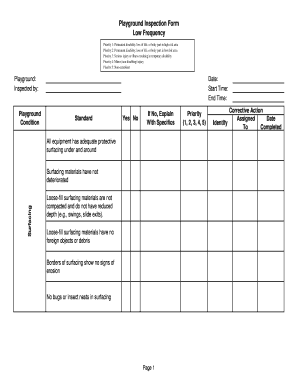
Get Equipment Inspection Checklist
How it works
-

Open form follow the instructions
-

Easily sign the form with your finger
-

Send filled & signed form or save
How to fill out the Equipment Inspection Checklist online
Filling out the Equipment Inspection Checklist is essential to ensure the safety and compliance of playground equipment. This guide provides a step-by-step approach to help you complete the form accurately and efficiently online.
Follow the steps to complete the checklist effectively.
- Click the ‘Get Form’ button to access the Equipment Inspection Checklist and open it in your preferred online editor.
- Begin by filling out the basic identification details—enter the name of the playground, your name as the inspector, the date of inspection, and the start and end times.
- In the section for playground condition, evaluate the safety standards. For each statement, indicate 'Yes' or 'No' and provide detailed explanations if you answer 'No'. Focus on protective surfacing, the condition of equipment, and general hazards.
- Assess the security of hardware. Here, confirm the integrity of equipment parts, such as checking for rust, broken components, or loose fastening devices. Again, use 'Yes' or 'No' and explain any issues.
- Check drainage and maintenance conditions. Confirm if the playground is free of debris and without standing water, indicating any necessary corrective actions if needed.
- Review additional concerns by evaluating signage and rules present at the playground. Answer accordingly and add comments if necessary.
- Finalize the inspection by filling out the priority level for any required corrective actions and assigning responsibility. Provide dates for each action if applicable.
- Once you have reviewed all information for accuracy, save your changes, and choose whether to download, print, or share the completed form.
Complete your Equipment Inspection Checklist online today to ensure playground safety.
To create an equipment list in Excel, start by opening a new spreadsheet and labeling your columns clearly. Include headings such as equipment name, description, location, and maintenance notes. Enter your equipment data methodically to maintain organization. By leveraging Excel for your Equipment Inspection Checklist, you can easily sort, filter, and track each item’s status over time.