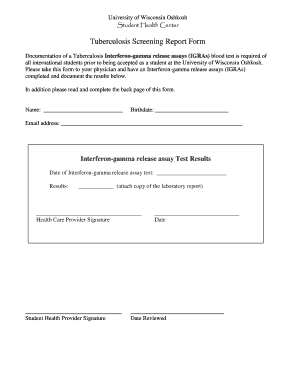
University of Wisconsin Oshkosh Student Health Center Tuberculosis Screening Report Form Documentation of a Tuberculosis -gamma release assays (IGRAs) blood test is required of all international students.
Open form follow the instructions
Easily sign the form with your finger
Send filled & signed form or save
How to fill out the Printable Tb Skin Test Form online
Filling out the Printable Tb Skin Test Form online is an important task for international students at the University of Wisconsin Oshkosh. This guide will provide you with clear and supportive instructions on how to complete the form accurately.
Follow the steps to complete the Printable Tb Skin Test Form online.
- Click 'Get Form' button to obtain the form and open it in the editor.
- In the first section, enter your name and birthdate. This helps to identify your personal information clearly.
- Provide your email address in the designated field to facilitate communication regarding your form.
- Record the date of the -gamma release assay test in the specified space. Ensure that you attach a copy of the laboratory report next to the results section.
- Have the health care provider and student health provider sign the form where indicated. Make sure dates are also included.
- Proceed to the Tuberculosis Screening Questionnaire sections. Respond to each question with a checkmark in the appropriate box.
- If applicable, circle the country of birth from the provided list that has a high incidence of active TB.
- After answering all questions, ensure that you have provided comprehensive responses as some may necessitate further action.
- Once every section is filled out, you can save changes, download, print, or share the completed form with your health care provider.
Complete your Printable Tb Skin Test Form online today to ensure a smooth admission process.
Experience a faster way to fill out and sign forms on the web. Access the most extensive library of templates available.
Related content
This questionnaire must be administered to all child care providers, by a licensed health...
It is very unlikely that a side effect to the test will occur. If such an event does...
Print a test copy of your double-sided document to test the selected settings. 10. Follow...
Get answers to your most pressing questions about US Legal Forms API.
How to get a TB report?
To obtain a TB report, you can request the test results from your healthcare provider or clinic. They may provide a formal report based on their records. Using a Printable Tb Skin Test Form ensures your results are documented properly for easy access and understanding.
How to explain a TB skin test?
To explain a TB skin test, describe it as a simple procedure that checks for tuberculosis infection by injecting a small amount of fluid under the skin. After 48 to 72 hours, the test site is evaluated for any reaction. Providing a Printable Tb Skin Test Form can help clarify the process and results for patients.
How to document PPD results?
Documenting PPD (Purified Protein Derivative) results involves noting the size of the induration and whether the test is considered positive or negative. Include the testing date and any other pertinent patient details. Using a Printable Tb Skin Test Form can make this documentation more straightforward and comprehensive.
How to record TB test results?
To record TB test results accurately, write down the date and time of the reading, the size of the induration in millimeters, and your interpretation. It’s important to include any potential follow-up or treatment options needed based on the findings. Using a Printable Tb Skin Test Form will help standardize this recording process.
How do you document a TB skin test?
Documenting a TB skin test requires you to note the time, date, and place where the test was administered. You should also include your interpretation of the results and any follow-up recommendations. A Printable Tb Skin Test Form is an excellent tool to ensure that you capture all crucial information succinctly.
How to write TB test results?
When writing TB test results, include the date the test was read, the result (positive or negative), and any additional notes regarding the size of the induration. Clearly state whether further action is necessary based on the results. A Printable Tb Skin Test Form can help structure these results effectively for clarity.
How to document a TB skin test?
Documenting a TB skin test involves recording the date of the test, the test site, and the interpretation of the results. Ensure you include the name of the assessor and any relevant patient information. Utilizing a Printable Tb Skin Test Form can streamline this process, ensuring all necessary details are captured efficiently.
How do you code a TB skin test?
To code a TB skin test, you should use the appropriate CPT (Current Procedural Terminology) code. Typically, the code for a TB skin test is 86580, which refers specifically to the administration of the test. Utilize the Printable Tb Skin Test Form to facilitate accurate documentation and coding of the test for insurance purposes.
How to check TB test result?
To check a TB test result, patients should return to the healthcare provider within 48 to 72 hours post-injection. The provider will assess the injection site to measure the induration. Having a Printable Tb Skin Test Form at hand can streamline the process of checking and documenting the results.
How to fill out a TB test?
Filling out a TB test requires accurate patient information, including the test date and practitioner details. It is crucial to ensure that all sections of the form are completed before submitting it for testing. A Printable Tb Skin Test Form can provide a standardized format for collecting the necessary information.
Use professional pre-built templates to fill in and sign documents online faster. Get access to thousands of forms.
If you believe that this page should be taken down, please follow our DMCA take down process here.