Loading
Form preview
  • US Legal Forms
  • Other Templates
  • More Forms
  • More Uncategorized Forms
  • Background Check Nc

Get Background Check Nc

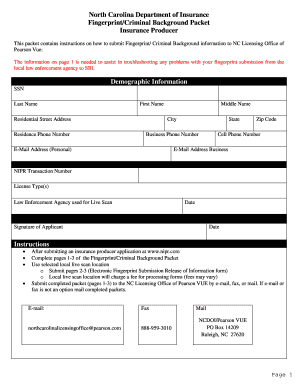
North Carolina Department of Insurance Fingerprint/Criminal Background Packet Insurance Producer This packet contains instructions on how to submit Fingerprint/ Criminal Background information to.

How it works

  1. Open form

    Open form follow the instructions

  2. Easily sign form

    Easily sign the form with your finger

  3. Share form

    Send filled & signed form or save

How to fill out the Background Check Nc online

This guide provides a comprehensive walkthrough for filling out the Background Check Nc form online. By following the steps outlined below, users can effectively complete the form with all necessary information to ensure a smooth background check process.

Follow the steps to complete your Background Check Nc form.

  1. Click ‘Get Form’ button to obtain the Background Check Nc form and access it in your preferred editing tool.
  2. Begin by filling in your demographic information, including your Social Security Number (SSN), last name, first name, middle name, residential street address, city, state, zip code, and contact numbers (business, residence, and cell phone). Make sure all information is accurate and up to date.
  3. Enter your email addresses for personal and business communications. This ensures you receive any important notifications regarding your application.
  4. Record your NIPR transaction number, which is essential for tracking your application.
  5. Specify the license type(s) you are applying for and the local law enforcement agency you have chosen for the Live Scan process.
  6. Date the application by filling in the current date, and ensure you provide your signature at the bottom of the form.
  7. Once all sections are complete, review your information for accuracy. Save any changes and prepare to submit the packet.
  8. Submit the completed Fingerprint/Criminal Background Packet (pages 1-3) via email, fax, or traditional mail to the NC Licensing Office of Pearson VUE. Ensure you choose a local live scan location and include pages 2-3 when submitting.
  9. If submitting via email, send to northcarolinalicensingoffice@pearson.com; if faxing, send to 888-959-3010; or if mailing, send to NCDOI/Pearson VUE, PO Box 14209, Raleigh, NC 27620.

Complete your Background Check Nc form online today for a streamlined application process.

Get form

Experience a faster way to fill out and sign forms on the web. Access the most extensive library of templates available.
Get form

Related content

Criminal Background Check | North Carolina...
Search, view, or email criminal records for yourself or others in any county or statewide...
Learn more
New Criminal History Record Check Requirements for...
Aug 26, 2025 — A new state law (Session Law 2025-16) enacted this summer will soon...
Learn more
Advanced Roadside Impaired Driving Enforcement:...
This course covers the goals of the course, drug problem elements, impaired driving...
Learn more

Related links form

Monroe Kennel Club Dog Shows Monroe Data Collection Form For Online Submissions After 4 ... - Zurich Math 171 Analytical Geometry And Calculus - Math Tamu CLINICAL ELECTROPHORESIS AND IMMUNOTECHNIQUES - Atom - Pds Magichome Co

Questions & Answers

Get answers to your most pressing questions about US Legal Forms API.

Contact support

On a background check, you may find information related to criminal records, including felonies and misdemeanors. Additionally, checks can reveal employment history, court records, and in some cases, consultation with databases for civil judgment histories. Being prepared with this knowledge allows for better management of your own information. If you’re unsure about what to check, UsLegalForms can guide you through the process.

Background checks typically provide insights into an individual's criminal record, employment history, and education. Other details may include driving records and possible financial background checks, depending on the context. It is essential to understand what will be revealed in your background check, as this can impact employment opportunities. Consider using UsLegalForms for a straightforward overview of what to expect.

An NC background check can include criminal history, court records, and information related to social security numbers. Additionally, it may review employment history, education verification, and credit reports, depending on what you are applying for. Thorough checks provide a comprehensive view of an individual's past. By choosing UsLegalForms, you can access reliable information and simplify the process.

In North Carolina, background checks can cover a range of time, often looking back at records for seven years or more. This duration may vary based on the specific type of background check and the information being sought. It's crucial to understand what type of check you need, as certain employers may require deeper investigations. UsLegalForms can help clarify the options available to you.

An NC background check typically takes anywhere from a few days to a couple of weeks, depending on various factors such as the request type and the agency processing it. Often, online services can expedite this process, providing results more quickly. Using UsLegalForms can streamline your experience and reduce waiting time. Make sure to plan accordingly to avoid any last-minute obstacles.

When you receive a background check request, it is essential to review the details thoroughly. Ensure that all the information provided is accurate and up to date. If you find discrepancies or issues, be proactive in addressing them to avoid delays. Utilizing a reliable service like UsLegalForms can simplify this process.

For state jobs in NC, certain offenses can disqualify an applicant, particularly those involving serious crimes or moral turpitude. Convictions of felonies, drug offenses, or other criminal activities that reflect poorly on an applicant's character can be significant deterrents. Additionally, lack of required qualifications or falsification of information can lead to disqualification. Explore more about employment eligibility through US Legal Forms to ensure you meet all criteria.

A background check in NC generally includes several components, such as criminal history, employment verification, and educational background. It may also cover credit history and driving records, depending on the job requirements. Each component helps give a clear view of an individual’s qualifications and reliability. Using US Legal Forms, you can obtain the relevant forms to facilitate a thorough background check.

Background checks in NC can review records dating back several years, often depending on the type of check performed. Criminal background checks typically look back seven years, but some employers may access longer histories. This scope may include felony and misdemeanor convictions, ensuring comprehensive due diligence. US Legal Forms helps individuals access the necessary documents for these checks.

The duration of a background check in NC can vary depending on the type of check requested and the agency conducting it. Typically, a standard background check may take anywhere from a few hours to several days. Factors such as the completeness of the applicant's information and the sources accessed can influence this timeframe. At US Legal Forms, we offer tools to help you navigate this process efficiently.

Get This Form Now!

Use professional pre-built templates to fill in and sign documents online faster. Get access to thousands of forms.
Get form
If you believe that this page should be taken down, please follow our DMCA take down processhere.
Get Background Check Nc
Get form
  • Adoption
  • Bankruptcy
  • Contractors
  • Divorce
  • Home Sales
  • Employment
  • Identity Theft
  • Incorporation
  • Landlord Tenant
  • Living Trust
  • Name Change
  • Personal Planning
  • Small Business
  • Wills & Estates
  • Packages A-Z
  • Affidavits
  • Bankruptcy
  • Bill of Sale
  • Corporate - LLC
  • Divorce
  • Employment
  • Identity Theft
  • Internet Technology
  • Landlord Tenant
  • Living Wills
  • Name Change
  • Power of Attorney
  • Real Estate
  • Small Estates
  • Wills
  • All Forms
  • Forms A-Z
  • Other Templates
  • Legal Hub
  • About Us
  • Help Portal
  • Legal Resources
  • Blog
  • Affiliates
  • Contact Us
  • Delete My Account
  • Site Map
  • Industries
  • Forms in Spanish
  • Localized Forms
  • State-specific Forms
  • Forms Kit
  • Real Estate Handbook
  • All Guides
  • Notarize
  • Incorporation services
  • For Consumers
  • For Small Business
  • For Attorneys
  • USLegal
  • FormsPass
  • pdfFiller
  • signNow
  • altaFlow
  • DocHub
  • Instapage
Form Packages
  • Adoption
  • Bankruptcy
  • Contractors
  • Divorce
  • Home Sales
  • Employment
  • Identity Theft
  • Incorporation
  • Landlord Tenant
  • Living Trust
  • Name Change
  • Personal Planning
  • Small Business
  • Wills & Estates
  • Packages A-Z
Form Categories
  • Affidavits
  • Bankruptcy
  • Bill of Sale
  • Corporate - LLC
  • Divorce
  • Employment
  • Identity Theft
  • Internet Technology
  • Landlord Tenant
  • Living Wills
  • Name Change
  • Power of Attorney
  • Real Estate
  • Small Estates
  • Wills
  • All Forms
  • Forms A-Z
  • Other Templates
Customer Service
  • Legal Hub
  • About Us
  • Help Portal
  • Legal Resources
  • Blog
  • Affiliates
  • Contact Us
  • Delete My Account
  • Site Map
  • Industries
  • Forms in Spanish
  • Localized Forms
  • State-specific Forms
  • Forms Kit
Legal Guides
  • Real Estate Handbook
  • All Guides
Prepared for you
  • Notarize
  • Incorporation services
Our Customers
  • For Consumers
  • For Small Business
  • For Attorneys
Our Sites
  • USLegal
  • FormsPass
  • pdfFiller
  • signNow
  • altaFlow
  • DocHub
  • Instapage
Social Media
Call us now toll free:
+1 833 426 79 33
As seen in:
© Copyright 1999-2026 airSlate Legal Forms, Inc. 17 Station Street, Suite 303, Brookline, MA 02445
  • Your Privacy Choices
  • Terms of Service
  • Privacy Notice
  • Content Takedown Policy
  • Bug Bounty Program